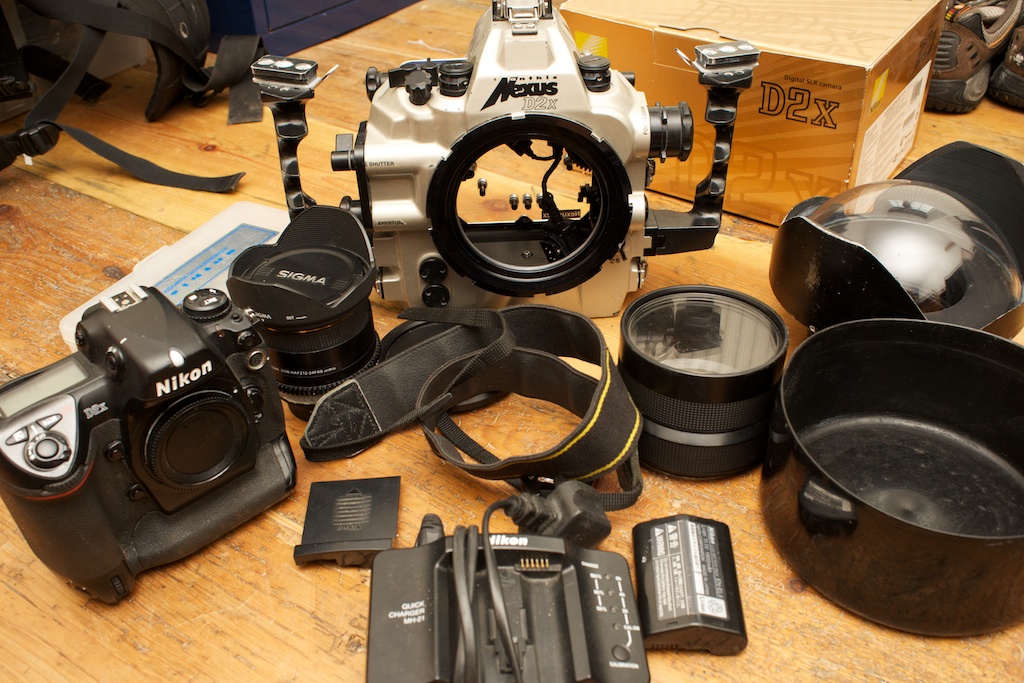
I've decided to part with my Nikon D2x and underwater housing set up. The kit consists of:
Nikon D2x body
Sigma 10-20 f/4-5.6 lens
Zoom gear
Nexus D2x housing
Wide angle port
Macro port
Extension ring
Battery charger
Spare battery
Accessory park with tolls and spare )-ring set
The Nikon D2x is an exceptional camera that produces images that can stand up to some of today's more modern cameras. It is brilliant both above and below the water. It is easy to use, has a great feature set and produces outstanding images. In fact the only reason I'm selling this camera on is because I need video capability, which the D2x doesn't do.
As stated above the camera comes with battery charger, 2 batteries, strap and several CF 2GB cards and the original box and paperwork.
It also comes with the outstanding Sigma 10-20mm F/4-5.6 lens. This is a far superior lens to the Tokina and even Nikon 12-24mm (in my opinion).
The Nexus D2x housing, made by, Anthis, is a superbly made piece of kit. It has superior components and is built to last. It comes with the zoom gear ring plus a Wide angle port, Macro flat port and an extension tube plus a viewfinder adaptor (to see the full viewfinder image) and a close up filter.
New, this system cost around £5,000 and I am asking just £800 for everything plus postage.
I am based in the UK (Dorset)