



I'm cleaning house and I'm selling my video set up.
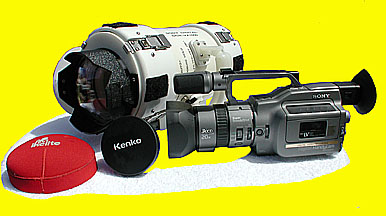
Sony VX 1000 Three Chip Digital Camera
and a custom housing.
The camera is in mint condition and the housing works great.
I have hardly used this equipment at all.
It has been stored for the last three years
and was only used for underwater video
for one summer with very little use.
I became more interested in digital stills
and gave up my interest in video.
The camera comes with a Kenko Wide converter lens. VC-050Hi 0.5x
UR-Pro Filter
AC Charger And two Batteries
Sony Manual
The Housing has manual type controls
Like Ikelite.
It uses a super wide dome port made by
Ikelite.
It also comes with a Flat Port.
Type of control over camera.
On-Off Power
Pause
Photo Mode ( Takes Digital Still Pictures )
Zoom
Manual focus,Auto
Exposure Hold
Push Focus
Nd-Filter On-Off
White Balance
The Camera also comes with a Sony Flash
unit thats used for taking digital still pictures.
The Camera Housing has a personal
Autograph on it from:
Jean- Michel Cousteau
The orginal cost of equipment:
Sony Vx-1000 $ 3,200.00
kenko Lens 150.00
UR-Pro Filter ?
Ikelite Dome Port 50.00
Flash Unit 150.00
Camera Housing est. 1,000.00
Low estimate total $ 4,550.00
I Will Sell For $1,800.00 OBO
My Loss Your Gain
Call Me For More Information
954-772-3336 EXT. O For the Office
e-mail blueseas@earthlink.net
Marc
 1,000.00


