Like New - Canon Video Camera with Underwater Housing and Lights - $800
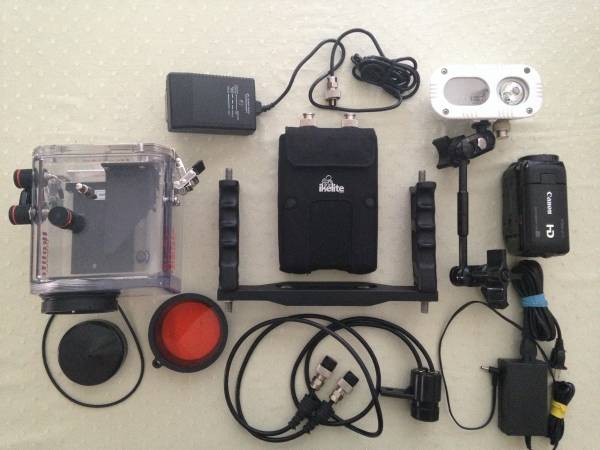
Selling a complete underwater video system in optimal condition. Set it up and it is ready to go.
The system is complete with:
- Canon Vixia HF10 16 Gb camcorder in perfect condition
includes battery, battery charger, USB cable
see EXCELLENT rating from CNET at http://www.cnet.com/products/canon-vixia-hf10/
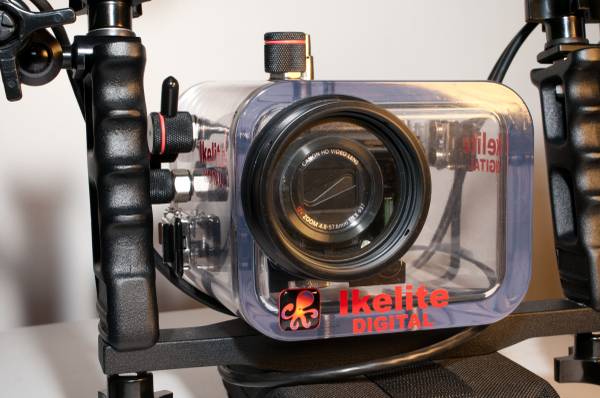
- Ikelite Underwater Housing #6090
includes all original pieces plus port cover, colored filter, spare o-ring, and instruction booklet
see this page for specs and info http://www.digitaldiver.com.au/shop/product/6090
- Ikelite Pro Video-Lite 3 100 Watts
includes video lite head, NiMH battery pack, ball socket arm, cable with in-line switch, battery pack pouch, battery charger with 4 plugs, mounting hardware, instruction booklet
see this page for specs and info: http://www.digitaldiver.com.au/shop/product/6341.06
The system was gently used a handful of times and takes great quality underwater video.
The camcorder can still be found for purchase in the US (see link above) but the housing and lights are no longer available. Comparable systems cost much more and this one is charged and ready to go underwater and start shooting now.
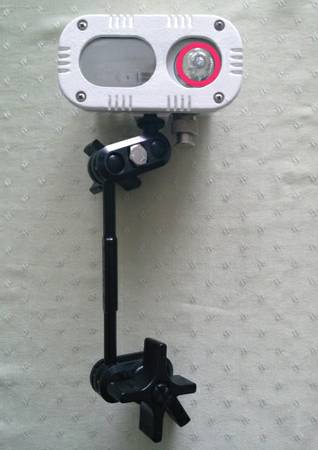
Note: one minor blemish on the light occurred due to accidental switch-on out of the water for a few minutes (see photo of light only with red circle around blemish). It does not impact the functionality of the light in any way but it is visible
See posting on Honolulu Craigslist for more photos if interested. Thanks for viewing!