Skip to content

Shooting Technique, Workflow and Editing / Archived topic

Over expossure

Started by larth ·

  • 6Posts
  • 6Replies

Read-only discussion

Over expossure

6 posts
  1. Hi,


    so I finally was able to dive with the D7100 and experienced some issues with over exposure. Searching the net shows some have the same problem (no solutions), others saying the D7100 would under expose instead.


    I tried a variety of changes in settings and there was a big improvement when changing the ISO setting from dynamic to 100, but there are still problems even in easy conditions. The below is an example with a green turtle on the sandy bottom at a depth of 10 meters.


    The equipment: D7100, Ikelite housing and a DS125 flash.


    Scaled picture attached. Location: Red Sea near El Quseir.


    EXIF / information from original file in case the scaled picture has different:


    General:


    Color Model: RGB
    Depth: 8
    DPI Height: 300
    DPI Width: 300
    Orientation: 1 (Normal)
    Pixel Height: 4 000
    Pixel Width: 6 000
    Profile Name: sRGB IEC61966-2.1


    EXIF:


    Color Space: sRGB
    Components Configuration: 1, 2, 3, 0
    Compressed Bits Per Pixel: 4
    Contrast: Normal
    Custom Rendered: Normal process
    Date Time Digitized: 25 apr 2014 10:32:44
    Date Time Original: 25 apr 2014 10:32:44
    Digital Zoom Ratio: 1
    Exif Version: 2.3
    Exposure Bias Value: 0
    Exposure Mode: Auto exposure
    Exposure Program: Not defined
    Exposure Time: 1/125
    File Source: DSC
    Flash: On, return light detected
    FlashPix Version: 1.0
    FNumber: 5,6
    Focal Length: 60
    Focal Length In 35mm Film: 60
    Gain Control: None
    Photographic Sensitivity (ISO): 100
    Light Source: unknown
    Max Aperture Value: 3
    Metering Mode: Pattern
    Pixel X Dimension: 6 000
    Pixel Y Dimension: 4 000
    Saturation: Normal
    Scene Capture Type: Standard
    Scene Type: A directly photographed image
    Sensing Method: One-chip color area sensor
    SensitivityType: Recommended exposure index (REI)
    Sharpness: Normal
    Subject Distance Range: unknown
    Sub-second Time: 60
    Sub-second Time Digitized: 60
    Sub-second Time Original: 60
    User Comment: El Quseir
    White Balance: Auto white balance
    AFInfo: 0.1947482, 0.64801, 0.04191517, 0.05323383, n, 0.2593605, 0.64801, 0.04191517, 0.05323383, n, 0.3239728, 0.64801, 0.04191517, 0.05323383, n, 0.398277, 0.6752487, 0.04837641, 0.06044776, f, 0.4758118, 0.6752487, 0.04837641, 0.06044776, f, 0.5533466, 0.6752487, 0.04837641, 0.06044776, n, 0.634112, 0.64801, 0.04191517, 0.05323383, n, 0.6987243, 0.64801, 0.04191517, 0.05323383, n, 0.7633367, 0.64801, 0.04191517, 0.05323383, n, 0.1301359, 0.5606965, 0.04191517, 0.05323383, n, 0.1947482, 0.5606965, 0.04191517, 0.05323383, n, 0.2593605, 0.5606965, 0.04191517, 0.05323383, n, 0.3239728, 0.5606965, 0.04191517, 0.05323383, n, 0.398277, 0.5725124, 0.04837641, 0.06044776, f, 0.4758118, 0.5725124, 0.04837641, 0.06044776, f, 0.5533466, 0.5725124, 0.04837641, 0.06044776, F, 0.634112, 0.5606965, 0.04191517, 0.05323383, n, 0.6987243, 0.5606965, 0.04191517, 0.05323383, n, 0.7633367, 0.5606965, 0.04191517, 0.05323383, n, 0.8279489, 0.5606965, 0.04191517, 0.05323383, n, 0.1301359, 0.4733831, 0.04191517, 0.05323383, n, 0.1947482, 0.4733831, 0.04191517, 0.05323383, n, 0.2593605, 0.4733831, 0.04191517, 0.05323383, n, 0.3239728, 0.4733831, 0.04191517, 0.05323383, n, 0.398277, 0.4697761, 0.04837641, 0.06044776, n, 0.4758118, 0.4697761, 0.04837641, 0.06044776, f, 0.5533466, 0.4697761, 0.04837641, 0.06044776, n, 0.634112, 0.4733831, 0.04191517, 0.05323383, n, 0.6987243, 0.4733831, 0.04191517, 0.05323383, n, 0.7633367, 0.4733831, 0.04191517, 0.05323383, n, 0.8279489, 0.4733831, 0.04191517, 0.05323383, n, 0.1301359, 0.3860697, 0.04191517, 0.05323383, n, 0.1947482, 0.3860697, 0.04191517, 0.05323383, n, 0.2593605, 0.3860697, 0.04191517, 0.05323383, n, 0.3239728, 0.3860697, 0.04191517, 0.05323383, n, 0.398277, 0.3670398, 0.04837641, 0.06044776, n, 0.4758118, 0.3670398, 0.04837641, 0.06044776, n, 0.5533466, 0.3670398, 0.04837641, 0.06044776, n, 0.634112, 0.3860697, 0.04191517, 0.05323383, n, 0.6987243, 0.3860697, 0.04191517, 0.05323383, n, 0.7633367, 0.3860697, 0.04191517, 0.05323383, n, 0.8279489, 0.3860697, 0.04191517, 0.05323383, n, 0.1947482, 0.2987562, 0.04191517, 0.05323383, n, 0.2593605, 0.2987562, 0.04191517, 0.05323383, n, 0.3239728, 0.2987562, 0.04191517, 0.05323383, n, 0.398277, 0.2643035, 0.04837641, 0.06044776, n, 0.4758118, 0.2643035, 0.04837641, 0.06044776, n, 0.5533466, 0.2643035, 0.04837641, 0.06044776, n, 0.634112, 0.2987562, 0.04191517, 0.05323383, n, 0.6987243, 0.2987562, 0.04191517, 0.05323383, n, 0.7633367, 0.2987562, 0.04191517, 0.05323383, n
    Flash Compensation: 0
    Focus Distance: 1,995
    Focus Mode: 1
    Image Number: 1 006
    Image Stabilization: 0
    Lens Info: 60, 60, 2.8, 2.8
    Lens Model: AF Micro-Nikkor 60mm f/2.8D


    Nikon info


    Flash Setting: NORMAL
    Focus Mode: AF-A
    ISO Setting: 0, 100
    Lens Type: 2
    Quality: FINE
    Shooting Mode: 0
    Shutter Count: 1 006
    White Balance Mode: AUTO1


    Picture style:


    Brightness Value: 0, 0, 0
    Filter Effect: N/A, 255, 255
    Hue Adjustment: 0, 0, 0
    Monochrome: 0, 0, 0
    Pict Style Color Space: sRGB, 1, 1
    Picture Control Adjust: 0, 0, 0
    Picture Style: Standard, 3, 3
    Sharpness: -128, -128, -128
    Toning Effect: N/A, 255, 255


    Any clues would be appreciated! Next trip comming up in a month.


    Also it seems that it is not possible to use a single center focus point in auto more, correct?


    Many thanks,

    Lars
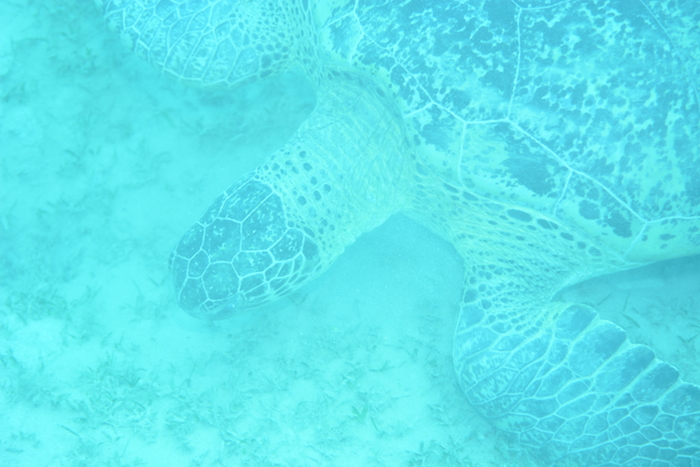
    post-2680-0-65199300-1403440678_thumb.jpg

    Edited by larth
  2. Hi Lars,


    There are number of potential issues!


    Firstly, I would suggest that you do not shoot in Auto mode. The camera is doing its best to cope with the light underwater, but cannot deal with it. In addition, you are adding external light with a strobe, which further complicates the issue. For best results underwater, you should probably try to shoot in manual mode.


    I note that you flash mode is normal-I'm not sure that Auto mode will give you the option, but it needs to be working in TTL mode in order to expose correctly with a DS125. In truth, for wide angle shooting, most people would be using their strobes in manual mode too.


    Most underwater shooters prefer to use RAW rather than jpg, as this gives better results when editing. I would also avoid sRGB, and shoot in Adobe RGB-it has a wider gamut.


    There is a wealth of info on here about shooting with your SLR underwater. I would suggest a thorough browse of the forum too...


    Adam

  3. Hi Adam,


    thanks! I've spent some time looking around and will try it out the next two weeks. Guess my error was thinking that since I got ok pictures in auto mode with my old one, I would get it too with this (better) camera. Practice time!


    best regards,

    Lars

  4. The image does not look too blown and would have been workable from raw. You will need to do a lot of post processing shooting a turtle from a distance (> 1 m). At these distances the strobe will be contributing relatively little light and at 10m depth the light is already rather blue.


    Have you tried working with the jpg? Some basic jpg image editors (such as Preview on a Mac - it is under "adjust colors") have white balance control and contrast control.

  5. Auto exposure almost always seems to over-expose, at least with of my Nikons, over the years. The EXIF data says "pattern" metering, which has probably completely misinterpreted the scene: spot metering can be better underwater. TTL strobe settings can help, but in the end almost everyone comes to manual exposure and manual strobes for wide-angle images.


    post-4522-0-00412800-1405866788_thumb.jpg


    I'm pretty sure that you can select the focus point and keep Auto metering: there should be a combination of Menu and camera settings to do that on such a sophisticated camera. I've certainly done that with a D200 and all my subsequent cameras.

    Edited by tdpriest
  6. Lars,

    I agree with tdpriest- Nikon's Matrix metering for both wide angle and macro can lead to an exposure misinterpretation underwater. I also shoot with a d7100 and would say I'm set on center weighted metering about 70% of the time and spot meeting the other 30% (talking about wide angle now.). I will shoot on manual (both camera and strobes) while using the viewfinder exposure meter as a base line guide for camera and strobe settings and make my choice of aperture and shutter speed depend on what I want to express (shallow depth of field, blue water backgrounds, etc.) I prefer the manual settings because it gives the diver total control over the artistic outcome of the composition, rather than allowing the camera's exposure models to decide for you. You just need to experiment with different combinations of settings.


    You're right, though... It is no doubt more labor intensive - initially, but as you gain experience it will soon become more intuitive and a larger advantage for you with a much greater range of tools in your box. With practice, you will start to anticipate your favorite settings for a range of scenes, just remember to enjoy every moment! I am just a newbie in this world of UW photography and it sometimes seems very frustrating when the outcomes are no way near my intentions but that just gives me more reason to dive again... more practice! Lol...


    If you have the chance, try to shoot in RAW and not JPEG. This will give you a whole lot more options for tweaks with programs like Lightroom just in case the settings didn't yield what you were looking for. Again, the final product will be more in your hands than what the camera chooses.


    james

WaterPixels Store

Account

Navigation

Search

Search

Configure browser push notifications

Chrome (Android)
  1. Tap the lock icon next to the address bar.
  2. Tap Permissions → Notifications.
  3. Adjust your preference.
Chrome (Desktop)
  1. Click the padlock icon in the address bar.
  2. Select Site settings.
  3. Find Notifications and adjust your preference.