Skip to content

Photo / Video Showcase / Archived topic

Spinner dolphins and color challenges

Started by tri4funnow ·

  • 4Posts
  • 4Replies

Read-only discussion

Spinner dolphins and color challenges

4 posts
  1. Hi all,

    I am back in the water after a 5 year break from photography and the water. I took this in Kona, HI right near the harbor entrance. I struggled a ton with the color...may just be the limits of light, depth, and GoPro.


    Spinner dolphins under a boat
    Location: Kona, Hi near the harbor entrance
    GoPro Hero 3+


    Adjustments in Aperture (totally new to this):

    Temp: 4345k

    Tint: 10

    Exposure +0.08

    Black Point +14.29

    Brightness +0.06

    Definition +0.43

    Saturation +1.0

    Mid Contrast +17.26


    Looking for any help, constructive criticism, composition advice, or resources


    Thank for the help and inspiration,

    James

    post-23406-0-58962300-1403473721_thumb.jpg

  2. my humble opinion...


    • Nice image overall.
    • I like how the dolphins and boat line up.
    • I like the blue in the bottom 2/3 of the frame,
    • I don't like the surface color in the top 1/3. It looks too washed out/over processed. Perhaps play with your white point or selective white balance
    • The blotch or speck or bubbles in the bottom left quadrant is distracting. I would clone out or crop.
    • Perhaps consider black & white conversion?
  3. I like the shot. If it were a raw file and being edited in lightroom i think you could really do a lot more with it. But to get ideal color and exposure in all areas of this shot from a jpeg image would be impossible without reducing the overall image quality.

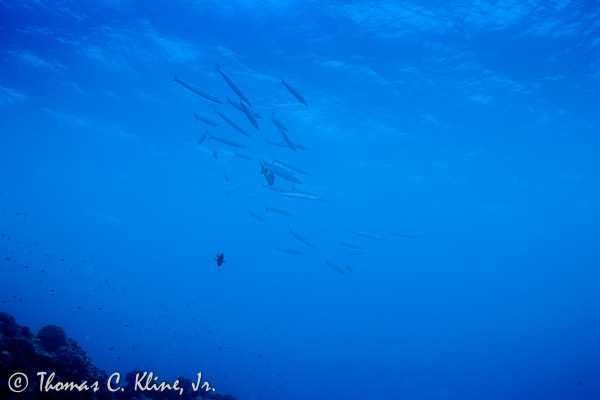
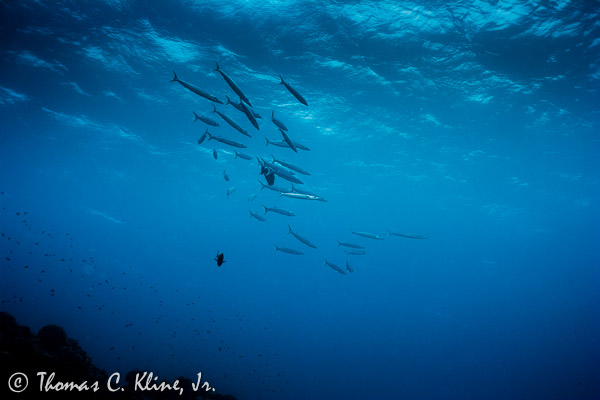
  4. post-3540-0-40001600-1404161799_thumb.jpgpost-3540-0-67587100-1404161812_thumb.jpg


    There is a limit to how much color correction (white balance) that can be applied even from a raw file. Here are two versions from the same raw file pic, also from Kona. In one version the color temperature was set to "daylight" using the pull-down selection in Lightroom, the other I maxed out both the color temperature and tint sliders, respectively, all the way to yellow and magenta. The issue is shooting through too much water, which acts as a blue-green filter. The longer the distance the greater the filtration effect of water.

    Edited by Tom_Kline
Fotosub Shop

Account

Navigation

Search

Search

Configure browser push notifications

Chrome (Android)
  1. Tap the lock icon next to the address bar.
  2. Tap Permissions → Notifications.
  3. Adjust your preference.
Chrome (Desktop)
  1. Click the padlock icon in the address bar.
  2. Select Site settings.
  3. Find Notifications and adjust your preference.