



Skip to content

Shooting Technique, Workflow and Editing / Archived topic

Flash flooded or?

Started by poseidonsenforcer ·

  • 15Posts
  • 15Replies

Read-only discussion

Flash flooded or?

15 posts
  1. Hello,


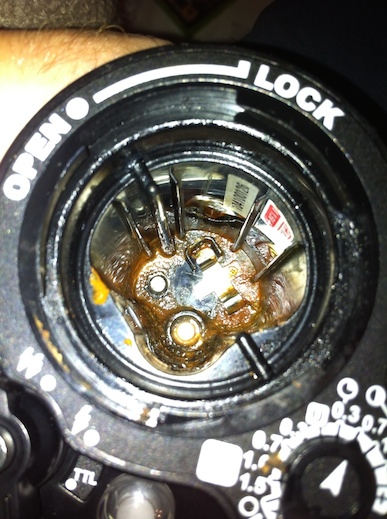
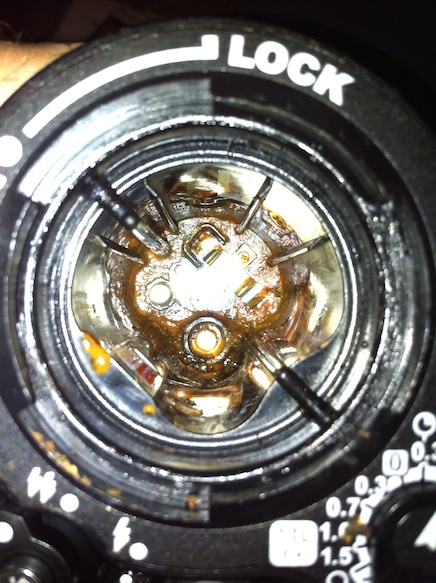
    I just got my YS-D1 strobes back from Sea and Sea (I was having the firmware updated). This was my first dive with them since the upgrade. Before that, they were fine. Before the dive I made sure the Oring looked good and was free of any debris, slathered on some silicone lube, put new batteries in and locked the flash. I then did 2 dives (the first was slightly deep @ 112') and didn't notice any strange behavior with the flash. I got back to my hotel room and opened up the flash to take the batteries out and noticed this-
    post-47297-0-97375600-1404090812_thumb.jpgpost-47297-0-42911900-1404090814_thumb.jpg


    So I can't quite tell what happened here. Either my flash flooded or a battery exploded, or ??? I didn't notice any seawater inside the flash, which makes me think the battery exploded. I was diving in the caribbean where the ocean temp was 84-86 degrees, so maybe things got too hot?


    Has anyone ever seen anything like this? Brown smelly goo in your flash? I'm wondering what to do next and what's the safest way to clean this up. I am also wondering if i should contact Sea & Sea to see if there's something they can do.


    Thanks!

    -Pete
    Edited by poseidonsenforcer
  2. Hi Pete,


    looks like 112' is well within their depth rating of 330'.

    http://www.seaandsea.jp/products/strobe/ysd1/manual_Uveg.pdf


    Which battery cells/brand were you using?


    Did the battery cap pop when you opened it?


    Could have been a cell failure/leak or a tiny leak eg a few drops, just enough to short the cells.


    Had all the battery cells leaked or did it just look like one? Understand if you didn't get a good

    look as they are hazardous in that state.


    Cheers,

    Jim.


  3. --Which battery cells/brand were you using?

    I was using brand new Rayovac brand batteries.


    --Did the battery cap pop when you opened it?

    Not that I noticed, it still seemed sealed to me.


    --Could have been a cell failure/leak or a tiny leak eg a few drops, just enough to short the cells.

    Right, I guess I was wondering if a battery leak would look different than a flood, but it all probably looks like a brown goo mess!


    --Had all the battery cells leaked or did it just look like one? Understand if you didn't get a good

    look as they are hazardous in that state.

    I honestly didn't get a great look since I tried to dispose of the batteries as quickly as possible.


  4. The recommended battery to use is Sanyo Eneloop. Rayovac is not a good brand, as far as I know, Energizer is better than Rayovac. I would help if you can take a picture of the batteries and post it here as well.

  5. Be aware of Eneloops as well as there are some fake ones out there on Fleabay etc that are causing allsorts of issues as well with over gasing and poping 'O' rings - I had it happen to me (saved the strobe) and I know of one other who had both strobes flooded.


    Karl

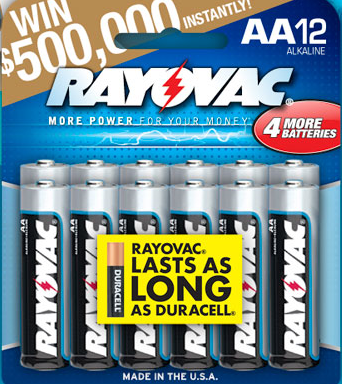
  6. They were just standard alkaline batteries. Like these-

    post-47297-0-11886200-1404186157_thumb.png'


    I hadn't seen any literature on the recommended batteries for the YS-D1 strobes yet. Who was recommending the eneloops?

  7. Most folks use rechargeable Nickel–metal hydride batteries in their strobes. Everyone has there fave but

    I have been using the Powerex cells for many years and happy to recommend them. I started using the

    2700mAh cells but switched a few years back to the 2400mAh Imedions which are now my brand of choice

    for AA cells. Coupled with a good smart charger you can't go wrong IMHO.


    Cheers,

    Jim.


  8. Battery life

    Alkaline: Approx. 150 flashes

    Ni-MH(eneloop pro) : Approx. 250 flashes

    Ni-MH(eneloop) : Approx. 200 flashes


    Without seeing the picture of the battery after you take them out of the strobe, it's hard to tell if they explode or not. Perhaps you can see if Sea & Sea would clean the battery compartment for you for a small price.


    I talked to a dealer during a photography workshop, Eneloop gives your more flashes and it's the brand listed in the manual.

  9. you don't need to send the strobe to S&S to clean it, you can easily do it yourself. Use some sodium bicarb in water first, then rinse with clear water (a good bottle brush will help remove the crud. Rinse til clear then rinse with IPA (not the beer) and you should be fine.

    Bill

  10. Thanks for the Battery info. I must of missed that in the manual!! Maybe this should have gone into the newb forum. :pardon:


    Yeah, after doing some research I am going to try to clean this myself rather than spend more money on it. Seems like I should also replace the cap.

    I also found this helpful video- https://www.youtube.com/watch?v=_uoiyydkSqo


    Thanks Everyone!

  11. you don't need to send the strobe to S&S to clean it, you can easily do it yourself. Use some sodium bicarb in water first, then rinse with clear water (a good bottle brush will help remove the crud. Rinse til clear then rinse with IPA (not the beer) and you should be fine.

    Bill


    What's the measurement of baking soda to water? 1 tsp/cup? Also, what's IPA? Hopefully I don't need to do it some day.

  12. Before the dive I made sure the O-ring looked good and was free of any debris, slathered on some silicone lube


    "Slathering" is never good: it traps dust and grit and causes leaks. Something let some water in...

  13.  

    What's the measurement of baking soda to water? 1 tsp/cup? Also, what's IPA? Hopefully I don't need to do it some day.


    The amount of baking soda to water isn't really critical, you are just using it to neutralize the acid from the batteries, and will just wash the excess away.


    By IPA, I presume that bvanant is refering to isopropyl acohol, which is commonly sold in the US as "rubbing alcohol". This will help remove all the water from inside the case, and allow it dry fully.

  14. I had a similar case with a Sea&Sea 110a strobe last May. In my case I had been down for close to an hour and had been taking pictures normally until at some point the strobe started to malfunction. Looking at the strobe there was dark stuff oozing out of the top cap and I could see the blue o-ring popped out of the groove. I aborted the dive (solo shore dive so that was easy). Upon opening the battery cap it was clear that the strobe was flooded. One of the batteries was damaged at the nipple end, as far as I remember the others looked nasty or maybe just dirty but without structural damage. I cleaned out the battery compartment immediately with fresh water followed by a soak in cleaning vinegar. Finally another rinse with water and then drying in front of the air conditioner. To my surprise and relieve the strobe functioned just fine for the remainder of the trip.


    I wasn't sure if the strobe flooded first leading to battery damage or vice versa. I assumed it was operator error but have found the lid closing system of the 110a to be rather fool-proof. In addition, if it was flooding first then why did it not happen earlier. From the discussion here it appears that it may actually have been the battery that was at fault. I was using Imedion powerex 2400mAh and a MAHA powerex smart charger. They are supposed to be good and the problem did not reappear so I hope it was just an unlucky but one-time event.


    Bart

  15. Sorry, for not being more precise. For the baking soda, 1 tablespoon in a cup (5 grams/100 ml) or so should do. IPA is indeed isopropyl alcohol, (too much time in the lab I guess).

    Bill

Aquatica

Account

Navigation

Search

Search

Configure browser push notifications

Chrome (Android)
  1. Tap the lock icon next to the address bar.
  2. Tap Permissions → Notifications.
  3. Adjust your preference.
Chrome (Desktop)
  1. Click the padlock icon in the address bar.
  2. Select Site settings.
  3. Find Notifications and adjust your preference.

