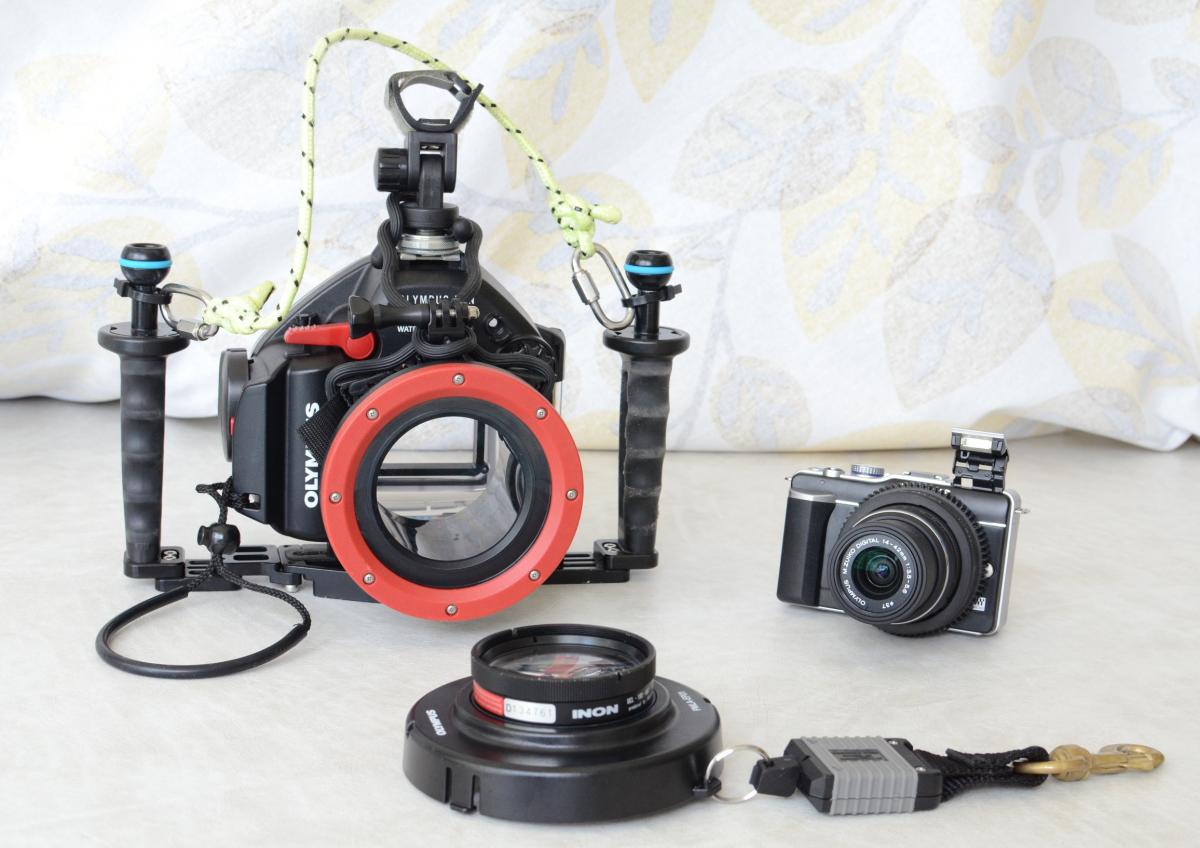
Olympus E-PL1 camera and housing with custom GoPro Port Mount
Started by joez2391 ·
11Posts
11Replies
Read-only discussion
Olympus E-PL1 camera and housing with custom GoPro Port Mount
11 posts
Seen less than 30 dives, in very good condition.  The Inon wet lens works great with this camera, I have gotten some awesome macro shots with this combination without having to buy a dedicated macro lens and port!  I loved this camera for its compact size but I recently decided to house my D7000 and need the money to upgrade.


Included:


Olympus PEN E-PL1 micro 4/3rds camera

14-42mm Lens

Zoom gear for 14-42mm lens (works with 9-18mm lens as well) Oly PPZR-EP01

Olympus Housing

Nauticam duel handle tray

Nauticam 1in ball mounts on each handle

Custom mounted GoPro Port mount (can be taken off if not needed, but an awesome way to capture video while you shoot)

Torch (flashlight) hotshoe mount

Custom carrying handle using glow in the dark rope


Inon Close up lens UCL-165-M67

with Olympus PMLA-EP01 threaded port mount


*GoPro and torch not included*


Will accept reasonable offers (and trades if you happen to have an Ikelite D7000 housing )
please PM me with any questions or offers, I have more pics if needed. Thanks!
Bump
Asking $900 OBO I'll cover shipping in the US
Price drop... $850 with free shipping in US
$825 shipped... Any takers?
Open to offers
final price drop to $750... great deal!
bump...any offers?
drop to $700.... great system in really nice condition.
$650 last price drop, really would like to sell this setup