Skip to content

Photography Gear and Technique / Archived topic

105 Macro Port question

Started by james-teverini ·

  • 7Posts
  • 7Replies

Read-only discussion

105 Macro Port question

7 posts
  1. Hi all! Question for those who may have some insight…


    I currently own a Nauticam NA-D7100 housing with the Macro Port 60 (for Nikon’s 60mm macro lens.) I have just purchased Nikon’s 105mm macro lens and I am trying to decide on a port selection.

    Nauticam states on their port chart that you can use the 105 lens with either a dedicated Macro Port 87 or the combo of the Macro Port 60 (which I already have) and their Extension Ring 30.


    Is there any optical quality difference between those two choices? Is the dedicated Port 87 better optically for any reason? (I plan on using my SubSee +10 Magnifier on the end of either port and was worried about the possibility that the 105 lens won’t sit as close to the glass using the Macro 60/Extension combo as it will sitting in the Macro 87)

    This is of course pure bovine-scatology speculation on my part tho :blush: … still, gotta ask before I drop anymore cash.


    thnx for any help or suggestions, :D

    james

  2. Just get the extension and use your 60 mm lens port. Optically there will be no difference between the 60 with extension vs the 105 port. I don't know with Nauticam, but Subal's 105 port allows manual focus too.

  3. That’s good to hear. It saves a little money but also relieves me of having to carry around another port halfway around the world. My packing space (the critical carryon) is crazy limited and kinda at capacity as it stands.


    Nauticam does make the manual focus gear for the 105 which is universal and works with both ports (already included in my final tab… :o )


    Thanks for your help! :yahoo:

    james

  4. If you want to know what the actual difference in port length is, you can do the math:


    macro port 87: 87mm

    macro port 60 + 30mm extension: 60mm + 30mm = 90mm


    So 3mm total difference.


    Regards,

    Chris

  5. Just get the extension and use your 60 mm lens port. Optically there will be no difference between the 60 with extension vs the 105 port. I don't know with Nauticam, but Subal's 105 port allows manual focus too.


    And you will want to have the manual focus... I use a D7000/Aquatica and have both lenses (and same port for both, with an extention ring). Critical focus needs to be done manually I find... DoF is just too small with the 105 with the DX format. I let the lens settle, lock the focus, then tweak it manually.


    You'll also need a little patience, possibly a tripod, a wide-open patch of sand to plant yourself etc... ;-)


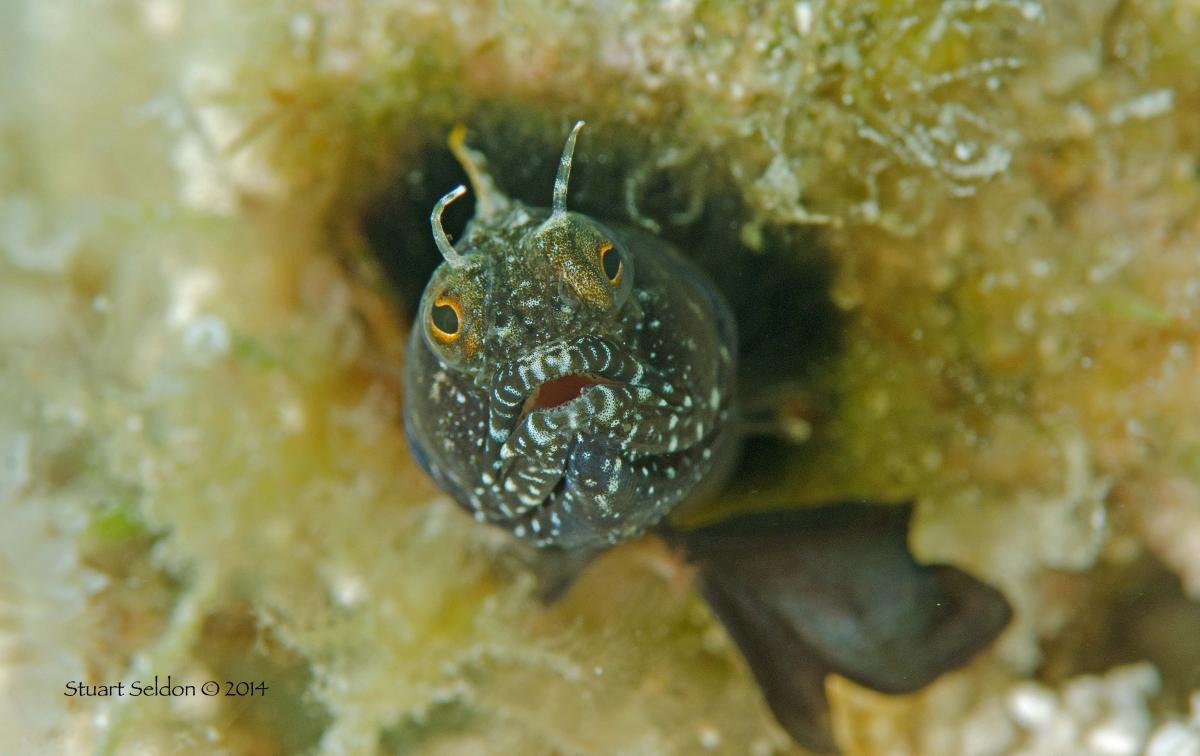
    This little blenny was shot with the 105 @ f16, and as you can see, the in-focus bit is from the tip of his nose to just behind his eye.... so maybe 3/16" tops... It's a great lens, but can be tricky.


    post-9633-0-58406100-1407367027_thumb.jpg


    Wow, that's bigger than I expected! ;-)

    Edited by Stoo
  6. That’s good to hear. It saves a little money but also relieves me of having to carry around another port halfway around the world. My packing space (the critical carryon) is crazy limited and kinda at capacity as it stands.


    Nauticam does make the manual focus gear for the 105 which is universal and works with both ports (already included in my final tab… :o )


    Thanks for your help! :yahoo:

    james


    When you say the focus gear for the 105mm works with both ports do you mean it will also work to focus the 60mm within the 60mm port OR do you mean the 105mm focus gear works to focus the 105mm in both the Macro Port 87mm and Macro Port 60mm + extension?


    Thanks

  7. The focus gear for the 105 only works on the 105 lens.

Nauticam

Account

Navigation

Search

Search

Configure browser push notifications

Chrome (Android)
  1. Tap the lock icon next to the address bar.
  2. Tap Permissions → Notifications.
  3. Adjust your preference.
Chrome (Desktop)
  1. Click the padlock icon in the address bar.
  2. Select Site settings.
  3. Find Notifications and adjust your preference.