



Skip to content

Shooting Technique, Workflow and Editing / Archived topic

Ikelite Gear Sleeves and Zoom Clamps

Started by scuba@60 ·

  • 8Posts
  • 8Replies

Read-only discussion

Ikelite Gear Sleeves and Zoom Clamps

8 posts
  1. I have a new camera - Nikon D5300 - and an Ikelite housing. My husband finally got the gear sleeve and zoom rings to work with the standard 18-55mm lens by putting things on upside down and backwards ( I kid you not).

    Trying to get it all to work with my new lens - 10-24mm - has been less than successful.

    Does anybody have any suggestions (and don't suggest calling Ikelite).
  2. I have a new camera - Nikon D5300 - and an Ikelite housing. My husband finally got the gear sleeve and zoom rings to work with the standard 18-55mm lens by putting things on upside down and backwards ( I kid you not).

    Trying to get it all to work with my new lens - 10-24mm - has been less than successful.

    Does anybody have any suggestions (and don't suggest calling Ikelite).


    Can you post a picture of upside down and backwards. Depending on the 18-55 that you have ikelite recommends Zoom with 5509.28 zoom set – except for the last lens listed they recommend the 5509.27 zoom set . What 18-55 do you have ED AF-S DX, G ED II AF-S DX, G VR AF-S DX or the VR II AF-S DX?


    They recommend the Zoom with 5509.27 zoom set – included with housing for the 10-24. Post some pictures please.

  3. Thanks for responding to my plea for help. I have made progress. The 18-55mm lens is now working flawlessly. I simply went back to the drawing board and started over again from scratch with from you and Ikelite rep and website.

    The 10-24mm lens still has issues Everything works well until I lock on the dome. Then the gear knob WILL NOT move. I can just imagine breaking it off. When I just set the dome onto the housing and turn the gear wheel, the dome turns as well. Any ideas????

    I'm sending pics to your website as I can't figure out how to upload here.

  4. Unfortunately I do not have the 10-24 lens but I would like to see some pictures of the 10-24 setup you are trying to use. Please feel free to email me pictures looking directly at the face of the lens and a few that are the front of the housing. What dome are you using?

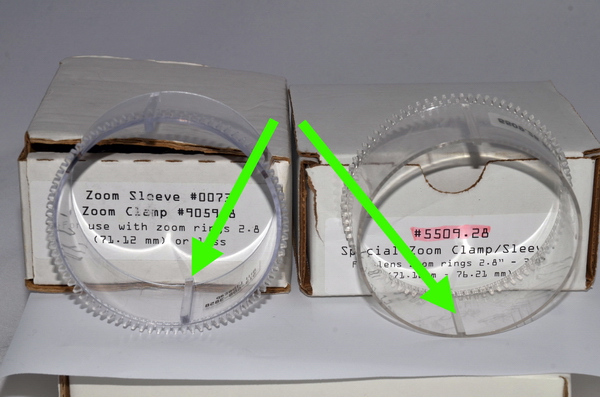
  5. If you are having problems with binding then you probably have the wrong zoom ring or lens clamp installed. attached you will see two zoom rings and two lens clamps. The zoom rings to the left are for smaller diameter lenses and have a taller bar on them then the ones on the right. the lens clamps on the right are different thicknesses also. Feel free to mix and mach as needed. When they are installed they should be snug but not binding. also don't forget that the rubber gripers for the clamps if needed.


    I am sure that this will solve your problems.


    Bill

    post-2195-0-28786100-1408401029_thumb.jpg

    post-2195-0-17109000-1408401191_thumb.jpg

    Edited by blibecap
  6. Thanks Bill. I really appreciate your help on this problem.

    When I went back to the drawing board as it were, I used exactly the same ring and clamps as recommended by Ikelite.

    Aso, with 2 lenses I would like to have each set up independently, with no switching around, however, I guess it is time to experiment.

    BTW, what exactly do you mean by 'taller'? Both my bars on the zoom ring and the holders on the lens clamps are exactly the same size - only one is thicker than the other.

  7. Believe or not, I now have both lenses set up so that they work perfectly in the housing. Furthermore, I am using exactly the setups recommended by Ikelite. I got my wish that each lens used a separate setup so no switching around is required. I hope that the setup becomes quicker as I use everything more often. Thanks again for all your help.

Nauticam

Account

Navigation

Search

Search

Configure browser push notifications

Chrome (Android)
  1. Tap the lock icon next to the address bar.
  2. Tap Permissions → Notifications.
  3. Adjust your preference.
Chrome (Desktop)
  1. Click the padlock icon in the address bar.
  2. Select Site settings.
  3. Find Notifications and adjust your preference.

