



Skip to content

Shooting Technique, Workflow and Editing / Archived topic

Color Variations between Lightroom and Photoshop Elements

Started by holloways ·

  • 6Posts
  • 6Replies

Read-only discussion

Color Variations between Lightroom and Photoshop Elements

6 posts
  1. My images change color when I go from Lightroom to Photoshop Elements and then back to Lightroom. Very frustrating - what's up???


    HOW DO I KEEP THE COLOR CONSISTENT when I go from Lightroom to PS Elements?????


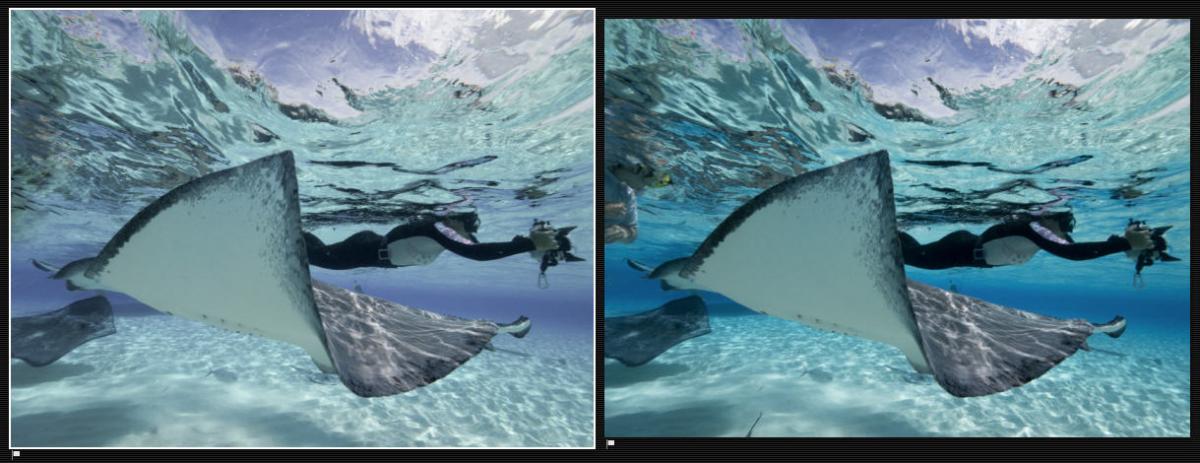
    I manage my raw files in Lightroom and do most of my editing there. If an image has a lot of scatter I make ONLY those fixes in PS Element. When I'm done with the back scatter I save the file in PS Elements and it then magically appears back in Lightroom. Very slick. Problem is that by the time the photo gets back into Lightroom the colors have changed (sometimes significantly). Its particularly bad with the blues (which turn purple).


    I've tried a number of things, including:

    -Setting the preferences in Lightroom so that the external editor has both a TIFF or PSD file format (I have tried both formats)

    -Making sure both software programs are using the same color space at the same time (I've tried both sRGB and ProPhotoRGB)

    -I've set Lightroom's external editor bit depth to 8-bit depth to align with PS Elements 8-bit depth


    I'm at a loss!


    Any suggestions?


    PS - the RAW editor in PS Elements does not come up when I pull my RAW images from Lightroom into PS Elements. Does that provide a clue?


    See photo attached.... I made no color changes between the two images. The difference is before and after using Photoshop Elements as the external editor. The more purple photo has been edited (for scatter only) in PS Elements. This is what it looks like when it comes back

     

    post-4110-0-63760400-1415609373_thumb.jpg

  2. I think you are not editing the raw image in Elements. Do you have the correct ACR version. The images look like you edited the JPG and that will have a color shift compared to the LR rendering.

    Bill

  3. Thanks for the reply Bill! I REALLY appreciate it.

    Sounds like a dumb questions - but how does one check that the ACR version is the correct one?

    Someone else suggested that the issue had to do with the image being in its native RAW format in Lightroom when I tried to bring it across to PS Elements. They suggested saving the image a PNG before trying to bring the image into PS Elements. I have tried saving as a TIFF and PSD - but not a PNG. So very complicated for a novice like me....

    thoughts?

  4. Hi Sandy,


    The spots tool in Lightroom is great for getting rid of scatter too....


    http://wetpixel.com/articles/preview-lightroom-5-betas-visualize-spots-feature


    I don't think this is to do with conversion necessarily. I think you have a color space issue.


    Lightroom uses Prophoto RGB as its default color space. I don't use Elements, but have Googled a little and it seems that it only offers sRGB or AdobeRGB. Others may well know more....


    Whichever way, you need to match the color spaces in both programs. The shift above is caused by the two programs interpreting the colors in your images differently as they are using different "algorithms" to process color information.


    If my supposition above is correct, I would suggest that you set the color space in both Lightroom and Elements to AdobeRGB.


    Adam

  5. Can your version of elements open a raw file from the camera? That will tell about ACR.

    As for color space, I think Adam might be right, but in your initial post you suggest that you did that.

    BVA

  6. Honestly I didn't even know what an ACR version was - let alone whether or not they were compatible between programs ... but Bill was right.

    My Lightroom V. 4.4.1" uses ACR V. 7.4

    Photoshop Elements V.12 uses ACR V. 8.5.0236


    Not sure it those are incompatible - but I can see why they might be.


    I have calibrated all my monitors to sRGB and set sRGB to the color space for both programs.


    I'm still not able to open a photo, from native RAW in Lightroom, into RAW when I "open in" PS Elements (it opens in JPEG).


    This is way over my head - but I appreciate you sticking with me. Any other suggestions?


    PS.... ADAM - the picture I attached is of Nadya with the sting ray ( from Alex Mustard's Digital Madness Week this September). I tried the spot remover in lightroom - but I have SO many spots - that I need something more to fix them (unless I'm doing something wrong). Elements works a lot better.

Marelux

Account

Navigation

Search

Search

Configure browser push notifications

Chrome (Android)
  1. Tap the lock icon next to the address bar.
  2. Tap Permissions → Notifications.
  3. Adjust your preference.
Chrome (Desktop)
  1. Click the padlock icon in the address bar.
  2. Select Site settings.
  3. Find Notifications and adjust your preference.
