Skip to content

Photography Gear and Technique / Archived topic

FlexiTray Trigger - Need someone who has a NA-BMPCC!

Started by thetrickster ·

  • 13Posts
  • 13Replies

Read-only discussion

FlexiTray Trigger - Need someone who has a NA-BMPCC!

13 posts
  1. Hi All,


    Because I'm tight and not made of money, so not going to buy the NA-GH4 for the time being for just for the trigger, I'm looking at fudging together a grip Trigger for my NA-GH3 on a FlexiTray similar to the one on the BMPCC.


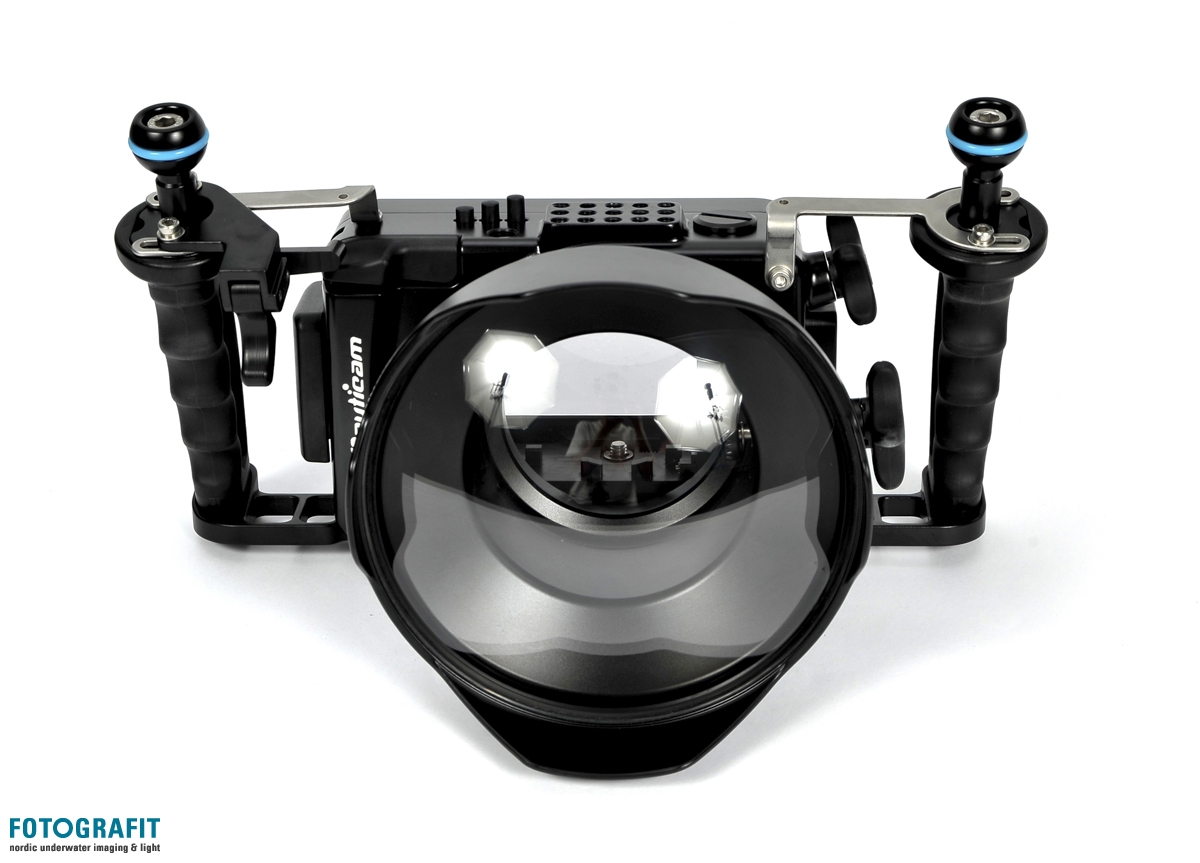
    I've looked at others, but the NA-BMPCC trigger is the best one to base my idea on I think! I've looked at the photos on ReefPhoto and I can guess at the mechanics of it.


    But if anyone has a housing and would be willing to take some photos of it and describe how it works, that would be sweet, as it appears to have the trigger on one pivot and then another to press down on the housing button.


    Thanks :)


    Richard

  2. Hi All,


    Because I'm tight and not made of money, so not going to buy the NA-GH4 for the time being for just for the trigger, I'm looking at fudging together a grip Trigger for my NA-GH3 on a FlexiTray similar to the one on the BMPCC.


    I've looked at others, but the NA-BMPCC trigger is the best one to base my idea on I think! I've looked at the photos on ReefPhoto and I can guess at the mechanics of it.


    But if anyone has a housing and would be willing to take some photos of it and describe how it works, that would be sweet, as it appears to have the trigger on one pivot and then another to press down on the housing button.


    Thanks :)


    Richard


    Hi Richard,


    actually if you search on google images specifying "large images" you get some impressive photos...


    Just look at this, over 3000px


    http://www.nauticam.com/images/product/p_292.jpg


    Try to zoom 1:1 the mechanical part is quite clear.


    Or this:


    http://fotografit.eu/upload_dir/pics/Nauticam/BMPCC/Nauticam-BMPCC_01.wm.jpg


    But the Nauticam site has huge hi res images.


    Go here:


    http://www.nauticam.com/product.asp?id=292


    Click on images in the lower gallery and the on every image just click with the right button and open image in another tab. You will discover that those images are hugeeeeee


    http://www.nauticam.com/images/product/p_image_292_6.jpg

  3. Hummm... I see what you mean. We never see the trigger internal part :)

  4. Thanks for the photos. Some new angles of it there. I haven't seen. Thanks. Got a rough model knocked up in CAD. Will post soon...


    Sent from my iPhone using Tapatalk

  5. I like it also.


    I do not think these triggers are available separately, but I will ask.


    Front view from middle of housing


    BMPCC-Trigger_1.jpg


    View from rear of housing

    BMPCC-Trigger_2.jpg

    Front of housing, view from right side.

    BMPCC-Trigger_3.jpg

    View from underneath, front of housing

    BMPCC-Trigger_4.jpg

    Edited by DiveMasterDewey
  6. If I remember correctly, Simon Spear had one???

  7. DiveMasterDewey.


    Many many thanks. Very kind!!!!!


    Nauticam I believe were going to release something. They had prototypes on display somewhere. But with the advent of the NA-GH4. I don't think the idea got off the ground.


    Obviously the handles on the NA-BMPCC are angled so I don't think even getting off one a NA-BMPCC it would fit correct with a standard flexitray.


    Your photos have helped a lot!!


    Sent from my iPhone using Tapatalk

  8. First draft...

    (I first modelled a ball base i had sat here, so to get a feel of the scale)


    t725.png?t=5488a6ce


    https://tinkercad.com/things/8mTIwaHbabR

    Edited by thetrickster
  9. Wow


    From nauticam photos and your draft I don't get how the trigger will act on the leverage which push the housing button.

  10. I think with anything Nauticam related, its always well/over engineered!


    I get a feeling mine will be a lot simpler!


    The basic mechanics of it will be (I'm guessing!) is that the trigger is hinged at the very front (or the arch of movement is the greatest), at the back of this will be a flat area, which as you pull the trigger will go UP and engage a flat area on back part (with the bar to the housing trigger). As this back part is hinged in the middle, it will cause the rear of the back part to go DOWN.


    Getting the angles / force right, I think is were the Nauticam engineers are craftsmen, and I'm not...


    I think I've worked it out... sort of...I was wrong above....


    the rear hinge for the downward part, isn't the rear pivot at all (on my drawing) - its the bottom screw on the back of the unit. (2nd photo from DiveMasterDewey) that is, its a L shape movement. That is why there is a cut away from the side of the trigger, you pull it, and the right hand side back goes up, which then pushes on the opposite pivot causing a 90degree transfer...causing the back bar to swing on the bottom nut/axis to the left.

    Edited by thetrickster
  11. How much it cost? :crazy:

  12. Nothing hopefully!


    I'm going to print it (in 3D)


    Sent from my iPhone using Tapatalk

  13. I just edited and reposted the photos, I brought the shadows way up in Lightroom.


    In my second and third picture you can now see that there is a curved slot in the lever that you move with your finger.

    This lever pivots on the screw toward the front (to the left in my first picture.)


    The second lever, the one that presses the shutter lever on the housing, does not pivot down from this assembly; it rotates around the second screw (the one closest to the housing).

Isotta

Account

Navigation

Search

Search

Configure browser push notifications

Chrome (Android)
  1. Tap the lock icon next to the address bar.
  2. Tap Permissions → Notifications.
  3. Adjust your preference.
Chrome (Desktop)
  1. Click the padlock icon in the address bar.
  2. Select Site settings.
  3. Find Notifications and adjust your preference.