



Skip to content

Photography Gear and Technique / Archived topic

Feedback on my rig setup appreciated

Started by Storker ·

  • 1Posts
  • 1Replies

Read-only discussion

Feedback on my rig setup appreciated

1 posts
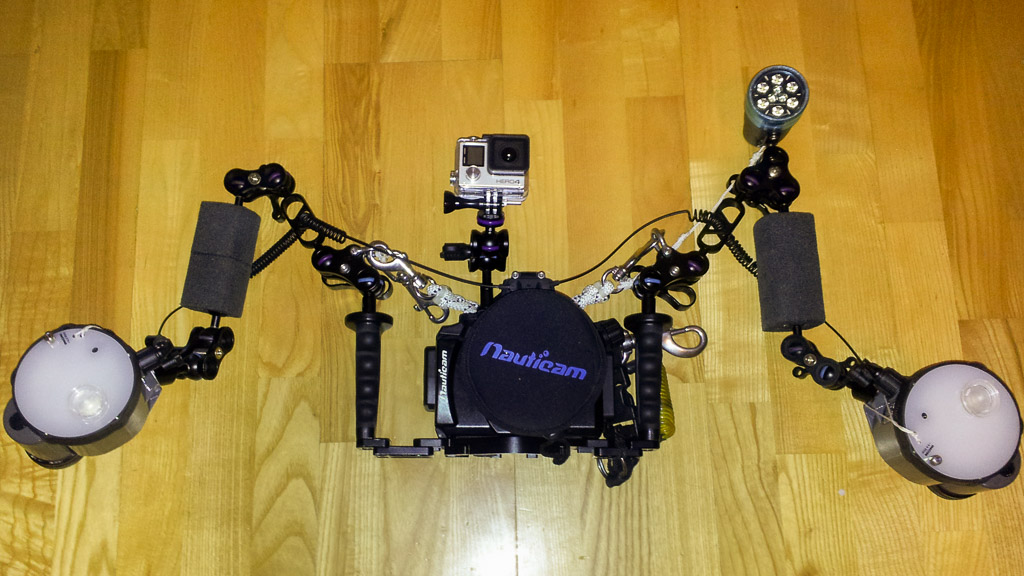
  1. So, I just went and bought myself a GoPro and a ball mount for my torch since the hand mount for the SOLA makes for some erratic "signaling" when I adjust my strobe arms, particularly on night dives. I've been tweaking my setup almost on every dive, but now I was thinking I could ask for some opinons on the way I've set up my rig.

    • Camera: Olympus OM-D E-M5 with M Zuiko 9-18mm f/4-5.6 and a +2 achromatic dry diopter to improve corner sharpness.
    • Housing: Nauticam NA-EM5 with 4" WA semidome, Flexitray and M10 ball.
    • Strobes: Inon Z240 Mk4 with diffusers on 5"+7" arms. The arms are usually extended to the max when I'm underwater.
    Extras:
    • GopPro Hero4 Silver on top of housing
    • SOLA 1200 diving torch on a tri-clamp on the left hand strobe arm.
    • Lanyard on MP clamps on tray handles.
    • Spiral lanyard on tray, suicide clip on lanyard exchanged with bolt snap. Clipped to my left hip D-ring or my right shoulder D-ring when I'm diving.
    • Bolt snap tied to right hand MP clamp. Clipped to the right shoulder D-ring on ascent from the safety stop and on shore diving exit and entry. Doubles as a place to clip the neoprene port cover during the dive if I'm shore diving.
    Unfortunately, I had to remove the hand strap from the housing when I got my 2nd strobe and the right hand tray handle. Although I like to have my housing sort of "hanging" from my right hand using the hand strap, there just wasn't room for both my hand and the strap between the housing and the tray handle. Maybe it could have worked if I didn't have to wear thick gloves, but around here thick neoprene 3-fingers or drygloves are necessary large parts of the year. I still don't hold the right hand tray handle, though, since the controls on the NA-EM5 are laid out for a hand position on the housing, not on the tray handle.


    Any feedback or tips about how to tweak the setup further would be appreciated.
    post-38245-0-06895800-1422719676_thumb.jpg

    Edited by Storker
Aquatica

Account

Navigation

Search

Search

Configure browser push notifications

Chrome (Android)
  1. Tap the lock icon next to the address bar.
  2. Tap Permissions → Notifications.
  3. Adjust your preference.
Chrome (Desktop)
  1. Click the padlock icon in the address bar.
  2. Select Site settings.
  3. Find Notifications and adjust your preference.

