



Skip to content

Classifieds / Archived topic

FOR SALE - Ikelite strobes and cord

Started by blueh2os ·

  • 4Posts
  • 4Replies

Read-only discussion

FOR SALE - Ikelite strobes and cord

4 posts
  1. post-48337-0-53125500-1427649920_thumb.jpgpost-48337-0-50513000-1427649918_thumb.jpgpost-48337-0-73474700-1427649941_thumb.jpgpost-48337-0-12836400-1427649956_thumb.jpgAll items are in very good to excellent condition. Free ground shipping to continental USA only. Payment via PayPal please. Contact Lauren at blueh20s33@gmail.com .


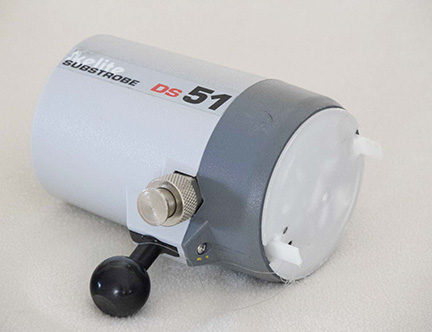
    Ikelite strobe DS51 with diffuser, bulkhead cap, and 1" ball to DS substrobe mount $390

    photos: http://s1066.photobucket.com/user/lbsmith1/library/DS%2051%20strobe


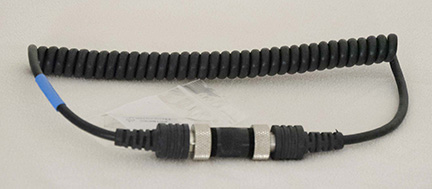
    Ikelite to Ikelite TTL Sync Cord with connector cap $50

    photo: http://s1066.photobucket.com/user/lbsmith1/library/single%20strobe%20cord


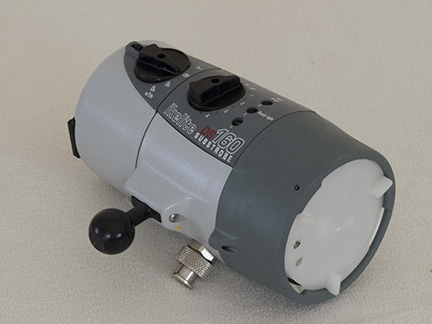
    Ikelite DS-160 Underwater Strobe with NiMH battery pack. Shows some signs of being used $725

    photo: http://s1066.photobucket.com/user/lbsmith1/library/DS%20160%20strobe

    Also included are the following:

    • new Ikelite 4066.1 Smart charger for Ikelite NiMH and NiCad Substrobe lights (includes 4 interchangeable AC adapter plugs for USA, European, United Kingdom, and Australian regions),
    • diffuser,
    • bulkhead cap, and
    • 1" ball to DS substrobe mount.
  2. Hello,

    How old are these strobes? How heavy was the use? Trying to understand how well the batteries will hold a charge.

    Rob

  3. The DS-160 was bought in 2009 (new from Helix) and used for 3 weeks max per year since. I haven't used it in about a year, but it seems to hold a charge fine.

    The DS-51 was purchased new from Ikelite in March 2013. It's almost like new and uses AA batteries.

    Hope this helps.

  4. Please remove this posting. Items have been sold.

Turtle

Account

Navigation

Search

Search

Configure browser push notifications

Chrome (Android)
  1. Tap the lock icon next to the address bar.
  2. Tap Permissions → Notifications.
  3. Adjust your preference.
Chrome (Desktop)
  1. Click the padlock icon in the address bar.
  2. Select Site settings.
  3. Find Notifications and adjust your preference.

