Skip to content

Photo / Video Showcase / Archived topic

Process the natural color out?

Started by Absolutbill ·

  • 4Posts
  • 4Replies

Read-only discussion

Process the natural color out?

4 posts
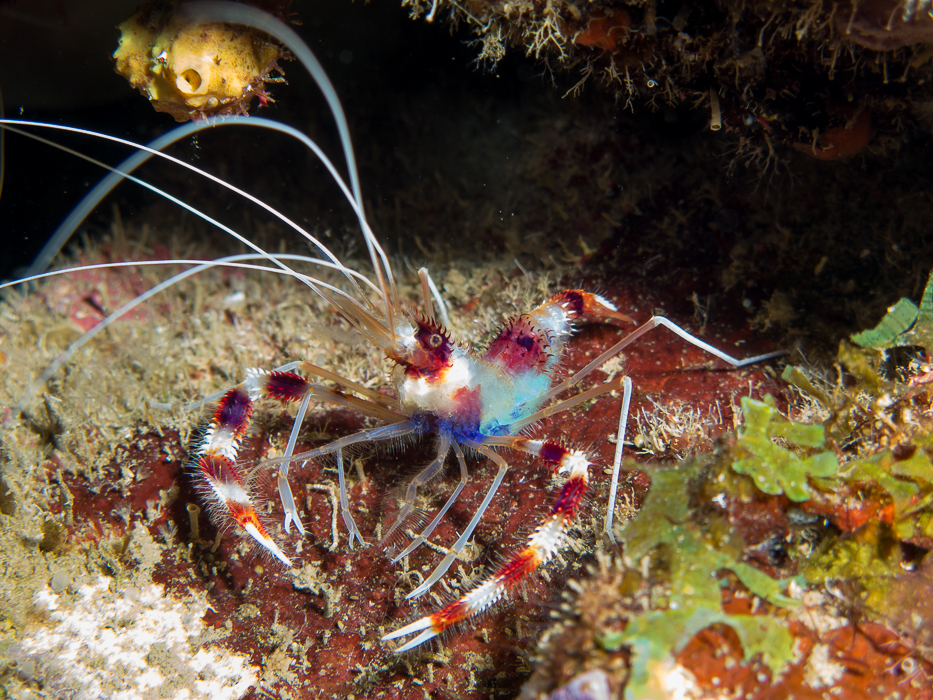
  1. I have been diving and shooting for around 3 years. I recently began shooting raw and manual with a Canon G16, Fantasea Housing, Sea & Sea ys-D1, sola focus light and a subsea +10. On a recent trip to Dominica I finally became very comfortable shooting my setup in Raw and Manual. This Banded Coral shrimp was shot at 1/125th, f 4.0, ISO 100. It was shot a little overexposed. When processing the blue and purple of the underbody of the shrimp almost looks fake? should I process this out?


    For this shot most of my processing was dropping the highlights as i was over exposed.


    Thanks
    post-41674-0-51716000-1435517515_thumb.jpg

  2. Hi Absolutbill


    To my eye the colours look very slightly over-saturated - although others may disagree.


    But that, for me, is more in the red band closest to the pincers of the coral shrimp - rather than the blues of the belly. I agree those blues are strong but from many of the pics I have taken of this creature, those colours are right.


    If you are using Lightroom I'd suggest pulling the Saturation back slightly and see what that does for you.


    Terrifically sharp pic

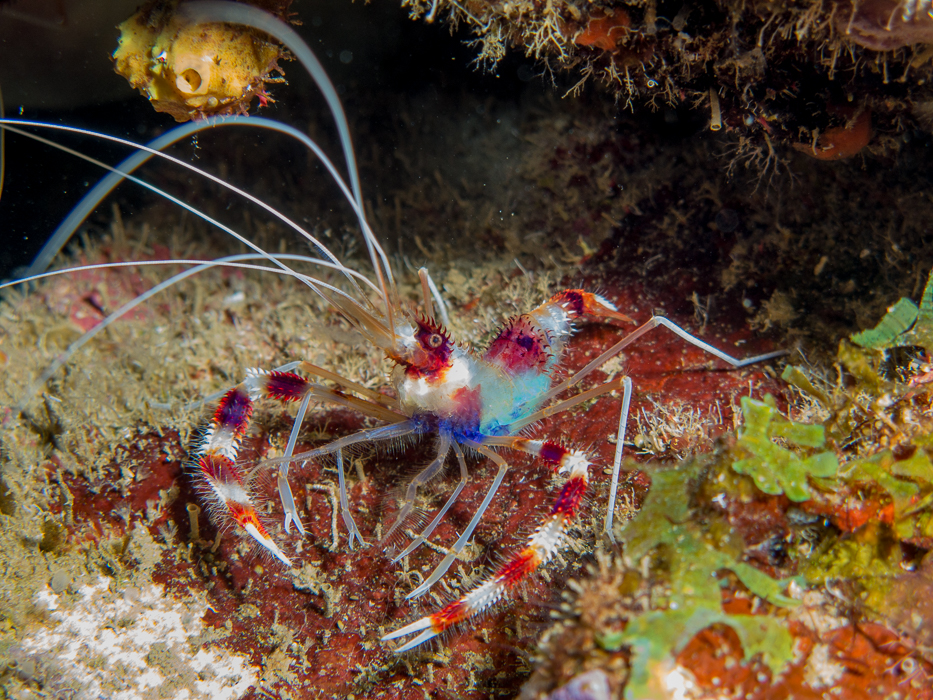
  3. I have no adjustments on the saturation, vibrance or any individual color correction for the picture I do understand and agree that it looks a touch off. I realized it may be the balance of whites and blacks. Since the shot was over exposed, i had to adjust the shadows, highlights, exposure, whites and blacks. I re-adjusted the amount of whites and blacks. How is this?


    thanks for the feedback.

    post-41674-0-55374500-1435546430_thumb.jpg

  4. Hi


    Yeah, I think that works better but, as I said, it's such a personal thing!


    If you are looking for further tweaks, i'd try and tone down the yellowish ?sea squirt in the upper left corner. It's a bit of a distraction drawing the viewer's eye (well, this one at least) from the eye of the coral shrimp to the sea squirt.


    But I understand completely you might not want to remove/reduce something that is a natural part of the image.


    As I said before, nice pic. I think you did well with this as coral shrimps are always tricky being as they are often hanging upside down in some dimly light crevice.

Marelux

Account

Navigation

Search

Search

Configure browser push notifications

Chrome (Android)
  1. Tap the lock icon next to the address bar.
  2. Tap Permissions → Notifications.
  3. Adjust your preference.
Chrome (Desktop)
  1. Click the padlock icon in the address bar.
  2. Select Site settings.
  3. Find Notifications and adjust your preference.