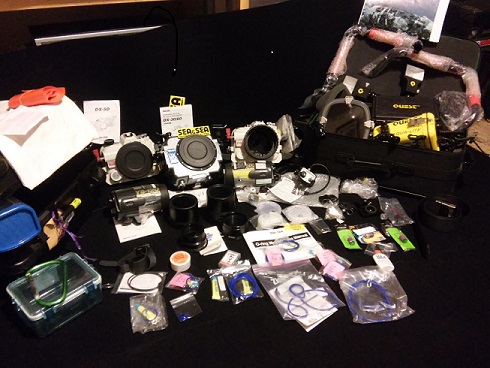
So ill start by apologizing for the photo situation here,if your interested and want more or better pictures PM me and ill send them over to you . Anyways this is what i unfortunately have to let go of
Sea&Sea
+Two D5-XD housing units for cannon.Both in good condition and come with spare O-ring kits and grease
+DX-3O/60 housing unit also is in very good condition and comes with extra o-ring kit and grease
+TTY converter
+Two YS- 120 Duo Strobes
+CX-600 EF20mm F2.8 USM Focus Gear
+CX-600 EF50mm F2.5 Compact Macro Focus Gear
+Plastic dome port Covers
EVERYTHING LISTED ABOVE IS ABLE TO FIT IN ONE INCLUDED TRAVEL CASE
QUEST
+Quest Aqua-lite (which contains the small battery
+Two Strobe lights that extend opposite sides of Aqua-Lite
+Wall outlet charging source
+Mini Quest tool box
+Quest Rip-Tide
+Brand new handles for maximum control
QUEST ITEMS WILL FIT INTO ROLLING TRAVEL CASE MADE BY QUEST
AM WILLING TO SHIP ANYWHERE THE BUYER PREFERS GIVEN THAT THE PAYS THE COST
$2,000 O.B.O-But PLEASE DONT HESITATE SHOOT ME A MESSAGE WITH AN OFFER YOU THINK IS FAIR.THANK YOU AGAIN
Thank you for taking th
IF YOU HAVE ANY QUESTIONS PLEASE DONT HESITATE TO ASK. VIA PM