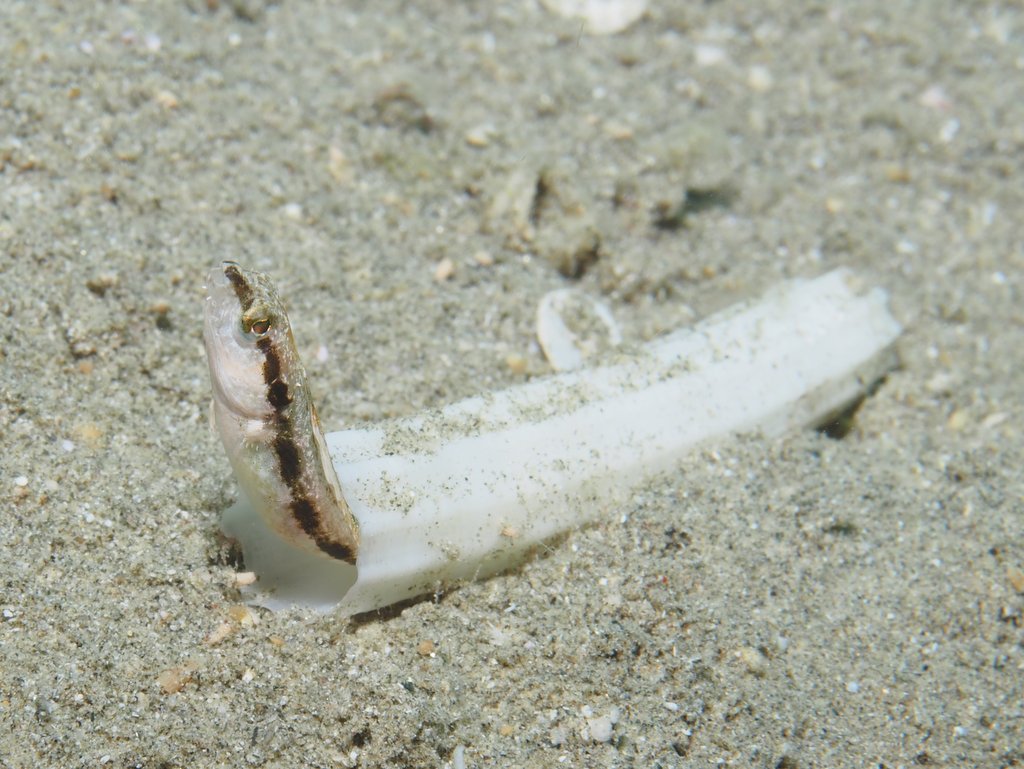
I have tried to find out what the shell is that this fangblenny (Adelotremus leptus) often uses for protection. The 2012 paper describing the fish species referred to it as a calcareus polychaete tube but I can't find examples of it, and perhaps it is something quite different. They were found in 5-10m depth in the silty central area of Marsa Abu Dabbab (Marsa Alam region). I have also found small hermit crabs using them (tiny crab for such a long shell looked really funny).
Any help is appreciated, Bart
It could be part of a scaphopod shell a.k.a. tusk shell, a type of mollusk.
Thanks Tom,
I think you are right. Interesting animals I had never heard about. I contacted a person who has looked at Red Sea scaphopods in hopes to find the actual species. If I do I'll post here. But I am already a big step closer.
Bart
OK, it is indeed a Scaphopod and a member of the Dentalium genus. Scaphopod shells were used by pre-historic cultures in the region (Natufians) for beads and they are also found in burials. They collected them in the Mediterranean and Red Sea, as well as from fossil deposits (Scaphopods have been around for 360My). The Natufian Red Sea shells belonged to the Dentalium reevei species complex. Likely that is what the one in my image is as well (but there are other similarly looking species in the Red Sea).
They live in the sand with the wide opening pointing down and feeding on diatoms and other small sand creatures. The other end has a much smaller opening (smaller than in the image, probably due to damage) and touches the surface of the sand.