HELP!! I just purchased this new camera after downsizing from a Canon SLR. I'm trying to go through the MAZE of menus, sub menus and sub sub menus to set up for an upcoming dive trip in a few weeks...
Can someone help me with what they use for basic settings for this camera? I'm having trouble getting the camera to readily focus with the attached internal flash. There are so MANY customizable features on this little camera that's it a bit overwhelming!!!!
These are applicable to the EM5 mk2 just set flash synch to 1/250 and rest pretty much the same.
Hi Griff,
Thanks for the link, but I had already seen this link (and read through it) but it's not specific enough for the camera settings… Where do you set the flash synch?
I have the e-m5 not the mark II, but I suspect the menus are somewhat similar. So, to set the flash sync, push the menu button, go to the "gear" on the side, that will get you to the custom settings menus. Look for the lightning bolt, on the m5 is letter "f". Once you click on it, just scroll through the settings till you find the flash sync.
Thanks, but the menus are definitely different....:-(
Flash synch is the fastest shutter speed ie 1/250 so just set to that figure when in manual.
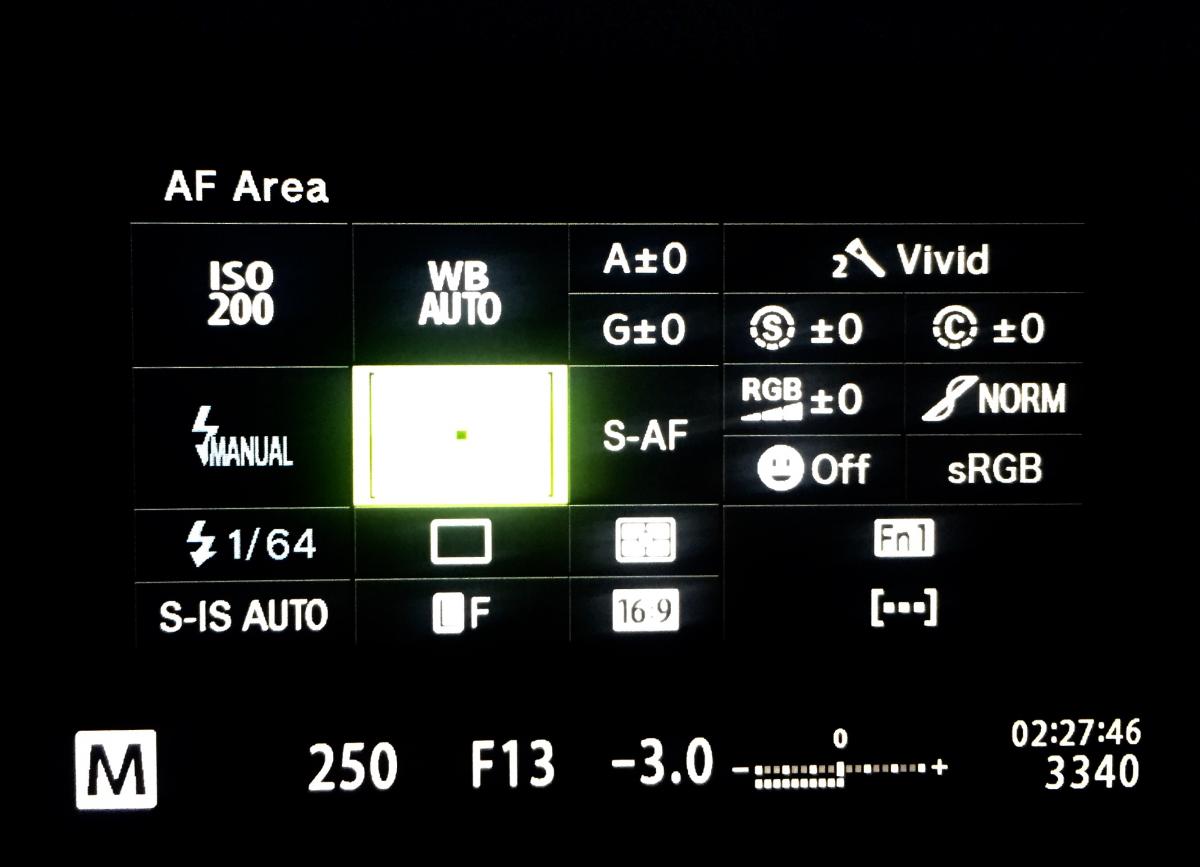
I also set the flash to manual and the power to 1/64 of full power to save the batteries which don't last half as long as my Canon DSLR rig. If you use TTL leave the flash in auto and fill in. I also have the Super Control Panel set as default whenyou press ok and Otis the same as pressing the Q button on a Canon. See below for a typical dive set up.
How about the comprehensive guide posted by coroander here a while back? Even if the menu structure is different it ought to be possible to map these settings across to the new structure.
(I can't get the UW Photo Guide page to load for some reasons so I don't know if provides a different approach)
It goes through every setting of the menus, very thorough.
We edited Corrander's excellent post (with his permission) and added a bit to it, as well wrote a similar set-up article on the E-M1. They are going to be similar to your camera.
They are available free in our Education Resource Center:
Thanks for posting these Jack, its a very handy reference.
There's one change not yet captured in most descriptions I've read. Selection of the small focus point is now much easier with the firmware update. From the SCP, select focus options, press INFO, then up/down arrows to change.
By the way, the original post was spot on about thr Olympus menus, they are indeed a maze.
Thanks for posting these Jack, its a very handy reference.
There's one change not yet captured in most descriptions I've read. Selection of the small focus point is now much easier with the firmware update. From the SCP, select focus options, press INFO, then up/down arrows to change.
By the way, the original post was spot on about thr Olympus menus, they are indeed a maze.
Glad they helped. You get used to the menu layouts after a while, they do offer an amazing amount of adjustment and fine-tuning. But items are sort of hidden or not where yo expect them to be...
Jack
Thank you EVERYONE for the helpful hints and tips!! I sincerely appreciate all emails and links…. :-)




.jpg.857dbbfbdc4d79d9c6ebf7b4ba96ed1b.jpg)

