



Skip to content

Photo / Video Showcase / Archived topic

How to add images to forum posts

Started by adamhanlon ·

  • 1Posts
  • 1Replies

Read-only discussion

How to add images to forum posts

1 posts
  1. Hi all,


    Here are a few screenshots detailing how to add images to forum posts.


    If possible, please try to link to images, rather the embed. Some ideas on how to do so are here:


    http://wetpixel.com/forums/index.php?showtopic=15473


    If you have to embed, please follow the instructions below:
     

    adding_images_1.jpg


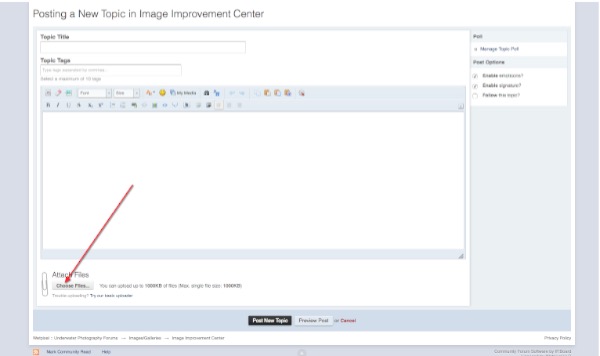
    Click on the Attach Images (Choose Files) button. This will open a dialog that allows you to select the files on your computer. Please note that maximum file size is 1000KB.
     

    adding_images_2.jpg


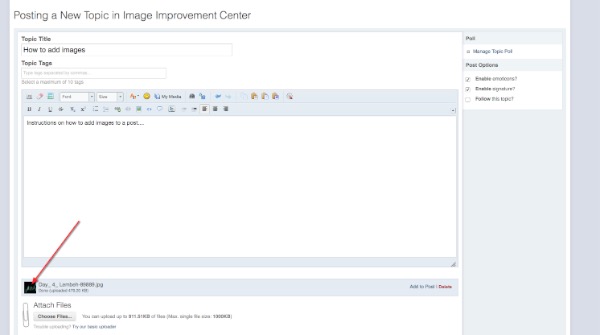
    This will add a small thumbnail of your image(s).
     

    adding_images_3.jpg


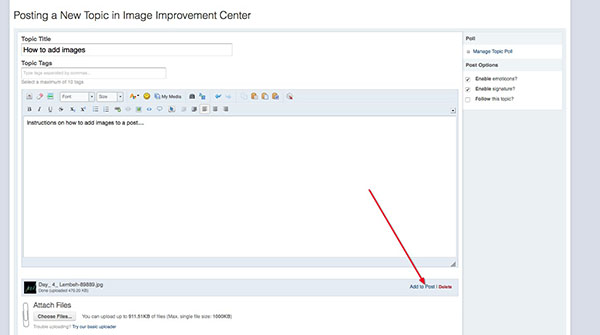
    Move you cursor to where you want the image to appear in your post. Click the "Add to Post" text on the bottom right.
     

    adding_images_4.jpg


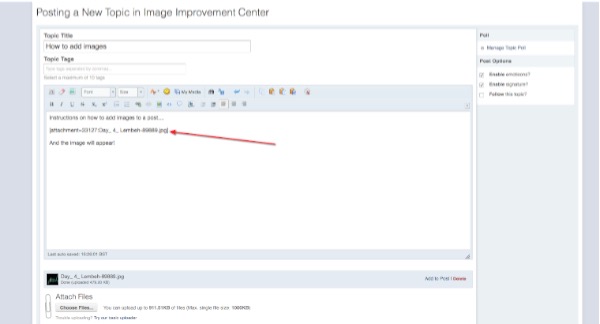
    This will add the text linking to your image. When you click "Post New Topic", the image will appear in your post.


    Any problems, please let me know!


    Adam

    Edited by adamhanlon
AOI

Account

Navigation

Search

Search

Configure browser push notifications

Chrome (Android)
  1. Tap the lock icon next to the address bar.
  2. Tap Permissions → Notifications.
  3. Adjust your preference.
Chrome (Desktop)
  1. Click the padlock icon in the address bar.
  2. Select Site settings.
  3. Find Notifications and adjust your preference.
