Skip to content

Shooting Technique, Workflow and Editing / Archived topic

Vivid-Pix- Magic Bullet Editing software

Started by GrtDay ·

  • 5Posts
  • 5Replies

Read-only discussion

Vivid-Pix- Magic Bullet Editing software

5 posts
  1. I used to spend about an hour and one half on each dive, editing and workflow. So much time that it interrupted my diving and quit photography.

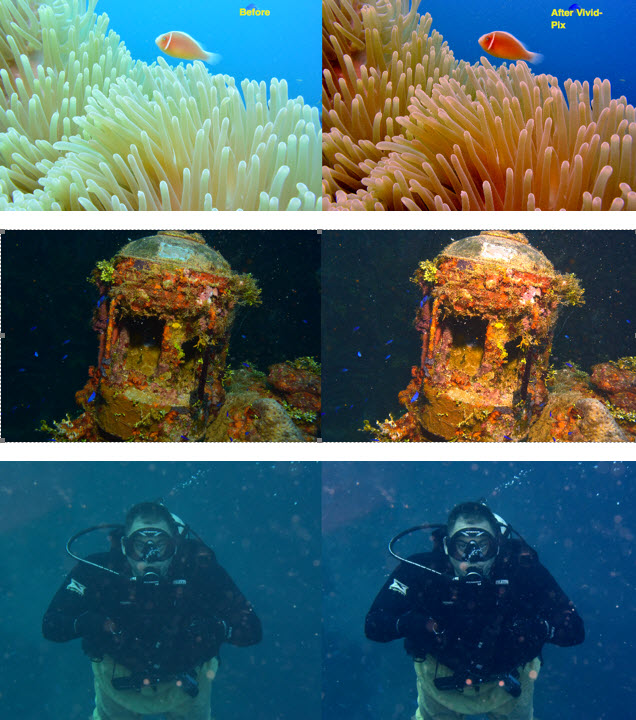
    Yesterday I downloaded Vivid-Pix for Scuba. (www.vivid-pix.com). I was cautious about this but what the heck....If it shortened my workflow and give me the results I wanted, I'm on it!

    Well fellow shooters, I spent a couple of hours on it today and was completely amazed.

    Basically, one click after selection. Maybe a minor tweak but this software has a bad-ass algorithm that really works! Sadly it only works on .jpg and not RAW, but they will be having an upgrade that will work on .dng.

    My .jpg files are 7-10 mb while the RAW files are 40-60 mb.

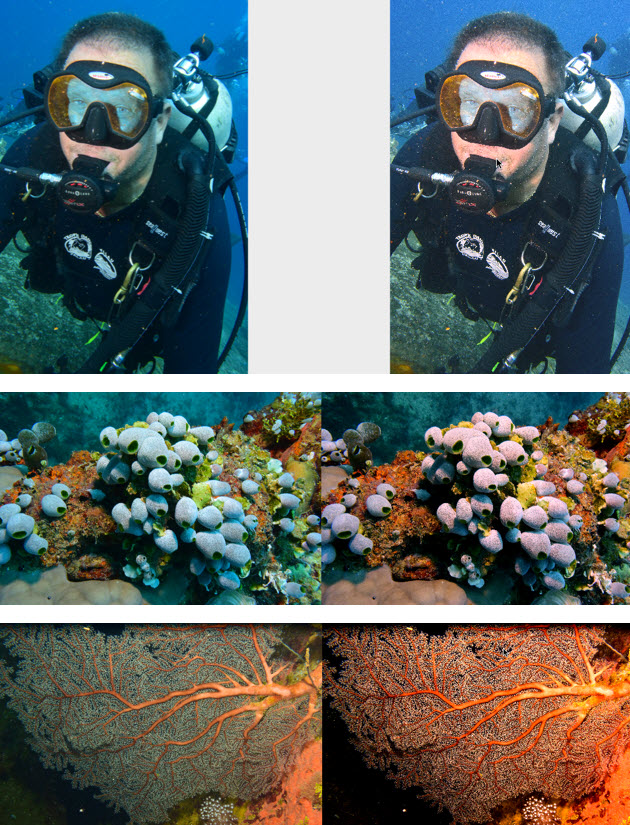
    Like any software, it's not perfect, but this product exceeds its claims. I heartily recommend you download the trial.

    There are some of my beginning pics. Please see before and after below.
     

    post-1051-0-20581800-1465425701_thumb.jpg

    post-1051-0-99154700-1465425736_thumb.jpg

    Edited by GrtDay
  2. Perhaps move this post to photography instead of video?

  3. Topic moved: Admin

  4. OOps.... Sorry!

  5. Looking for where this was moved and cannot seem to find it.

Account

Navigation

Search

Search

Configure browser push notifications

Chrome (Android)
  1. Tap the lock icon next to the address bar.
  2. Tap Permissions → Notifications.
  3. Adjust your preference.
Chrome (Desktop)
  1. Click the padlock icon in the address bar.
  2. Select Site settings.
  3. Find Notifications and adjust your preference.