Skip to content

Shooting Technique, Workflow and Editing / Archived topic

Color Correcting Purple Water

Started by dreifish ·

  • 16Posts
  • 16Replies

Read-only discussion

Color Correcting Purple Water

16 posts
  1. I've noticed that a number of cameras, including my current Sony A7RII and former GH4 tend to turn water an ugly purple color when custom white balancing at depth, with or without filters for assistance.


    As best as I understand it, this is because they push the red channel a bit too much in order to give a pleasing appearance to the foreground objects and make the white balance slate actually white.


    One approach to combat this might be to introduce some red/magenta into the white balance slate itself.


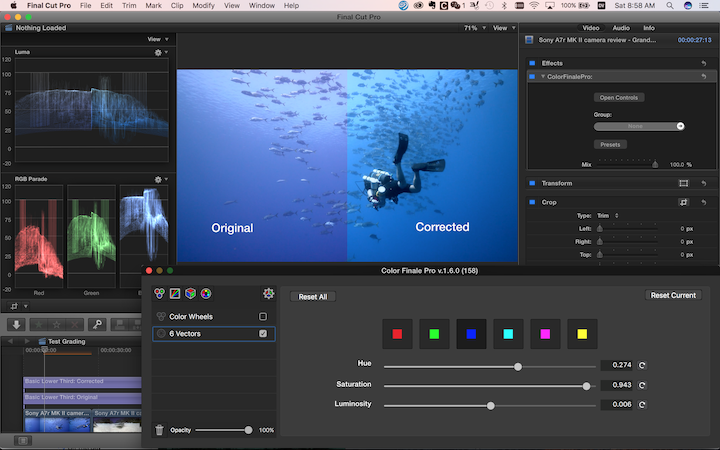
    But it seems it's possible to adjust the magenta in post as well. Here's the results of my initial test using ColorFinalePro in FCPX and playing around with the blue slider is the 6 vectors. The footage comes from Backscatter's review of the Sony A7RII and was initially exposed using a orange filter and custom white balance, I believe.


    https://youtu.be/6_YnpLnnT1M


    If anyone else has insight on how to improve on this, please share!
    Edited by dreifish
  2. Looks good to me! I still usually white balance my GH4 on the palm of my hand. Gets me near enough, as I'm correcting everything anyway, and I don't have to take a slate.

  3. I agree, that does look good. It also gets rid of that pinkish cast to the white areas of the eagle ray. Can you give some more detail on how you got there? I'd like to be able to duplicate that correction to some of my footage.

  4. Swift,


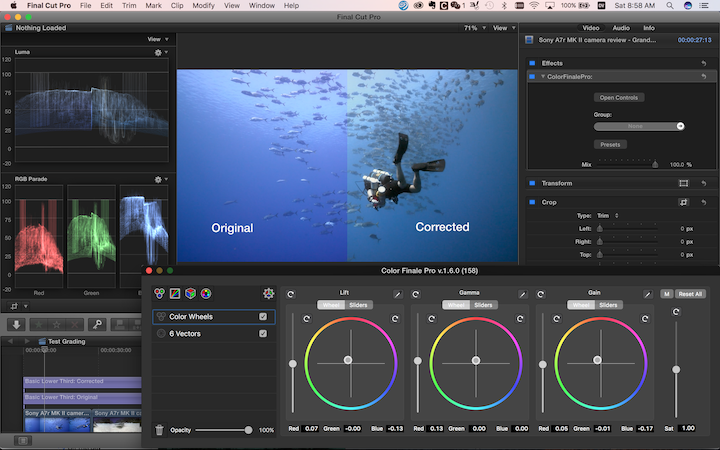
    It's actually a pretty easy correction using the blue color vector in the 6 vectors panel of Color Finale Pro plugin for FCPX, pushing the hue of blue from magenta towards cyan and increasing the saturation a bit. I do the same thing with the HLS panel in Lightroom for stills, so I suspect something similar can be done in Adobe Permiere or DaVinci Resolve, but I'm not experienced enough with that software to explain. Here's the exact correction:


    First, adjust the blue vector, which fixes the water column:


    post-42872-0-14078600-1477098573_thumb.png


    Then fine-tune white balance with the color wheels.


    post-42872-0-62741300-1477098581_thumb.png

  5. Dreifish. The corrections you made to the footage really make it better.


    This is actually quite an interesting discussion. As it's all very subjective.


    I had a play with the footage myself yesterday (also with CF Pro) and ended up with a slightly different variant. I tend to step away for a day and have another look as the longer you spend on a clip the worse it can become. Some stuff I've done is horrible, looking back!


    Apart from the above you did with CF, I added another couple of CF layers and masked off the diver with shape and colour mask and made the black less saturated on the suit, while not blowing the tank highlights (while keeping everything under 100IRE) I also (tried to) neutralise the skin tones.


    Perhaps we should have a show and tell of the same frame grab and see how everyone has a different view on correcting and can learn from others what they do. As looking at mine and yours. I prefer your blues!


    Sent from my iPhone using Tapatalk

  6. Dreifish. The corrections you made to the footage really make it better.


    This is actually quite an interesting discussion. As it's all very subjective.


    I had a play with the footage myself yesterday (also with CF Pro) and ended up with a slightly different variant. I tend to step away for a day and have another look as the longer you spend on a clip the worse it can become. Some stuff I've done is horrible, looking back!


    Apart from the above you did with CF, I added another couple of CF layers and masked off the diver with shape and colour mask and made the black less saturated on the suit, while not blowing the tank highlights (while keeping everything under 100IRE) I also (tried to) neutralise the skin tones.


    Perhaps we should have a show and tell of the same frame grab and see how everyone has a different view on correcting and can learn from others what they do. As looking at mine and yours. I prefer your blues!


    Sent from my iPhone using Tapatalk


    Great idea, Trickster. Color correcting/grading underwater footage seems to be one of those topics I haven't found much information on online, so everything I've done is more or less trial and error. It'd be great to see what approaches other people take. The footage here I've downloaded from Backscatter's vimeo channel -- would probably have been better to explicitly get a license from them first, though it probably falls under fair use in the U.S. given the transformative purpose we're employing it for.


    I'm curious to see what the additional corrections you've made amounted to. What do you mean, you've desaturated the blacks on the suit? Black (and any other shade of grey) should by definition have 0 saturation. Do you mean you've lowered its luminance further? Also keen to see what you've done with masking and the skin tones. Looking at how they turned out in my correction, I'd say they suffer from a distinct lack of red saturation -- they come across as rather greyscale. Not sure if there's enough information in the footage to rebuild the red channel in that IRE range.


    EDIT:


    Here is some tricky footage to give you guys something to play with. This was shot on a GH4 with custom white balance done around 15-20m depth off my hand. Iso 800 -- you can really see the noise in these shots, which makes it very difficult to color correct I think. Can anyone salvage them? Password: learning


    https://vimeo.com/188404391

    Edited by dreifish
  7. Ok.. here's what I managed -- unfortunately, it's very noisy, especially the second clip. Might need to invest in Neat Video or a similar de-noising solution.


    https://youtu.be/O589EFUcOyY

  8. This is a great thread!


    I couldn't correct the whale shark for toffee. Need to have another go. Couldn't get anywhere near the results you got. Kudos.


    But here is my for the reef sharks:


    Before


    9b41952bf85f3d2e239167c7083e56e9.jpg


    After (with Neatavideo)


    65819d016568b38122f50e3614854b86.jpg


    Sent from my iPhone using Tapatalk

  9. Nice results on the reef sharks, Richard! How did you manage to bring back the blue of the water column? Pushed saturation in the vectors panel? My water was much too noisy to bring back the color. Perhaps with neat video applied -- hmmm, I think you're selling me on the plugin :)

  10. Firstly I over corrected some of the lacking red (using the vectors - I will post the numbers up when I get home) and I then used the curves to remove some of the red in the shadow/dark areas.


    Do you have any footage from your GH4 with filters attached?


    Also if you are interested in NeatVideo... there is a new plugin from Coremelt, called NoiseX - which from the tech demo shown, looks very good. I think released soon. NeatVideo is a nightmare to use in FCPX.

    Edited by thetrickster
  11. I agree the UI of the Neat Video plugin for FCPX is not 'Macish' at all. Its all a bit clumsy but I do like the results I get from the plugin. I think it wipes out noise quite effectively.


    I'll watch developments on that NoiseX plugin - but then the UI of the Coremelt products aren't really outbursts of beauty either....


    bubffm

  12. Apart from the Windows based UI. (Which is yuck)


    My main issue with NeatVideo is the constant rerendering it try's to do every time you adjust a clip it's an effect on, from trimming to enabling or disabling another effect. It slows the whole thing down. Even with background rendering turned off.


    With Resolve you can lock nodes but for me at the moment NeatVideo is awful to use for FCPX ( but results are good)


    Sent from my iPhone using Tapatalk

  13. My workaround for that issue is to just disable the plugin while I do other stuff to the clip. Because otherwise the machine will indeed come to a complete standstill as any change in coloring, stabilization or whatever needs the be recalculated by Neat. But I doubt NoiseX would be any different. Even denoising in Resolve grinds the machine to a halt more often than not...

  14. Here's my go with the whale shark footage. Wasn't happy with the first go with it. Here is an attempt from today.


    Any comments?


    Before:

    4f88482a10aaff27b09eada02a19f216.jpg


    After:

    c8326a57cc63392d506e3eceb7034198.jpg


    Sent from my iPhone using Tapatalk

  15. Any comments?


    The water colour looks good but to my eye the shark and diver are a bit too magenta/red.

  16. Thanks Nick, you know its one of those 'come back tomorrow' things - looking at it today - you right, probably need to knock down the Sat a bit

Account

Navigation

Search

Search

Configure browser push notifications

Chrome (Android)
  1. Tap the lock icon next to the address bar.
  2. Tap Permissions → Notifications.
  3. Adjust your preference.
Chrome (Desktop)
  1. Click the padlock icon in the address bar.
  2. Select Site settings.
  3. Find Notifications and adjust your preference.