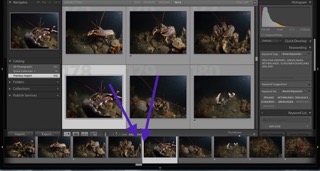
Between the two arrows i seem to have lost the tool bar that sits above the thumbnails in Lightroom 5.7.1.
I have gone into prefrences and purged the caches this seems to have done nothing to get this back on track.
Can anybody help or advise me on this problem
Press "T" or click View>Show Toolbar
:-)
Hi Tim
That does the tool bar above the thumbnails. The tool bar on the thumbnaills seems to be sitting under that?
Gr
Marko
Sorry Marko, I misunderstood what you were trying to resolve.
Try View>Grid View Style>Show Extras [etc]
I'm struggling a bit to see the pic you attached clearly - but if the problem is you are getting an overlap between the thumbnails at the bottom of the screen and the bottom line of the grid, I had the same thing a couple of weeks ago. I'm not sure what caused it but I Googled and found an answer in, I think, Lightroom Queen. I can't remember what I did now (!) but it was a simple fix. I'll try and find it again for you.
No luck with that either
I've not yet found what I think was the solution that I googled.
I assume you've tried to close LR and re-open it?
Yes i have given that a go to reboot ect no luck their with it either
I played around with zooming the film strip - momentarily when doing so the black part above the row of images does cover up the grey toolbar but only for a split second then fixes itself. This is not exactly what you are getting. What happens when you close the filmstrip (click on the tiny triangle in the middle at the bottom)?
FYI, I am using a 2012 mac pro with 32GB of ram and have re-set the LR cache to 10GB. I avoid running other apps such as office when working in LR. I have nearly 1/2 million images in my LR library.
Hi Marko
Annoyingly I still can't find the article I found before to solve the problem - but I think it involved doing a Preferences Reset. This solved the problem immediately.
I found this link also last night while having a chat to Goose over the problem. I haven't given it a try yet but I think its the next option I will try when I get in tonight. I will let you know how I get on.
Thanks for your help
Marko
.
Hoi Gerard
Im not sure if it is should filter bar. I will give that a go, and let you know how I get on
marko
Hi Tim
I found this link also last night while having a chat to Goose over the problem. I haven't given it a try yet but I think its the next option I will try when I get in tonight. I will let you know how I get on.
Thanks for your help
Marko
.
Fingers crossed! Reading it this morning brought back memories of going through that process through Finder.
Here is the update
I have reset the lightroom preferences it has worked which is really good, there is always a BUT. I think what it has done is reset the preferences to default all goods everything looks like its back in place, here comes the but, looks like all my catalogs are gone for what ever reason, so i think i might be back to square one. Not sure what the next set is.
To everyone that commented i may not know any of you personally but, i really apreciate the comments and help each of you have given thanks so much.
Marko
Your catalog or catalogs should be a file or files on your computer. If you did back-ups you will have copies of them at an earlier state as well. A catalog is a file with a name that ends in .lrcat on a mac. Look for this.
Tom
Yes everything is backed up on and off LT it was just a matter of opening them up.
Well done, Marko! Yeah, you just need to open your catalog rather than the default that will start after a reset.
A heart stopping moment though, eh!?!?
Tim
Not heart stopping but I did drop a few F bombs in the process. Positive note good learning moment. I will say again thanks very much for your help and support.
marko
Hi Guys,
Just veiwed this feature and can say Lightroom Queen is a guru.