New to the forum not to diving or UW photography. Old setup was Canon G15 and I never encountered this problem. New setup Sony A6000. Starting with the basics before adding strobes etc, so just using natural light ATM.
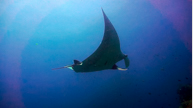
Getting great results for images BUT for video, I'm getting this annoying Purple Haze around the frame (screenshot attached of a particularly bad example). Almost like a severe Vignette. Sometimes it's not too noticeable, other times its ridiculous. I'm guessing its perhaps the quality of the kit lens (16-50mm) which I'm leaving at 16mm for now.
Any advice is welcome. Cheers.
What video codec you are using?
My friend had a similar issue with his Sony FS100/FS700, I think. It is discussed in detail on this forum. This haze (halo rings) only appears when shooting a subject in a blue water column like your manta shot.
I think it is to do with low bit rate of the codec and thus the compression of data causes such bad rendering of the blue water background. XAVC-S is better suited for video on the a6000 (50 Mbps).
If you are already using XAVC-S, then try different color gamma.
What video codec you are using?
My friend had a similar issue with his Sony FS100/FS700, I think. It is discussed in detail on this forum. This haze (halo rings) only appears when shooting a subject in a blue water column like your manta shot.
I think it is to do with low bit rate of the codec and thus the compression of data causes such bad rendering of the blue water background. XAVC-S is better suited for video on the a6000 (50 Mbps).
If you are already using XAVC-S, then try different color gamma.
Thanks for getting back to me Thani,
I'm using the AVCHD selection at the moment. I can switch to XAVC-S but only when I get a better SD card to cope with the files. I'm waiting on that to arrive so will make the switch soon.
I exported the files using photo-jpeg codec as that is what is required for the place I'm uploading it too.
Thanks for the tip on the colour gamma. I'll try adjusting that in post and see if I can get rid of the halo.
Thanks.
Thanks for getting back to me Thani,
I'm using the AVCHD selection at the moment. I can switch to XAVC-S but only when I get a better SD card to cope with the files. I'm waiting on that to arrive so will make the switch soon.
I exported the files using photo-jpeg codec as that is what is required for the place I'm uploading it too.
Thanks for the tip on the colour gamma. I'll try adjusting that in post and see if I can get rid of the halo.
Thanks.
Hey Thani,
Wow thanks for the Gamma tip, it's totally fixed it. I'd never used the gamma tool before and wasn't quite sure what it was for but I reduced the red gamma and hey presto, the purple halo has gone. thanks so much :-)
Hi,
I am glad you were able to fix the issue. Can you elaborate on what gamma did you use and how did you fix it?
Hi,
I am glad you were able to fix the issue. Can you elaborate on what gamma did you use and how did you fix it?
Yes Thani, I'm using hitfilm 4 express. I added the 'Gamma' effect to the clip (located under colour correction). the red gamma is automatically set to 1.0. I just dropped it to 0.8 and boom, the purple haze is no longer visible. TY.




 Hi,
Hi,

