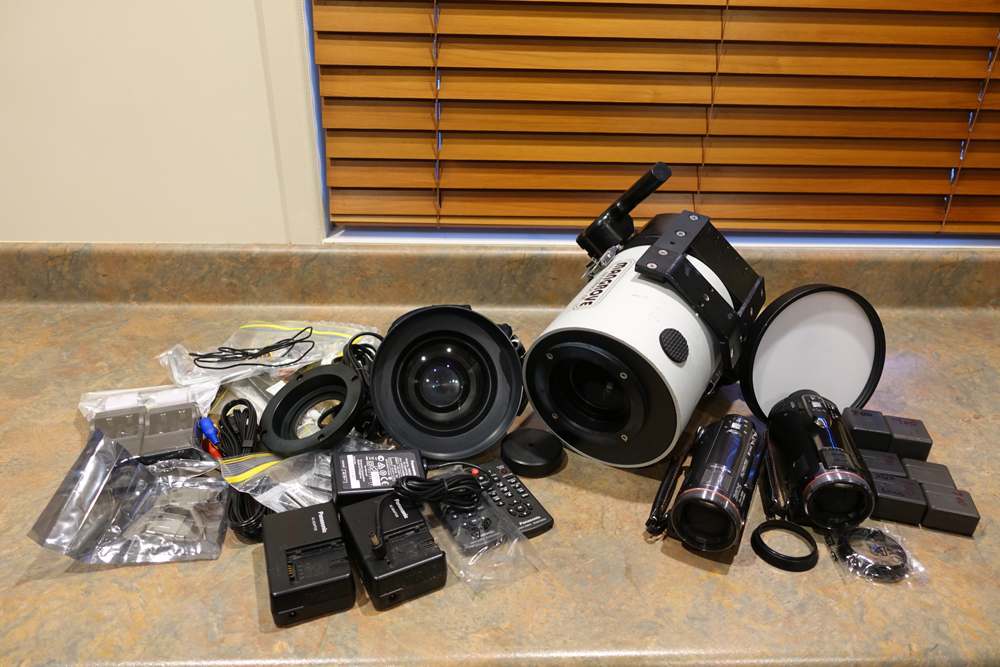
Complete Underwater Video Setup.
I am no longer diving, so reluctantly selling all my underwater video equipment as one bundled auction. Everything is in excellent condition. The gear has never been flooded, and has been lovingly and meticulously maintained.
The full auction includes -
Mangrove by Aditech Underwater Housing MVHP-1 rated to 200m to suit Panasonic Video Cameras (current retail is approx $2000)
Aditech WP-80 Wide Angle Lens with Neoprene Cover (cost $500)
Panasonic HDC-TM700 Video Camera
Panasonic HDC-SD900 Video camera
6 x Batteries for the Video Cameras (4 x standard, 2 x extended life)
2 x Panasonic Battery Chargers
2 x Panasonic Power Cords
1 x Panasonic Multi Video Lead
1 x Panasonic Power Adapter
2 x Panasonic Lens Shades
2 x Panasonic Remote Controls
1 x additional (spare) Aditech Housing Handle
2 x additional (spare) Housing Clips
1 x Housing Flat Port
1 x Standard Port Adapter
1 x Travel Port Cap
8 x Rechargeable Batteries for Housing
2 x Battery Chargers
1 x additional (spare) Internal Camera Tray
Various spare O rings
1 x Flat Port Tool
Further details, including sample videos shot using this setup are available on request.
Larger detailed photos are available on my website http://www.yambabeach.net.au/video.html
Asking AUD$990 plus postage.
The total weight of the parcel will be between 8 and 9 kilos, and will pack in to a box approx 50cm x 35cm x 38cm. Postage costs may be more affordable by packing into two smaller parcels.