



Skip to content

Shooting Technique, Workflow and Editing / Archived topic

ISO adjustment for Aperture

Started by ncheel044 ·

  • 2Posts
  • 2Replies

Read-only discussion

ISO adjustment for Aperture

2 posts
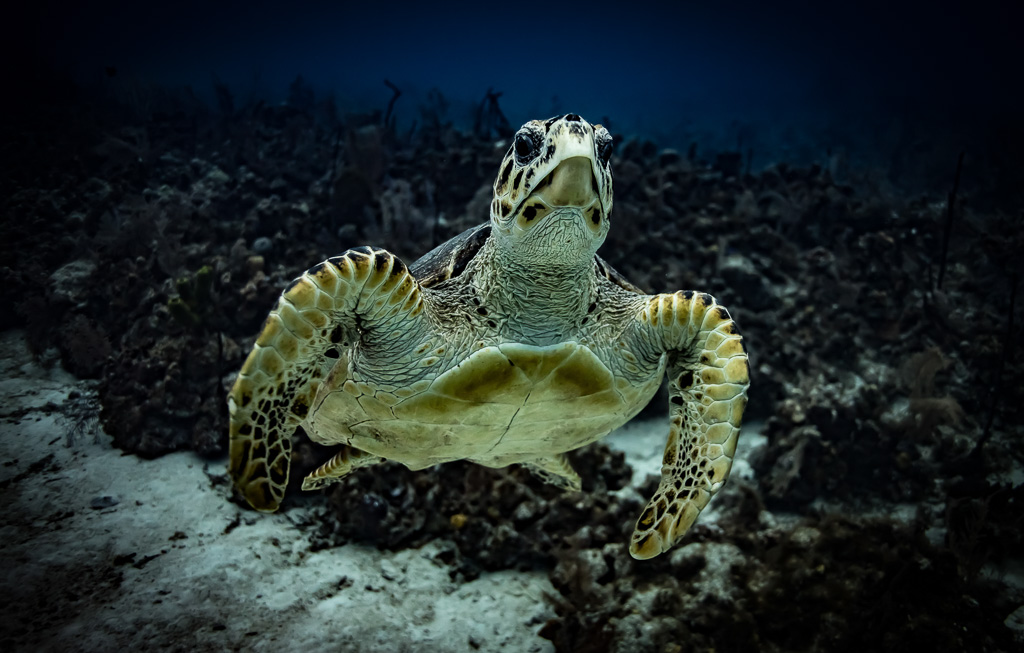
  1. ​Looking for a bit of advice for how much of an ISO change would be recommended for a full stop change of F/4 to F/5. I will be shooting in natural light. The attached picture is an example of what I would like to work on for the next shot, just want to go into the next dive somewhat prepared as the opportunities are not that often. I am mostly happy with the result after some work with Lightroom, however you can see there is a bit of softness on the lower left fin of the turtle that I am hoping a move to F/5 could do away with. Or if I should be trying something else all together. For simplicity let's just assume that the lighting conditions are the same or similar for the next dive. Here's the info from the example photo. Also a side note, I cannot adjust the shutter to anything less than 1/200 for the types of shots I'm looking for. Thanks!


    Shot on Canon 5D Mark IV - 24mm 2.8 EF IS lens - spherical dome port - natural light

    F/4 - ISO 500 - Shutter 1/200 - Manual white balance


    45 feet deep, mix of sun and clouds, sun at back
    post-68613-0-47112800-1512340753_thumb.jpg

    Edited by ncheel044
  2. f/4 to f/5.6 is a full stop not f/5. Closing down by one full stop is halving the amount of light passing through the lens so requires a doubling of the ISO to compensate if you keep the shutter speed the same. BTW I use auto-ISO in combination with aperture priority auto-exposure quite a bit for my non-flash underwater photography. This is because of the need to keep the lens stopped down to work OK with a dome port.

    Edited by Tom_Kline

Account

Navigation

Search

Search

Configure browser push notifications

Chrome (Android)
  1. Tap the lock icon next to the address bar.
  2. Tap Permissions → Notifications.
  3. Adjust your preference.
Chrome (Desktop)
  1. Click the padlock icon in the address bar.
  2. Select Site settings.
  3. Find Notifications and adjust your preference.

