I've recently upgraded to a Nikon D500 so now have an XQD card as well as SD. My previous camera had 2 SD card slots and I would often use the 2nd card as back-up, sometimes overflow. With the XQD, how should I use the SD card? Is it still sensible to use as back-up or would I lose some of the speed writing benefit of the XQD?
Thanks in advance
Hi Kirsty,
Welcome to Wetpixel. Like you, I have usually used the second slot for backup. With the D500, in this configuration write speed is limited by the slower card i.e. the SD slot. For most underwater shooting, the large buffer and the limitation of strobe recycle time on high speed shooting bursts means that the SD card write time isn't a real limitation. However, there could be occasions when shooting longer bursts of fast action, using natural light or possibly low strobe power mean that you would like to clear the buffer as quickly as possible. Usually these situations would be predictable and it's easy to switch second slot function on the fly. If needed you could then back up to the SD card in retrospect. I don't think there's a right answer to how to configure the slots on a D500 - it depends on your shooting preferences. Life just got a bit more complicated compared with the D7200.
Of course the advantage of an XQD card isn't just write speed. Read speed is also potentially higher so uploading images should be faster as long as you don't have a bottleneck somewhere else in your system.
Mark
With my D300 and with my D500, I have always used the second card for overflow. In twelve years shooting underwater, I've never needed a backup card and I typically shoot over a hundred shots per dive on at least 100 dives per year. I've found the overflow much more useful for topside shooting, where I might shoot 1000 high speed shots at a motorcycle race or while whale watching and them cull out 900 of them. Video also makes for full cards, although with a 64 gig XQD, I've yet to come close.
Hi Kirsty
I think how you use the second card is very much personal preference. I use mine for backup. I'm using 64GB cards and get around 1200 shots on the card so haven't needed overflow so far.
But I think you are right, if you use the SD for backup it does slow down the XQD card slightly if its not a fast SD card. I've just used my D500 on its first dive trip quite recently and used a Lexar 2933x XQD card and a Sandisk Extreme 30MB/s SD card. There was a delay when the SD card was in the drive - which didn't happen if I removed it. I couldn't say the delay was signifiant but it was noticeable.
On return I switched to a Lexar 2000x 300MBs SD card and that is much faster and there is now no noticeable lag.
I've always used the second slot as overflow. The main use, however, is when I forget to put the first card back in after downloading. So I have a rule to never take out the second card, so it is always ready for mistakes!
Usually overflow as well, but sometimes an Eyefi card to let me grab images to my phone for a quick share. Won’t need it with the new body bc it has Wifi, so back to overflow only.
I'm with Alex on this.
I write to XQD and use the SD card for backup.
I also never remove the SD, so I know that I always have at least one card on the go!
Adam
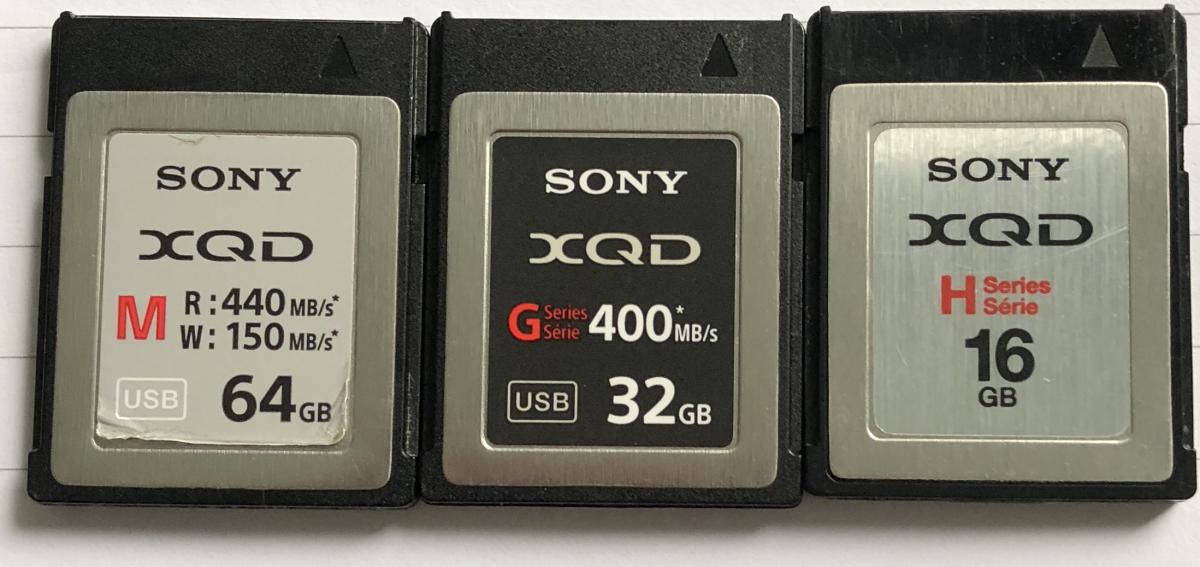
One thing to watch with XQD is compatibility between cards and readers. The card reader that came with my D5 is for G Series cards and won't read my older cards from D4 which are H series. Something to be aware of if buying secondhand cards. There is no issue with using these cards in any of the cameras.
I don't know what the M stands for on the lefthand card below (but it does work with the G series card reader)
Alex
Larry,
Just curious what resolution you are shooting the 64 Gig cards at?
Reason I am asking is that I just bought the D850 and plan to shoot video at the highest resolution and I don't want to buy the 128's if I can avoid it due to cost. I'd rather buy 2 64's if they aren't filling up that fast...
Hank
With my D300 and with my D500, I have always used the second card for overflow. In twelve years shooting underwater, I've never needed a backup card and I typically shoot over a hundred shots per dive on at least 100 dives per year. I've found the overflow much more useful for topside shooting, where I might shoot 1000 high speed shots at a motorcycle race or while whale watching and them cull out 900 of them. Video also makes for full cards, although with a 64 gig XQD, I've yet to come close.
1920x1080 60p
I was able to shoot for the better part of two 45 minute dives when we were continually dive bombed by sea lions without coming close to filling my XQD card. However, I just checked the card to jog my memory and I'm using 128s for both XQD and SDxc, 440 and 150mbs. For a one time investment, I figured spending the extra bucks would save me having to carry extra cards on trips or having to download frequently. I don't do an awful lot of video, so my bigger concern was being able to shoot 3 dives a day for a ten day trip, with 50-60 pics per dive.