



Skip to content

Lights, Strobes, and Lighting Technique / Archived topic

how to install Inon z-240 strobe unit

Started by foiegras ·

  • 2Posts
  • 2Replies

Read-only discussion

how to install Inon z-240 strobe unit

2 posts
  1. Hey guys,


    I hoper that you can give me some advice -


    My Inon D-2000 strobe somehow died underwater (the eneloop batteries I guess, first kind of fume coming out, then the bubbles ) subsequently flooded.

    By chance I got an Z-240 Strobe Replacement Unit for a very good price at Ebay, I thought it could be worth a try - but I couldn't find any "inside the strobe" pictures or plans

    online - my problem is that I want to connect the light detection sensor (Is there a specific expression for it?) that fires the strobe to the whole unit.

    For now I just have the bare cables. I attached a few pictures so that you know what I mean...

    Any help would be appreciated! Thanks!
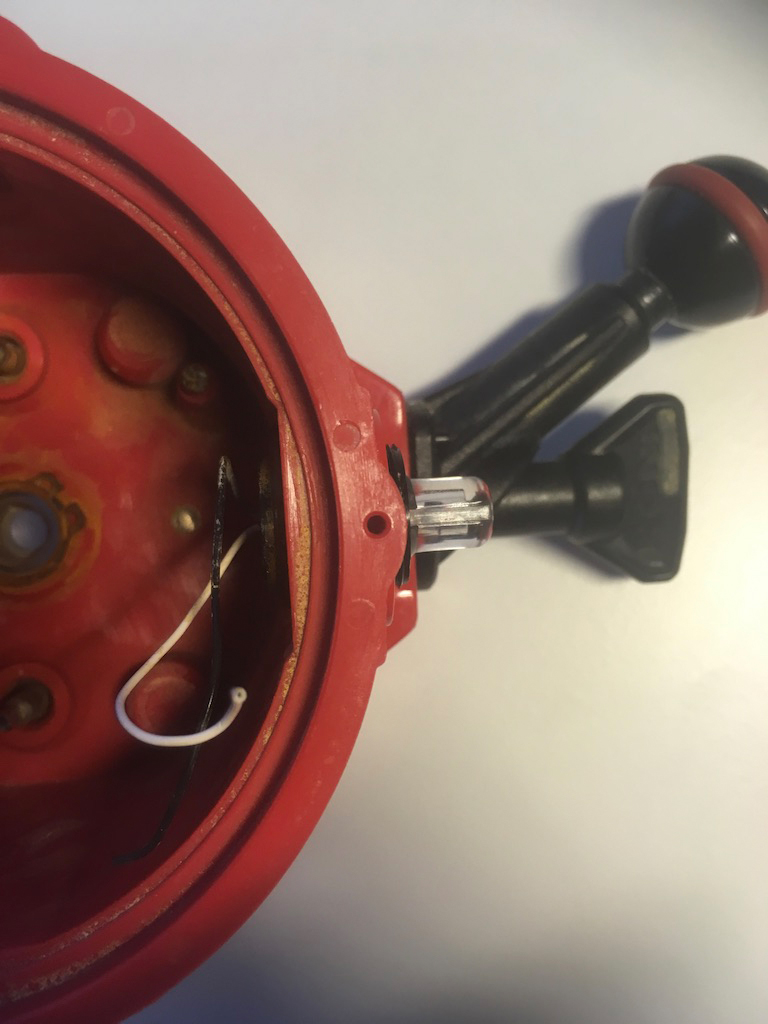
     

    post-54126-0-35519600-1542101845_thumb.jpg

    post-54126-0-13259500-1542101898_thumb.jpg

  2. Hi, M. Foiegras:


    The first step is to realize that strobes use high voltage capacitors. Their charge can curl your hair, throw you across the room or give you cardiac arrest. The second step is to find somebody who really knows electronics to help you, so you do not end up looking like Dr. Frankenstein's creation, with a zipper neck.


    The photo of the Z240 electronic unit shows a loop of a white cable. This might be joined to the white cable of the D2000 red housing. Hopefully there is a mating black cable somewhere in the Z240. But do Not mate them, nor load batteries until a knowledgeable person has checked you out, for the reasons just mentioned.


    Another course of action, the wisest IMHO, is to put both of these units up for sale, and then, with the proceeds take a friend out for dinner. This will provide for both a pleasant evening and might save you from some overly exciting high voltage moments.


    Please take careful care of yourself, and Best of Luck!

    Edited by Kraken de Mabini
AOI

Account

Navigation

Search

Search

Configure browser push notifications

Chrome (Android)
  1. Tap the lock icon next to the address bar.
  2. Tap Permissions → Notifications.
  3. Adjust your preference.
Chrome (Desktop)
  1. Click the padlock icon in the address bar.
  2. Select Site settings.
  3. Find Notifications and adjust your preference.

