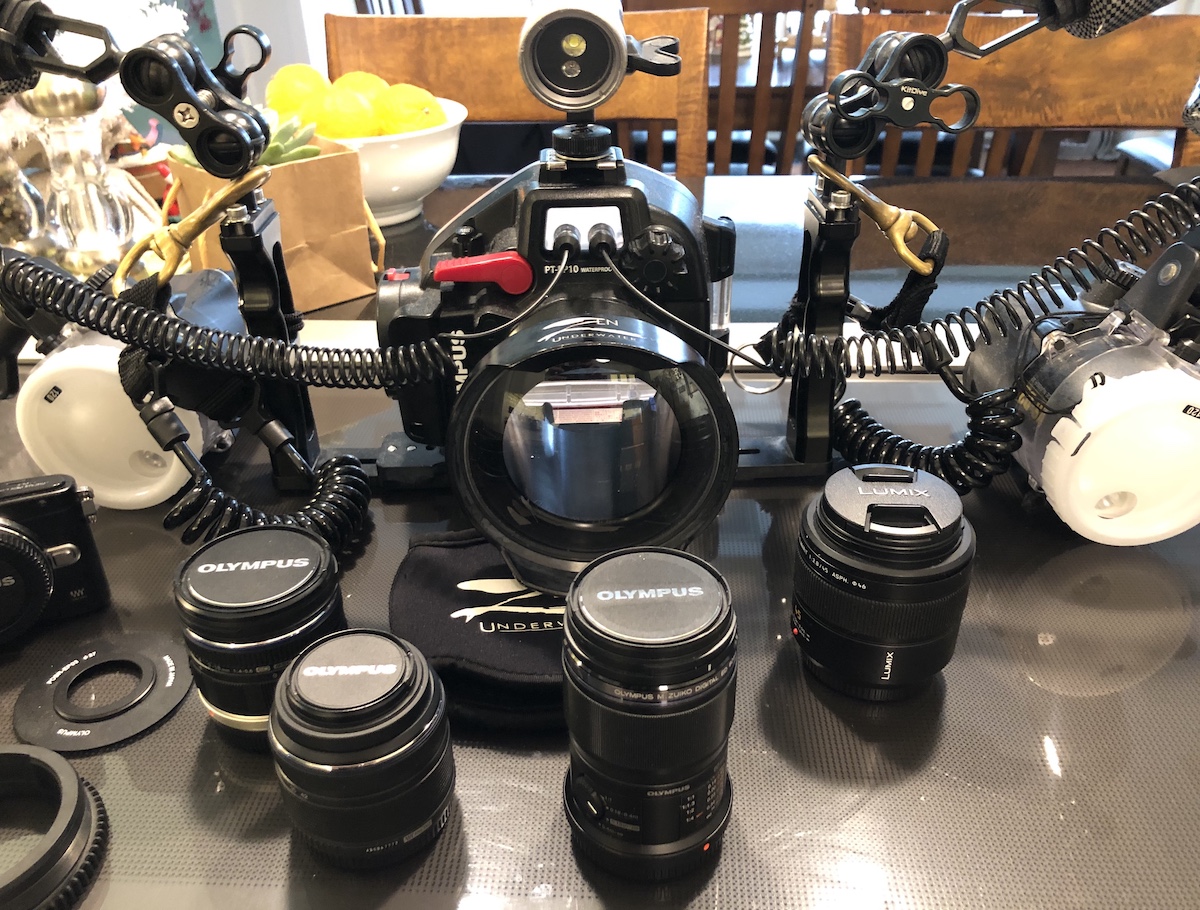
I've upgraded to a Sony full-frame setup, so it's time to find a new home for my old Olympus micro-4/3rds gear.
Here's what you get:
- Olympus E-PL5 16 megapixel micro-4/3rds body, with extra battery.
- Olympus PT-053 housing, with the original flat port and an extra unused o-ring.
- Zen Underwater 100mm dome port (with extra o-rings).
- Olympus 14-42mm f/3.5-5.6 lens (with zoom gear and anti-glare shroud)
- Olympus 9-18mm f/4.0-5.6 lens (with zoom gear)
- Olympus 60mm f/2.8 macro lens (with focus gear)
- Panasonic 45mm f/2.8 macro lens
- 2x Sea and Sea YS-D2 strobes (these are the black Chinese ones), with spare fiber optic cord.
- iTorch Venusian III 800 lumen focus/video light, with two batteries.
- KitDive dual arm tray with 2 8" arms for each side.
Everything works, and has been well taken care of. The housing has never flooded. There's some blueing to the aluminum from hard water on some of the liveaboards we've been on, and it's all definitely been used (the strobe arm mounts have some wear on them as well). But, it's ready to go dive and take pictures.
All of this, shipped to you, for $1700 US. Unfortunately, I can't ship internationally, sorry.
Examples of the pictures I've taken with it just last year:
- https://www.flickr.com/photos/jonmcclintock/sets/72157701827088315
- https://www.flickr.com/photos/jonmcclintock/sets/72157673235003268
- https://www.flickr.com/photos/jonmcclintock/sets/72157697635211164