Skip to content

Lights, Strobes, and Lighting Technique / Archived topic

Inon Z330 Y connection

Started by davec13o2 ·

  • 8Posts
  • 8Replies

Read-only discussion

Inon Z330 Y connection

8 posts
  1. On page 17 of the instructions for two recently delivered strobes, is the warning not to connect two strobes via

    Y sync cable because of possible damage to the strobes. The reseller verified this warning after a discussion

    with Inon, and suggests that I return the strobes for refund.


    My Meikon case at the moment has only a single sync connector. Waiting for the UW-Technics TTL converter

    with fiberoptic connection for Sony cameras.


    Looking now for other options:

    Sea&Sea YS-D2J appears problematic according to recent reports.

    Retra takes fiberoptic only, but they do have a sync-fiber converter.

    Ikelite case with TTL sync cable requires their heavy strobes.


    Comments, please.


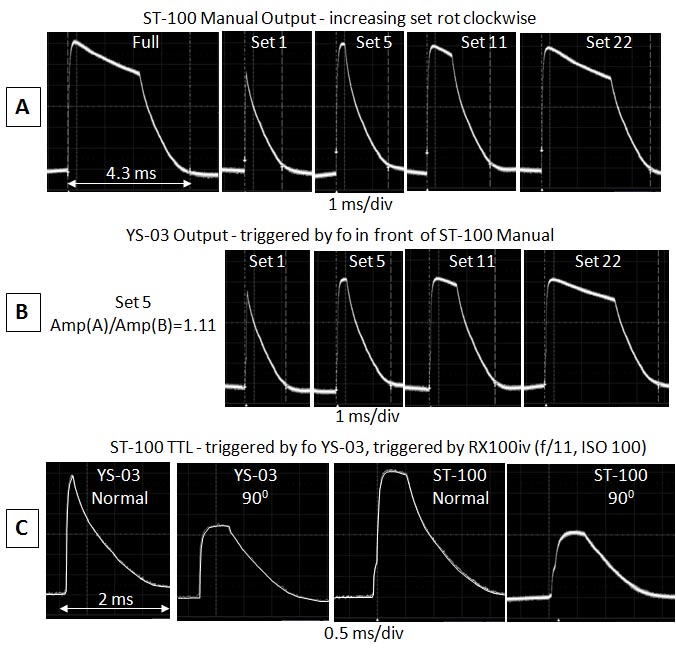
    I took traces of the Z330 manual output and integrated them for output. From Full to -0.5 (1.4 stops), -0.5 to-2 (1 stop), -2 to -4 (0.06 stops), -4 to -6 (0.32 stops).

    post-77081-0-25790300-1549556495_thumb.jpg

    Edited by davec13o2
  2. You could try using a single sync cord and have the other strobe running TTL mimicking what the synced strobe does until such time as you get a TTL trigger. Or if both strobes are in manual, just trigger the second strobe from the first one.

  3. Thanks, Eagle


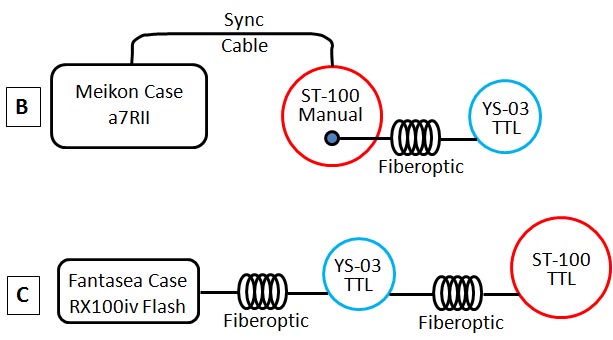
    Barmaglot also mentioned that approach on another website. So, that's what I finally settled on - triggering my YS-03 with my ST-100 - the cheapest solution until UW-Technics comes through with a Sony electrical-optical converter.

    Approach B.

    post-77081-0-00998300-1549777232_thumb.jpg

    post-77081-0-50976500-1549777251_thumb.jpg

    Edited by davec13o2
  4. Sea frogs support is still saying Inon strobes will work with their synch cable. Is it your understanding that they will not?

  5. This is about using a "Y" cable to trigger two strobes. INON are saying that you can't trigger two strobes with a "Y" cable. SeaFrogs only appear to sell a single strobe cable?? No reason that should not work, the question then is how to trigger a second strobe. In any case I doubt Seafrogs would compensate you if their cable broke an INON flash.

  6. Yes, Chris' comments match what I believe.


    Seafrogs and Meikon sell only a single cable that connects the single cable port on their housings to a single strobe. My ST-100 strobe triggers fine with it on manual, no TTL.


    Seafrogs and Meikon did not respond to my question about triggering two of their ST-100 on a Y-cable without strobe damage, which leads me to believe they do not know the answer. In order to do that test, I would have had to buy another ST-100 ($250) and a Y-cable ($150), but decided instead to put the money to an order for two Retras and their electrical-optical trigger.


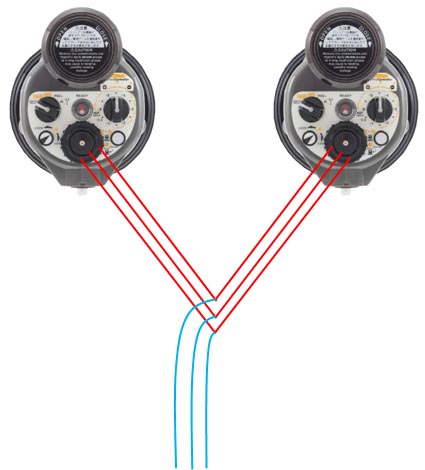
    The cable has 3 pins at one end, trigger, return, and quench. A Y-cable is dumb, only wires, no extra circuitry; so it would essentially connect the strobe control circuits. I imagine that differential voltages could appear on the strobe pins, and if unbuffered, could blow out the circuit input/output.

    post-77081-0-00317100-1552068642_thumb.jpg

    Edited by davec13o2
  7. mmm....news to me. I purchased two Z330s and execute them through Nikonos Y cable. I have had it down 40-50 dives so far without issue...hope they dont die. Some basic observations on this stobe here

  8. I suspect it could be that INON have not specifically designed for this, the potential problems may vary between different camera models and are saying that as they have not tested and don't want to take responsibility if the strobe dies. In other words use at your own risk.

Turtle

Account

Navigation

Search

Search

Configure browser push notifications

Chrome (Android)
  1. Tap the lock icon next to the address bar.
  2. Tap Permissions → Notifications.
  3. Adjust your preference.
Chrome (Desktop)
  1. Click the padlock icon in the address bar.
  2. Select Site settings.
  3. Find Notifications and adjust your preference.