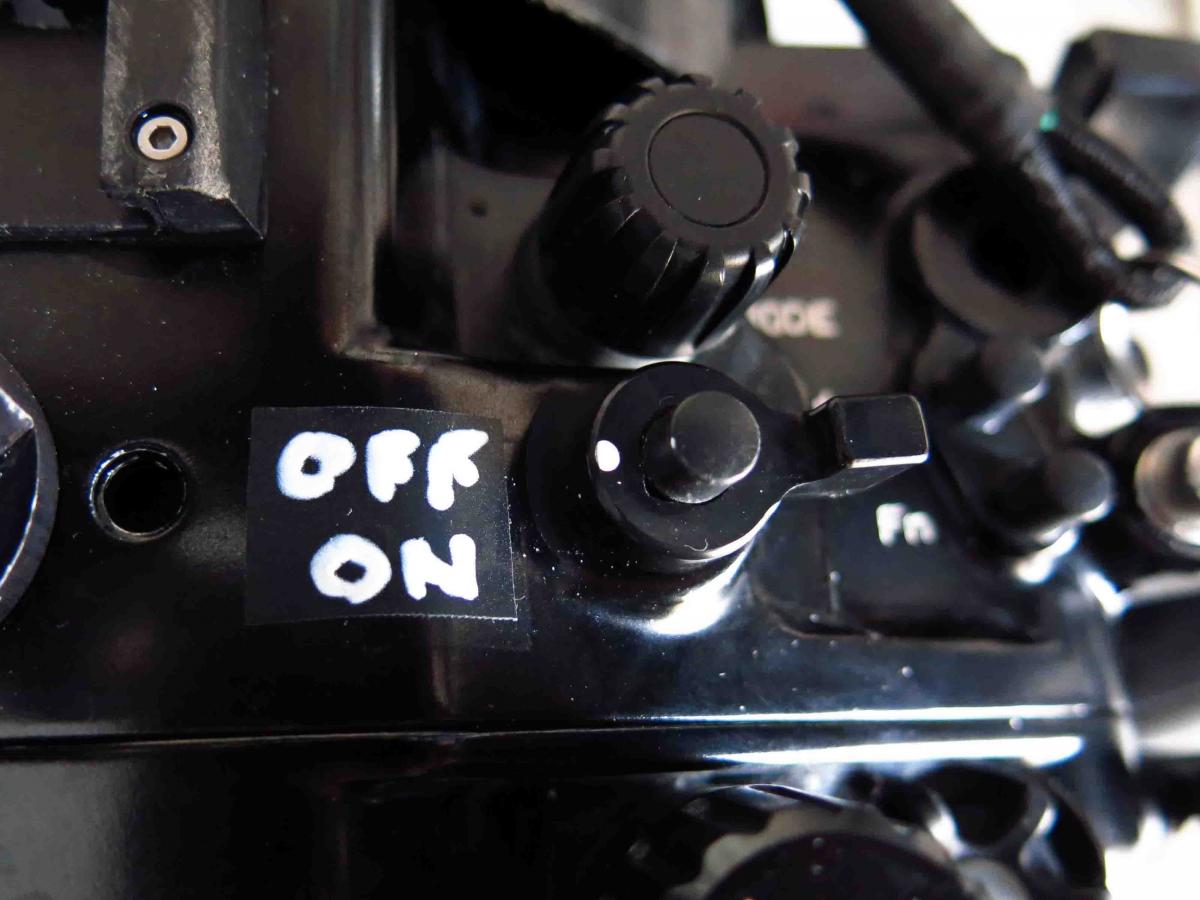
Just about broken my power switch off completely. It's plastic and it looks as if the Nauticam housing may be the culprit here as there's a small gap so there has not been full contact with switch. I expect it to break off completely probably on tomorrow dive. It is a plastic switch after all. Poor design Panasonic grrr.
- 12Posts
- 12Replies
Read-only discussion
GH5 broken power switch
12 posts
-
-
Oh dear... Hope they have a service center somewhere near you. I had problems with the plastic on the grip coming off after only a couple of months usage. I contacted support, send it in and had it back in perfect condition 3 or 4 days later.
-
No service center that I know of haven't hear back from manufacture yet. No number to call on their website. https://youtu.be/KjxYs58DkrM
-
What happen there did you leave the camera in the housing while transporting it?
-
....did you leave the camera in the housing while transporting it?
Thats usually not a problem. I'd guess that the knob on the housing that has to be pulled upwards when you insert the camera was not (entirely) up and when the camera was pushed in, that on/off switch got a knock.
Worth trying superglue as a temp fix?
-
Just about broken my power switch off completely. It's plastic and it looks as if the Nauticam housing may be the culprit here as there's a small gap so there has not been full contact with switch. I expect it to break off completely probably on tomorrow dive. It is a plastic switch after all. Poor design Panasonic grrr.
I actually broke the power switch of my GH5s in the same Nauticam housing. It happened while I was surfacing from the dive. I tried to turn off the camera but it wouldn’t turn off. I guess I rotated the on/off dial of housing in the wrong direction with enough force and managed to break it ( too much nitrogen to handle
 ).
). It is a user error but I believe Nauticam can prevent this by putting stoppers on both side of the switch to prevent over rotation in either direction. We need to send them such feedback.
Another error I find myself doing cause I’m a casual user is when inserting and removing the camera in the housing. The on/off switch needs to be raised like bubffm pointed out previously.
BTW, the button is a metal/alloy and not plastic. The service center in my country replaced it for free cause my warranty was valid. (great service). According to them, the full top part of the camera that holds the top switches including on/off had to be replaced.
-
I actually broke the power switch of my GH5s in the same Nauticam housing. It happened while I was surfacing from the dive. I tried to turn off the camera but it wouldn’t turn off. I guess I rotated the on/off dial of housing in the wrong direction with enough force and managed to break it ( too much nitrogen to handle
).It is a user error but I believe Nauticam can prevent this by putting stoppers on both side of the switch to prevent over rotation in either direction. We need to send them such feedback.
Another error I find myself doing cause I’m a casual user is when inserting and removing the camera in the housing. The on/off switch needs to be raised like bubffm pointed out previously.
BTW, the button is a metal/alloy and not plastic. The service center in my country replaced it for free cause my warranty was valid. (great service). According to them, the full top part of the camera that holds the top switches including on/off had to be replaced.
Did you watch the video description in the link. Is it normal to have that kind of gap for the switch? I don't believe it is normal and it was inevitable that the switch was to break because the pressure applied to tip of the switch and not the whole switch. I do not believe it is user error but anything is possible I guess. Metal alloy my ass,lol. They are BSing you...... that is NOT a metal alloy, lol.
What happen there did you leave the camera in the housing while transporting it?
No i did not.
-
I'm adding a link to the video again for you guys to compare with your housings? Is there a gap on your guys set-up? https://www.youtube.com/watch?v=KjxYs58DkrM&feature=youtu.be
-
Thats usually not a problem. I'd guess that the knob on the housing that has to be pulled upwards when you insert the camera was not (entirely) up and when the camera was pushed in, that on/off switch got a knock.
Worth trying superglue as a temp fix?
Yeah that was not how it happened the actuator has always been pulled up, had it not been as i set it in it would turn the camera on and not turn on if stuck on the other side of the power switch post. I turned the camera on as normal once in the water it was when attempting to turn it off i noticed the problem.
-
ok, that sounds like that fork-grip didnt pull into the switch but got stuck on either side just as Thani described above... Some manufacturers have auto-align buttons (Aquatica, Seacam, Isotta...). Time for Nauticam to catch up....
On the gap: Same here. I'd say thats normal. I think if there would be no gap you would not be able to push in that lock-mechanism for the camera mode wheel
-
When I recently started using an NA-GH4 housing I found I was guessing which way to turn the housing control for camera on/off. I was concerned about putting pressure on the camera switch so used a paint marker on black electrical tape to spell it out - it's not pretty but it works.

-
If you look around 5 sec mark I can briefly see the whole housing lever. It sits around the centre push button shaft by the looks of things and the shaft has a stop machined on it and it looks like you could lever the housing lever down another 1 mm or so on the shaft, whether it'll stay down or not I don't know, you might need a spacer above the housing lever. If you really wanted to fix it you might need to remove the housing lever, file the groove deeper and file a little of the thickness of the lever where it goes through the shaft so you can push it down a little more, you might get it 2mm lower at a guess but it's hard to judge scale from jiiggly video, but it might be enough - do at your own risk of course and look at the mechanisms closely to confirm the function of everything.before attempting anything. You'd have to leave a gap so you can't provide downward force from the lever onto the switch when you press the housing on/off lever in to engage the camera control.
I have an olympus EM-5 II which uses a similar lever arrangement but without the centre press button, The switch itself seems more robust as it has the full thickness of the lever attaching to the dial portion that turns where the Panasonic seems to have a thin lever to get under the dial the on off switch is associated with, so does not look as robust. I'd send it back to Panasonic particularly if its still in warranty.