



Skip to content

Photography Gear and Technique / Archived topic

flash issues in microscope "control" mode (TG5)

Started by Emarcomd ·

  • 2Posts
  • 2Replies

Read-only discussion

flash issues in microscope "control" mode (TG5)

2 posts
  1.  

    I'm learning my TG-5 better and setting it up for underwater macro w/ a strobe.


    I want the flash setting to be on "flash fill". The problem is, I somehow lost that option, but only when I'm on microscope "magnify" (microscope control., 4X)


    In other words, in plain old "microscope mode" the menu shows auto-flash options.

    Here it is in plain old microscope -- as in if you put the camera in microscope mode, and choose the first (leftmost) option. You can see that I can choose "flash fill".

    post-71848-0-65784000-1563814188_thumb.jpeg


    But, when I choose "microscope control" (as in, chose the *last* option, as in the right-most option which has the magnifying glass next to the microscope symbol and is called "microscope control" suddenly I get only manual flash options or RC (remote control).
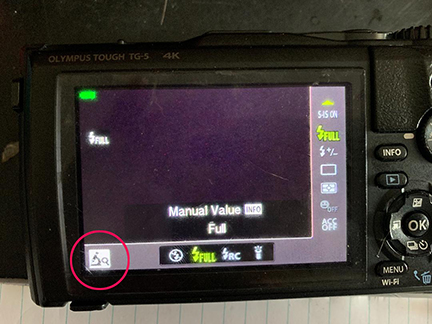
     

    post-71848-0-66245300-1563814353_thumb.jpeg

    I don't think it's always been like this. I think I somehow put it on manual flash and now I just don't how to change it back.


    post-71848-0-65784000-1563814188_thumb.jpeg

    post-71848-0-66245300-1563814353_thumb.jpeg

  2. I'd avoid the Microscope Control mode; it only magnifies things on the monitor, not in the recorded image.

    For reference, manual pages 27, 41, 111.

    post-16735-0-85011600-1563818405_thumb.jpg

    post-16735-0-69942400-1563818463_thumb.jpg

    post-16735-0-02369300-1563818505_thumb.jpg

Scuba.com

Account

Navigation

Search

Search

Configure browser push notifications

Chrome (Android)
  1. Tap the lock icon next to the address bar.
  2. Tap Permissions → Notifications.
  3. Adjust your preference.
Chrome (Desktop)
  1. Click the padlock icon in the address bar.
  2. Select Site settings.
  3. Find Notifications and adjust your preference.

