45 minutes ago, tantram said:
@Algwyn Wow, this is great information I should practice regardless.
Question for you. When taking pictures of a white balance slate, does it matter the distance from you, or only that it is at a similar depth? Is adjusting the white balance on the camera enough, or is shooting the photo of the slate that much better?
Thanks! Still getting better with my post-processing, so this could be a really good lesson/challenge for me.
Adjusting the WB in the camera is only useful if you shoot JPG. The camera WB will not affect the RAW file.
The distance of the card doesn't matter, I usually just hold it at arm length while I shoot it. It needs to be at the same depth as your subject.
To detail more the workflow:
-
Shoot a picture of the WB card holding it at arm length (or put it on the floor next to your subject if it is a static subject)
-
Shoot a set of pictures in the same area
-
Move a bit too much or ambient light condition changes, reshoot the WB card
-
etc.
Typically, I take 5-6 WB shots during a dive.
Post processing goes as follows (in Adobe Bridge as I find it best for my workflow):
-
Open a WB card picture in camera raw, set the WB on the card, close the picture
-
Copy the development settings fo the WB picture, paste the settings to all pictures taken with the same lighting conditions
-
Review the pictures with the WB corrected this way, select the pictures worth advanced processing
-
Open a selected picture in Photoshop, and make 3 copies of the background.
-
Apply to each copy one of the following adjustments: Auto-tone, Auto-color, Adjustments>Match Color>neutralize option
-
Depending on the image, one of the three adjustment will give a better result, select it for the final picture
You may fine tune the result by mixing the output of the original image, and of one or several of the adjustments: make some layer partially transparent and hide others ...
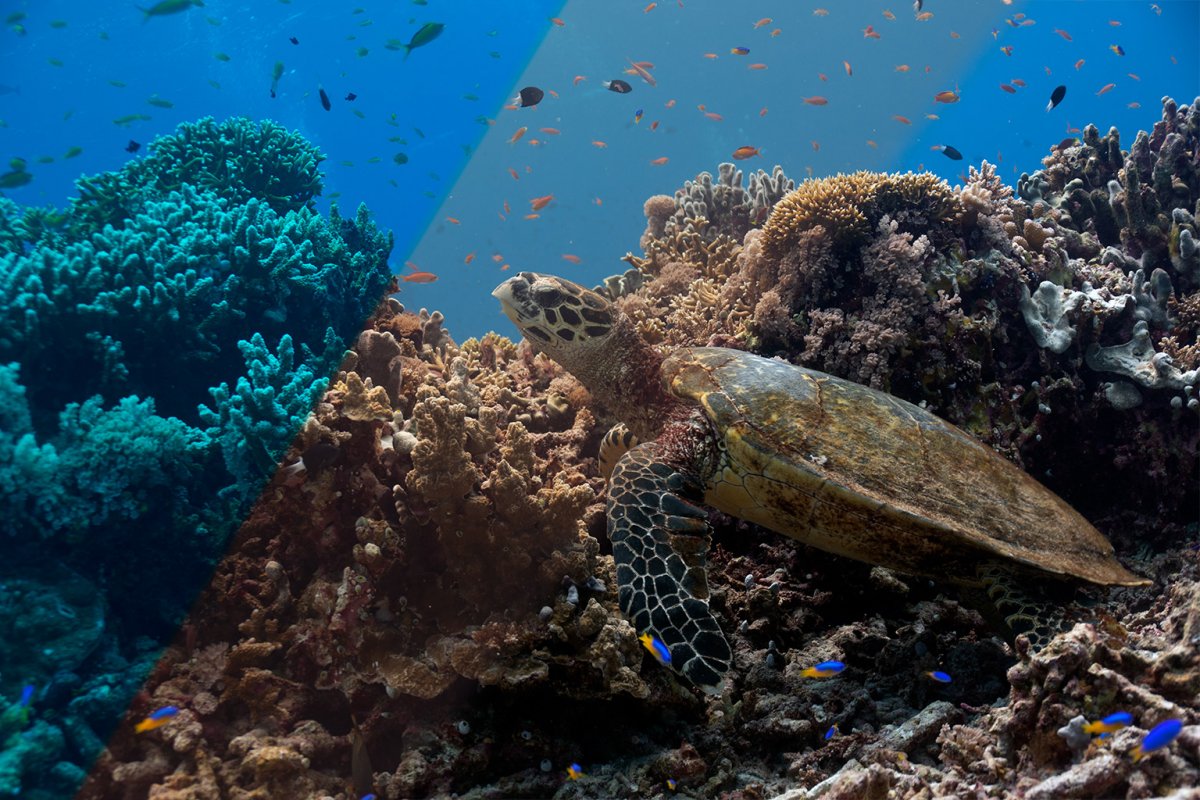
The picture in my previous post used the result of the Auto Tone adjustment, no further WB improvement needed.
This also works if you have not a WB card shot to initiate the WB correction. Just do the first step manually, the better the initial WB correction in Camera Raw, the better the output of the following adjustments.
This workflow is quite efficient, and you can automate most of the steps or apply them in bulk. You don't need to fiiddle with color tone sliders, ...