Skip to content

Shooting Technique, Workflow and Editing / Archived topic

DxO Photolab vs Lightroom

Started by Interceptor121 ·

  • 12Posts
  • 12Replies

Read-only discussion

DxO Photolab vs Lightroom

12 posts
  1. I have been testing DxO Photolab primarily to deal with rectilinear lenses.

    At first sight the functionality is similar to lightroom then there are some really technical tools but what makes it interesting is the lens profiles by DxOMark

    The shots that I am enclosing here are 3 versions of the same RAW files, the first is the file as I processed it in lightroom, the second is the same file where I processed it exporting a DNG and then applying settings in lightroom to my surprise it turned out different, the third is a file where the lens distortion correction has been turned off

    What I can observe is that lightroom is using the lens parameters embedded in the raw file and there is no way to remove the correction the outcome is the lowest quality output in terms of sharpness with some limited pull in the corners but the image is still ok

    The second file has been processed by DxOLab using an optimised profile for the Panasonic 8-18mm lens as you can see there is less crop and the image is sharper with less pull in the corners

    Finally there is the same file where distortion correction has been turned off this results in no pull in corners however in my opinion the quality is less than the Dxo Profile. This image has residual barrel distortion in it which has not been corrected

    The images are at full resolution it will take time to load

    Images taken with Panasonic GH5 in Nauticam housing with 7 Acrylic port that is the best performing option on the port chart


    49042952392_b0e87868b6_o.jpgSchool vs School by Interceptor121, on Flickr

    49042951357_2b978b154e_o.jpgDXO_Corrected by Interceptor121, on Flickr

    49042953837_0d1016464d_o.jpgDXO_Uncorrected by Interceptor121, on Flickr

    which one do you like the most?
    Edited by Interceptor121
  2. Uncorrected 100% - clearly the edges are sharper and there's more image area. Personally I don't 'see' any barrel distortion. I only see edge distortion in the 'corrected' versions.

    Really glad you can turn off the M4/3 profiles in Photolab. Many situations (UW especially) absolutely do not call for these 'corrections' which mostly serve to damage image quality (in this case by stretching the corners for no reason).

    My m4/3 is just a secondary camera, I shoot Nikon UW, but would be very frustrated if my wide shots were forcefully stretched as LR does for m4/3.

    A lens' distortion is its natural state of being. There are cases where its worth applying profiles to straighten lines but at the expense of image quality. More often I find it makes images look worse, but that's a personal preference I suppose. The term 'corrections' I think is a misnomer.

    Cheers,

    Chris

  3. it would be nice to have the same colour balance between the examples as that distracts from the other differences for me, clicking between them on Flikr is interesting the first one the LH side of the top school seems to be more forward in the frame and more prominent when you switch between them rapidly, but the effect ssems hard to see when either image is viewed alone.  For me  the differences are subtle and I guess the one with sharper corners is preferable if only because the fish are not being chopped off in that version in the corners and I'd like to see it with the Lightroom colour/tones.

    Edited by ChrisRoss
  4. 3 hours ago, ChrisRoss said:

    it would be nice to have the same colour balance between the examples as that distracts from the other differences 

    One of the issues when converting files between Lightroom and Photolab is that the colors are not retained. Apparently Photolab saves all color channel separately in a DNG while Lightroom does not. The conversion only works using TIFF however in this case I needed to process the raw file in photolab first as that is where I can alter the geometry corrections when I then get to lightroom and use DNG the colours go off so I am not able to reproduce anymore the same set up of the image I processed few months ago!

    For what concerns the image and the geometry correction there is what it seems a crop stronger in lightroom and to a lesser extent in the corrected photolab file, no crop in the uncorrected

    What I understand is happening here is as follows:

    1. DSLR lenses have a profile for correction and you can decide as user if you want to apply it or not. Typically a DSLR wide angle lens of good quality has a distortion of 3.5% so in effect nobody corrects it and lightroom by default does not propose a correction even if a lens profile is available.

    2. Mirrorless lenses have a smaller sensor and the error is higher than 5% (5.2% Panasonic 7-14 mm 6.6% Pana 8-18 7.2% Olympus 7-14) the manufacturers run a test on a grid and then put some parameters in the lens. This level of distortion IS visible on land images I will try and post some examples when I get back

    What lightroom does is to apply the correction parameters in the lens (you cannot disable) and then crop the edges and upscale the image. So even if you have full resolution of your camera the reality that it has lost around 2 Megapixels this is mostly in the corners that look badly

    The uncorrected image has those 2 megapixels more and if you were shooting a straight line you would see it is bent (i have done it and it looks horrid) underwater it is harder to see even if the lens has 6.6% distortion as in my example

    The corrected image from DxO looses less pixels than lightroom and still achieves a straight line what is good is that you can set the correction to 100% which is completely corrected or less all the  way down to zero where you have all your pixels back depending on having or not straight lines in the image. So if you have them and it is important you correct them, if not you can leave uncorrected and keep the full sensor resolution generally it is not possible to really notice a 5-7% unless there is a straight line in the frame


  5. Example against a rectilinear object

    100% correction 

    0% correction

    As you can see without correction the barrel distortion is visible


    FieldCurvature818-1100879_DxO_100.jpg

    FieldCurvature818-1100879_DxO_0.jpg

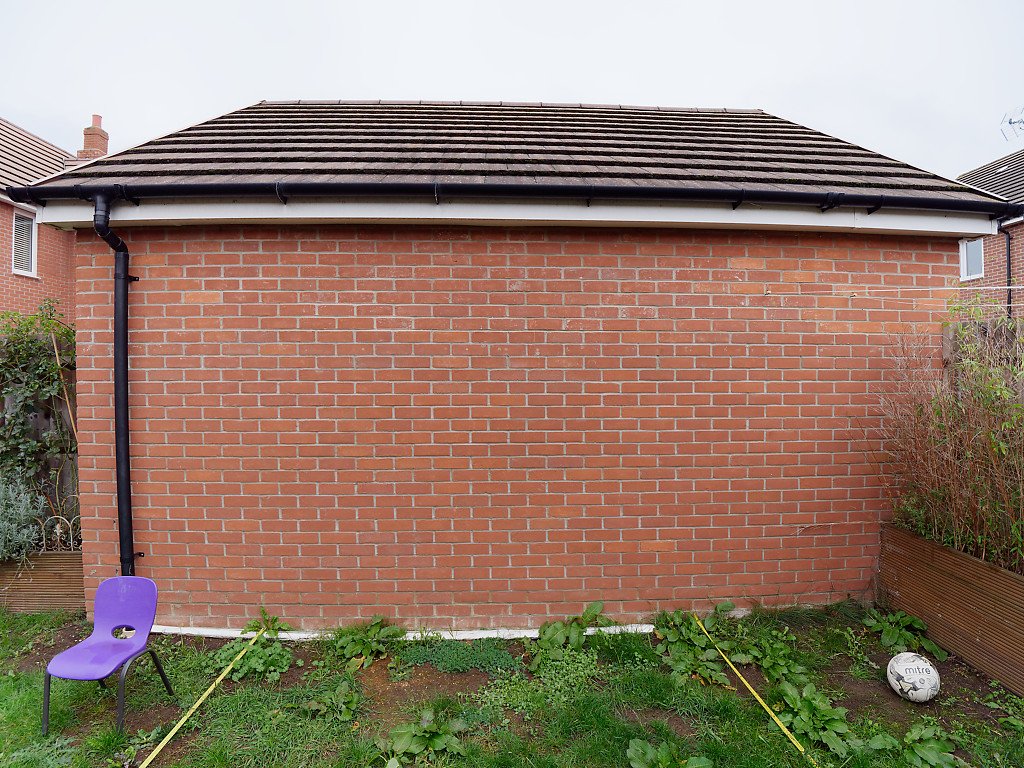
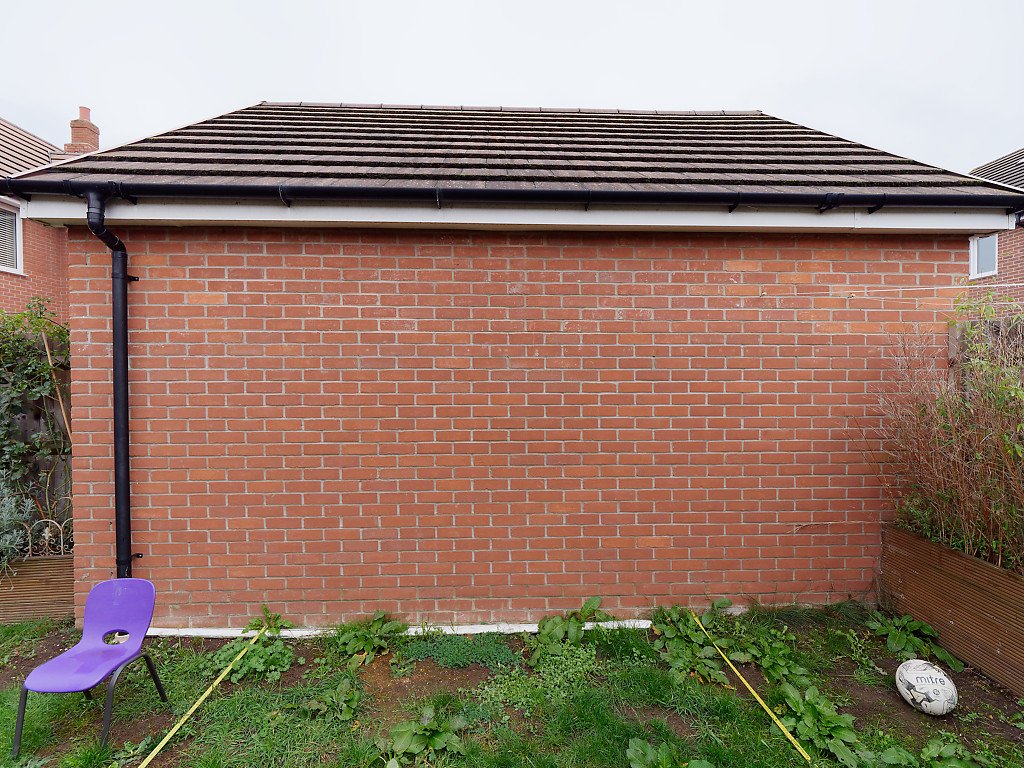
  6. Would be curious to see the difference in Photolab vs LR for that image, where straightening lines can be worthwhile. Though its still at the expense of oddly stretching the football & chair.

  7. Would be curious to see the difference in Photolab vs LR for that image, where straightening lines can be worthwhile. Though its still at the expense of oddly stretching the football & chair.

    I have no upload allowance on this post! Light room looks marginally worse than the corrected DxO has a bit more crop to it and the corners are worse

    The pull however is not the correction only is also perspective distortion that can’t be avoided and the primary reason why I no longer have a 7-14 mm lens. At 7mm is much worse


    I found I had it on my blog


    https://interceptor121.files.wordpress.com/2019/10/perspective409mm-f-8-20191012.jpg?w=1024


    Sent from my iPhone using Tapatalk


  8. Additional example of removing lens correction


    First shot lightroom processed lens correction on clear pull in corners

    48220947456_e3b17a4073_k.jpgSunset Neat by Interceptor121, on Flickr

    second shot processed in DxO lens correction off

    49107344437_ec1c1789c8_k.jpgWhirlwind Sunset by Interceptor121, on Flickr

    Edited by Interceptor121
  9. Kind of hard to make a comparison if the shot is not the same. Can you process the same shot twice?

  10. Just now, hyp said:

    Kind of hard to make a comparison if the shot is not the same. Can you process the same shot twice?

    Just look at the coral at the edges on the bottom 

    DxOMark processes the RAW in a different way from Lightroom so you never get the same outputs I have also finished my allowance on this post 1MB!

  11. I see the difference. You're probably right, but when I do comparison edits, I really see no reason to use different images. It is quite possible that the corners were already better in one shot. Especially with a difference this dramatic. The difference in the original post is not nearly as clear.

  12. I see the difference. You're probably right, but when I do comparison edits, I really see no reason to use different images. It is quite possible that the corners were already better in one shot. Especially with a difference this dramatic. The difference in the original post is not nearly as clear.

    The last one is a split shot that accentuates the issue as there is stuff close and far
    The shot in the wreck is more or less flat so has less issues
    The split is probably the hardest situation for the in built lens profile


    Sent from my iPhone using Tapatalk

Account

Navigation

Search

Search

Configure browser push notifications

Chrome (Android)
  1. Tap the lock icon next to the address bar.
  2. Tap Permissions → Notifications.
  3. Adjust your preference.
Chrome (Desktop)
  1. Click the padlock icon in the address bar.
  2. Select Site settings.
  3. Find Notifications and adjust your preference.