



Skip to content

Shooting Technique, Workflow and Editing / Archived topic

Blue light in cave diving photography

Started by Andrej Oblak ·

  • 10Posts
  • 10Replies

Read-only discussion

Blue light in cave diving photography

10 posts
  1. Hi

    Recently I've took my photo rig in the cave for the first time. Results were quite satisfying but something that I noticed and it annoys me quite a bit, was that in all of my photos I got this greenish hue from the remote slave strobe. Looking at the photos of some more experienced cave photographers, I see that they manage to capture blue light instead of green. What's the trick to achieve that? It is the temperature of light that remote strobe makes, temperature and/or clarity of water, or simply a lot of postprocessing?

    Attaching 2 of my photos as an example. Shot with Sony RX100 III, Inon Z-330 strobes attached to the housing and a Seacam Seaflash (I think it was 160, but I'm not sure) as a remote strobe

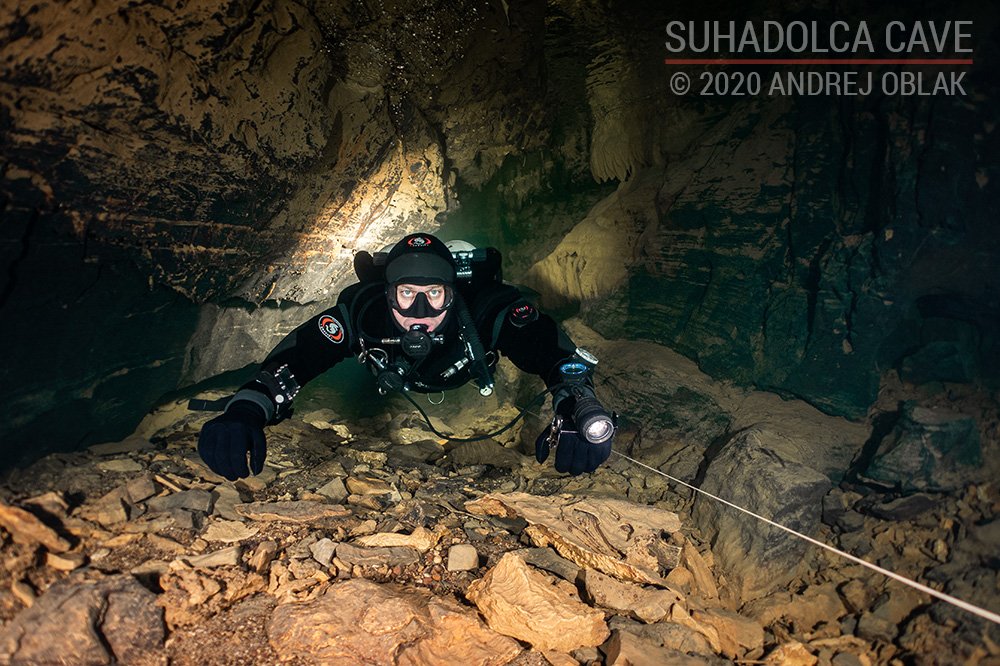
    DSC05625-FB.jpg

    DSC05641-FB.jpg

  2. I would think this has to do with the difference in color temp between the strobes.  I had a similar issue when I was shooting some video with two different video lights by different manufacturers.  There was a distinct color cast difference between the left and right side of the video.  If I got one side balance correctly the other side was greenish.   If I corrected the green I the other side went magenta, I think.  It is cumbersome to correct in post requiring masks to individually balance different parts.


    If that is the issue I see two options:

    1. Shoot with all the same strobes or find a different remote one that you can confirm have the same color temp
    2. Try to correct the difference with gel lighting filters sold by Lee and Rosco
  3. You make a good point, haven't even though about it. I can easily test this next time by using 4600K diffussers for my Inons, which would be quite a good match to Seacam with its ~4500K temperature.

  4. It also has to do with the cave you take pictures in. If you do it in 'Mayan Blue' in Mexico for example, with every light the cave looks blue. In France, the caves are more 'green'. 

    And som photographers make the blue color more intense like wreckphotographers do the same with rust: more orange and red.

  5. It depends on the cave and water a lot....
    Shallow caves in Mexico are green,
    if you go deeper, under the halocline,
    in the saltwater they look blue...
    So it will  bea matter of different factors.

    Regards,
    Wolfgang

  6. I'm assuming the slave is off behind the divers so further from the camera which means the light needs to travel through more water.  If it is twice the on-camera strobe to subject distance the amount of filtration by water  will be about equal.  Beyond that point it passes through more water.  

    On processing there a few tricks you can apply - first on my monitor I see an overall green cast in the lit portions, a very slight curves tweak will fix that but you still have green in the deep shadows.  If you have full photoshop you can use a selective color layer and adjust the blacks - add 6-7 points of magenta and the green will go away - it won't become blue but it's no longer green.  You can also add a lot of magenta to the greens.    It's a one minute fix in full photoshop.  Other programs you could probably do it working on curves through a shadow mask.

  7. Both of these photos were processed in Lightroom. Originally they had much more green cast, but I managed to eliminate most of it by playing with white balance (moving towards magenta) and especially by moving green and yellow hue sliders to -100 in HSL panel. I'll also try to do the suggested changes in Photoshop.

    Otherwise one very good example of what I have in mind is the Polish photographer Irena Stangierska. She has that really distinct blue color even in French caves. Here are the Ressel photos:

    I'd just love to get that color, it looks much nicer than green everywhere.

  8. To me it looks like the images you linked from Ressel cave are more wide open with the light source further from the camera for the background illumination, where your images are in smaller spaces with the slave light closer to the camera.  If the slave light travels through more water it will get progressively bluer.

    Processing your images in RAW can also assist I can readily turn image taken in green water blue using a levels colour balance adjustment with a curves tweak on the green channel.  I use Capture One and can do those adjustments in there, but PS lightroom you have to develop to access levels adjustments.  It does require a well exposed image your images seem to be totally missing blues in the midtone-highlight region. 

    I have attached snips of the blue channel histogram from your image:

    Blues_Andrej.JPG.4603f275d750d4251f3a920fbff65de0.JPG

    and one from Irena's image of the diver in the orange drysuit:

    Blues_Irena.JPG.2dcc176d0b8af2f37cee4da39e05c1fb.JPG

    You can see you have nothing to work with on the RH side of the histogram in blues so I don't believe any tweaks in post processing will help get blues in the image, maybe in raw colour balance you could do something but in general I think You need more blue in your lighting.


    Edited by ChrisRoss
  9. Thanks Chris! What do you think it's the best way of achieving that? Would 4600K diffussers on camera strobes and no diffusser (~5600K) on slave strobe help?

  10. Should help some, my experience is open water where there's heaps of blue from the sun hiding behind the green so hard to be sure.  If you have the BG slaves further from the camera that should also help and perhaps more of them.  The Technique Irena uses seems to be a strobe used like a sunburst behind the diver and I'm guessing it is some way back and set brighter , so the light would be bluer in that situation. 

    The 4600K strobes on camera forces you BG to be bluer to get netral on subjects illuminated by the on camera strobes, this is fairly standard technique to get very blue water on coral reef shots.

Account

Navigation

Search

Search

Configure browser push notifications

Chrome (Android)
  1. Tap the lock icon next to the address bar.
  2. Tap Permissions → Notifications.
  3. Adjust your preference.
Chrome (Desktop)
  1. Click the padlock icon in the address bar.
  2. Select Site settings.
  3. Find Notifications and adjust your preference.

