



I recently purchased a second hand Subal ND30 which has finally arrived after 3 months of shipping from Canada (hooray!).
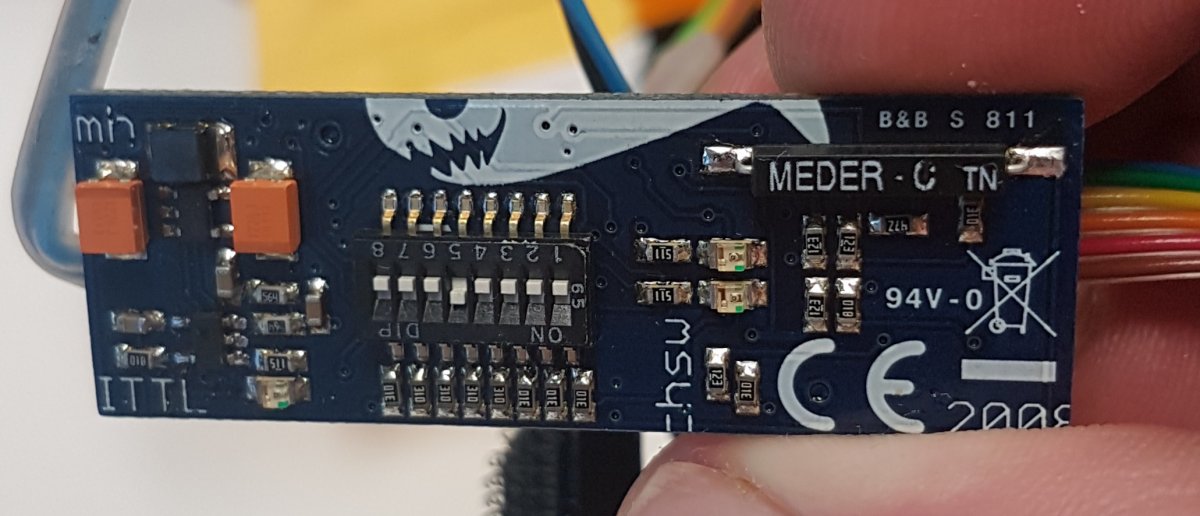
It includes this TTL board but I don't recognize it, does anyone know what it is?
Lights, Strobes, and Lighting Technique / Archived topic
Started by BaTnz ·
Read-only discussion
I recently purchased a second hand Subal ND30 which has finally arrived after 3 months of shipping from Canada (hooray!).
It includes this TTL board but I don't recognize it, does anyone know what it is?
I think that's the old Heinrichs Weikamp logo at the top? Not sure what boards like this they made though, nothing on the current website that I can see anyway.
I found an article in UwP calling it the "HeinrichsWeikamp converter for Nikon iTTL" or at least something that looks very close to this.
Will email them to see if I can get the manual or if someone has a copy or knows where I can find one that would be great.
I had one of these TTL converters for my Olympus C-8080 camera to a Nikonos 105 strobe. The chip fit in the camera hot shoe and then was connected to the strobe through a housing bulkhead and Nikonos syn cord. My chip was somewhat shorter than the one shown in your picture but they had to be ordered for the specific camera. It worked reasonably well although I got over exposures fairly often but the HeinrichsWeikamp compatible chart available at the time noted that it was 'marginal' for the Nikonos 105 because of the strobe's slow shutdown speed. However, I can not find my manual or any info on it on my present computer. The company was very customer responsive and even updated mine for free when an update became available.
They emailed me the manual very quickly! Here's a copy if anyone happens to find this thread in the future.

Terms of Use Privacy Policy Guidelines We have placed cookies on your device to help make this website better. You can adjust your cookie settings, otherwise we'll assume you're okay to continue.

A worldwide community for underwater imaging.

