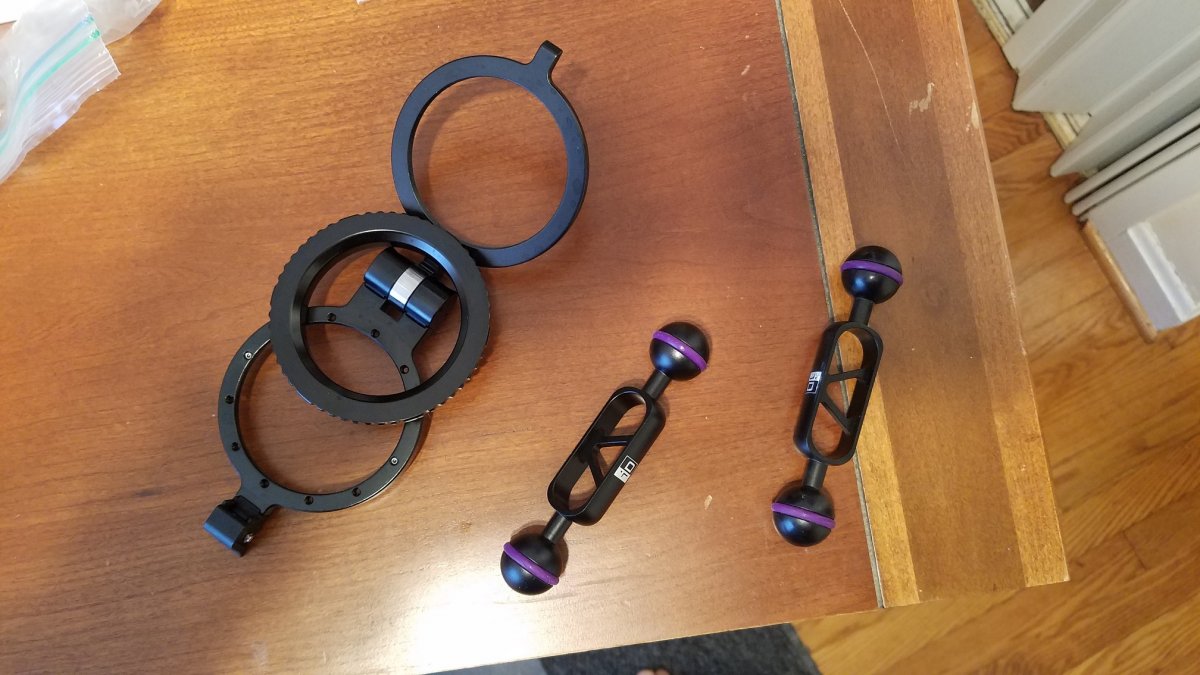
FS: Nauticam Flip Diopter Holder for M67 ports and two 5" i-Das arms
Started by mdo905 ·
8Posts
8Replies
Read-only discussion
FS: Nauticam Flip Diopter Holder for M67 ports and two 5" i-Das arms
8 posts
For sale is a Nauticam M67 flip diopter holder for M67 macro ports, SKU# 25101. Almost brand-new condition - used for ~10 dives. I have switched to the bayonet system, so I have no need for two diopter mounts. $210 + shipping.
Also, two i-Das 5" arms for sale. Again, almost brand new condition - ~ 10 dives. $30 shipped to US.
$230 + shipping for all three.
Lowered price for the a flip diopter holder: $200 shipped to US. Contact me for international shipping cost.
diopter holder still for sale? I recently acquired Nauticam housing. How does the flip holder connect to standard dome port?
Yes, I still have the flip mount for sale. The flip holder only connects a M67 flat port to a SMC/CMC lens. Which Nauticam housing did you get?
It connects to the M67 port via the center ring in the picture above. That center ring screws into the threads of the M67 port, compressing one side of the flip mount between it and the M67 port. A small pin keeps the mount from rotating.
My port number is Macro Port 60.
according to Nauticam website; This Nauticam Macro Port 60 is designed for housings supporting the N120 Port System. The front of the port has integrated 67mm threads for accessories.
It has what appears to be a threaded end on the port.
Yes, it should work. M67 port is a flat port with 67mm threads.
Just bought housing. Gonna dive with it first before adding this accessory. Thanks for the replies.