Skip to content

Photography Gear and Technique / Archived topic

Extension rings, dome compatibility and precision

Started by NEwreckdiver ·

  • 7Posts
  • 7Replies

Read-only discussion

Extension rings, dome compatibility and precision

7 posts
  1. Hi All-

    I have a Nikkor AF-S 14-24 mm full frame lens that I am using on a Aquatica Nikon D850 and I often shoot at 14 mm. I am using the 48458 2.5" / 63.5 mm extension ring with an AD 8" acrylic dome. I want a larger dome but I do not want to use a glass dome. I would like to use the larger Port 240 Sea & Sea acrylic dome and I have the adapter. I also have another shorter Aquatica extension ring I used on a different set up. The adapter ring + extension ring 18462 = 2.34" / 59.4  mm which is pretty close to 2.5" / 63.5 mm but not quite.

    I am wondering how I can determine the acceptable "range" for the optical center of the lens and whether this dome and this combined extension ring is acceptable.

    Any thoughts or suggestions? Is this a math problem or a guess? I am not sure how precise this has to be and before I spend the money on the dome, I want to know whether ~4 mm could make a difference such that I do not proceed.

    Thanks in advance,
    Heather

  2. The missing pieces of the puzzle are how much "extension" is included in each dome and if there is any difference in how far back the camera sits in the S&S housing vs the Aquatica housing as both of those measurements will move the entrance pupil with respect to the dome centre of curvature.

    S&S port charts say to use 60mm of extension and Aquatica uses 2.5" or 63.5mm, so the optical centre of the domes  and camera placement is likely in or close to the same spot in both systems.  I don't have a good feel for it but looking at port charts supplied by various vendors indicates the 10mm error might be OK - but it depends on your standards.  You could always do some measurements after you buy the dome and get a different extension ring or combination of extension rings.

    You know that the big acrylic dome is likely to be quite floaty and the housing is going to want to twist upwards and it may require the addition of some weight on the dome shade?

  3. 1 hour ago, ChrisRoss said:

    The missing pieces of the puzzle are how much "extension" is included in each dome and if there is any difference in how far back the camera sits in the S&S housing vs the Aquatica housing as both of those measurements will move the entrance pupil with respect to the dome centre of curvature.

    S&S port charts say to use 60mm of extension and Aquatica uses 2.5" or 63.5mm, so the optical centre of the domes  and camera placement is likely in or close to the same spot in both systems.  I don't have a good feel for it but looking at port charts supplied by various vendors indicates the 10mm error might be OK - but it depends on your standards.  You could always do some measurements after you buy the dome and get a different extension ring or combination of extension rings.

    You know that the big acrylic dome is likely to be quite floaty and the housing is going to want to twist upwards and it may require the addition of some weight on the dome shade?

    Thanks for the reply and information. I will review the port charts as well, but that’s helpful. Yes, I was also thinking about the dome itself and S&S appears fairly flat in the stock photo but this is another potential complication. Unfortunately I don’t think the next size up or down aquatica extension rings will work well in combination. If I used the 2.5” extension with the adapter the lens will fall short of the dome. 

    I have an older acrylic ~10” Subal dome that I didn’t realize was such a rarity now that I used on my very first D70s subal system through to my previous AD D7200 set up. I must have gotten very lucky it always worked well. I am very familiar with the floaty dome issue and I did have to add some weight to take the curse off it as you mentioned. But I had much less corner blur so I felt it was with the hassle. I’m planning to put the other dome on for a trial but the shape is a little different so it might not compare well to the S&S. 
     

    Thanks again,

    Heather

  4. The thickness of the S&S adapter appears to 19.9mm from the info you provided and the 18462 is 39.5mm.  If you are prepared to use multiple extension rings there are lots of options:

    19.9 + 39.5 = 59.4

    19.9 + 16.5 + 25.5 = 61.9

    19.9 + 21.5 +21.5 =62.9

    19.9  + 16.5 + 28.5 = 64.9

    19.9 + 21.5 + 25.5 = 66.9

    19.9 + 25.5 + 28.5 = 69.9

    So you could try it out with what you have - do some measurements and take a few dives to see if you wanted to adjust the extension amount a bit. 

    A shortcut way to get the same extension you have now might be to measure the length of extension from the camera body inside the housing to the end of both the old and new extension tubes /adapter assembly.  You should be able to do this my mounting the body with no lens into the housing and installing the extension tubes you are using without the dome.

    Next check the dimension from the end of the extension to the flat base inside the dome is the same for both domes.  If they are different you'll need to adjust for that.

    You are trying to get the dimension from the camera body to the inside flat surface of the dome.  For 180° fisheye domes this is also the centre of curvature for the domes.

    That way assuming they are both 180° domes you place the lens in the same spot relative the centre of curvature of both domes.

    Hope that makes sense!


  5. Hi Chris-

    Thanks for the additional information - yes this does make sense. I didn't consider using multiple extension rings and the possibility I suppose that the lens could need to reach deeper into the dome thus using a shorter extension depending on the shape of the dome.

    The measurements you suggest do make sense and I will do that exercise. I think this is what my original question was getting at - and this is what I need to determine. Thanks again!

    Thanks,

    Heather

  6. Make a card pattern to measure the radius of the inside of the dome. It's easy, when you insert the pattern, to see whether you need to make it bigger or smaller to fit the dome curvature perfectly. The point of the compass you use to make the correct circle will be the centre of curvature. c. of c on my pattern. No parallax points for many lenses are available online (same as apparent front entrance pupil) and you want the centre of curvature of the dome and the no parallax point in the same place if possible. See the diagram for where the NPP is for the 14-24 at 14. Choose the extension closest in length to achieve this.

    Many photographers get better results with the 16-35.

    14-24@14EP.jpg

    IMG_3210.jpg

  7. On 10/30/2020 at 8:37 AM, PeteAtkinson said:

    Make a card pattern to measure the radius of the inside of the dome. It's easy, when you insert the pattern, to see whether you need to make it bigger or smaller to fit the dome curvature perfectly. The point of the compass you use to make the correct circle will be the centre of curvature. c. of c on my pattern. No parallax points for many lenses are available online (same as apparent front entrance pupil) and you want the centre of curvature of the dome and the no parallax point in the same place if possible. See the diagram for where the NPP is for the 14-24 at 14. Choose the extension closest in length to achieve this.

    Many photographers get better results with the 16-35.

    14-24@14EP.jpg

    IMG_3210.jpg

    Thank you, Pete! This is very helpful. Apologies, I did not see this until now (I guess I didn't have notifications turned on). I think I am probably right on the edge at 14 mm with the 8" dome with 63.5mm extension. I will have to try and do this experiment for the 10" S&S dome. 

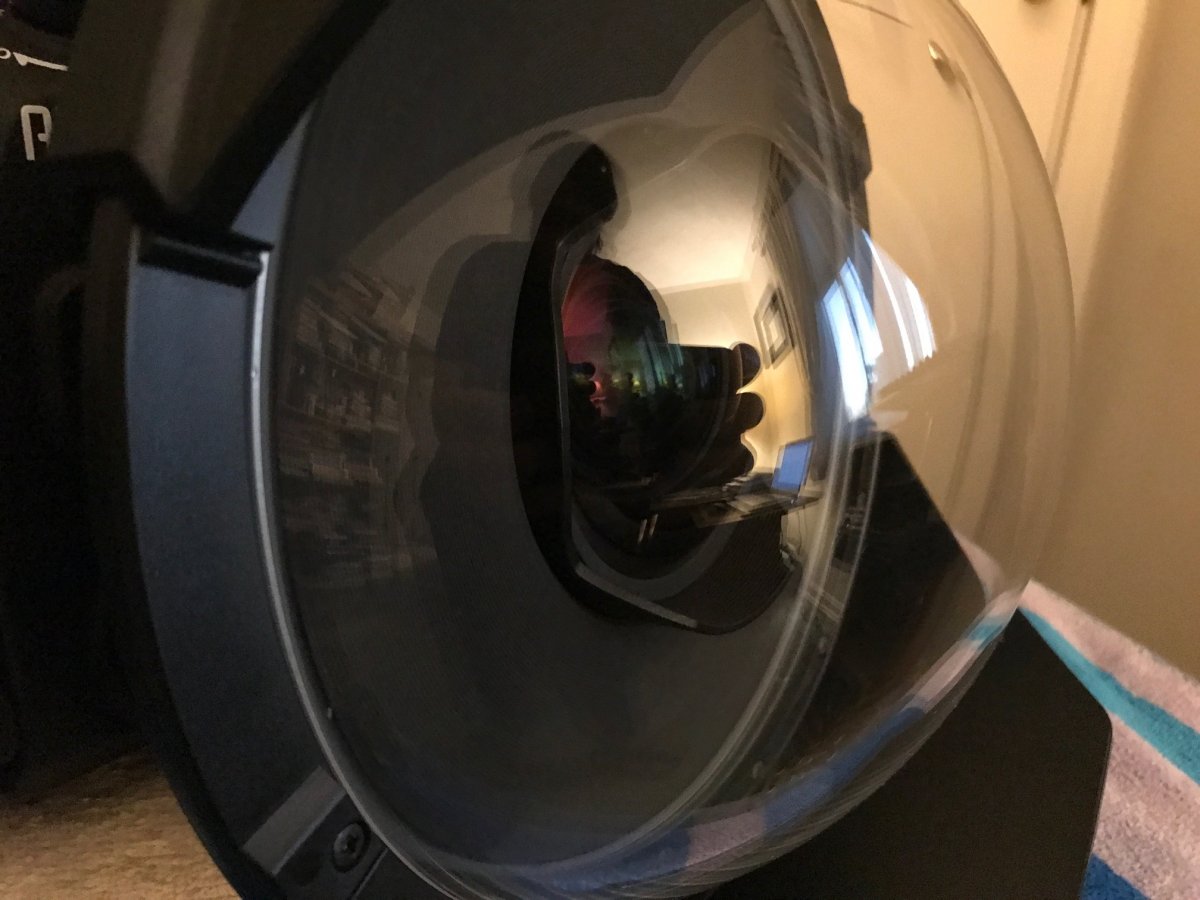
    I did get a S&S 10" dome on the housing with 59.4 mm extension. The lens doesn't protrude as much into the dome as it does with the 8" but it looks close to me. This was my much cruder experiment anyway!

    Thanks for the help!

    Best,

    Heather

    IMG_7283.JPG

    Edited by NEwreckdiver — forgot photo
Retra

Account

Navigation

Search

Search

Configure browser push notifications

Chrome (Android)
  1. Tap the lock icon next to the address bar.
  2. Tap Permissions → Notifications.
  3. Adjust your preference.
Chrome (Desktop)
  1. Click the padlock icon in the address bar.
  2. Select Site settings.
  3. Find Notifications and adjust your preference.