



I'm trying to think of a scenario where I would want to use two strobes each with snoots.
Thanks for the taking the time to read and respond.
Photography Gear and Technique / Archived topic
Started by Dann-Oh ·
Read-only discussion
I'm trying to think of a scenario where I would want to use two strobes each with snoots.
Thanks for the taking the time to read and respond.
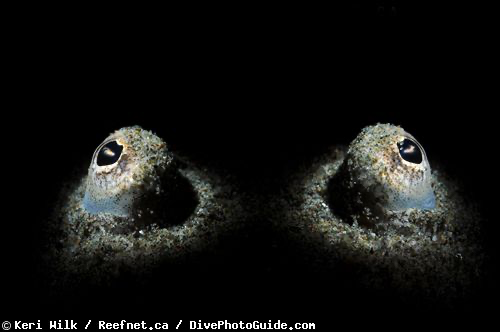
Amazing photo. Thank you for sharing. I just got two of the Backscatter Mini Flash 1 (each with a snoot). I was wondering if I had made a mistake by getting two snoots. It seems my only limitation is going to be my imagination. I'm going to pair the the Mini Flashes with my Olympus PEN E-PL10 and 60mm macro, I also have a 8mm fisheye.
If you are interested in taking a newer UW photographer under your wing let me know, im always looking for a mentor and diving buddies.
Dann-oh
Snoot shots are really tricky. I’d suggest starting with one and really getting the hang of the technique, angles, lighting the right place etc, before moving to two. It’s quite a frustrating learning curve. Fun though!
8 hours ago, TimG said:Dann-oh
Snoot shots are really tricky. I’d suggest starting with one and really getting the hang of the technique, angles, lighting the right place etc, before moving to two. It’s quite a frustrating learning curve. Fun though!
Oh yeah, I am really looking forward to getting my new kit underwater and learning with it. My Wife took the credit cards away from me during the black friday sales last week, I bought a whole new camera system.
Tsk. Bad boy 
Kerry Wilk has a trove of other snoot shots that are also amazing, but that double eye shot is pretty amazing. Personally I don't shoot snoots very often but I have friends who shoot with them most of the time.
Bill
.jpg.857dbbfbdc4d79d9c6ebf7b4ba96ed1b.jpg)
Terms of Use Privacy Policy Guidelines We have placed cookies on your device to help make this website better. You can adjust your cookie settings, otherwise we'll assume you're okay to continue.

A worldwide community for underwater imaging.
