



Skip to content

Photography Gear and Technique / Archived topic

Reflections from focus ring caused by flash trigger

Started by jskotte ·

  • 9Posts
  • 9Replies

Read-only discussion

Reflections from focus ring caused by flash trigger

9 posts
  1. I have a Canon R5 in a Nauticam housing, which I'm generally very happy with. The wide angle options in Denmark are not always that great, so I haven't gotten to use it a lot. But recently I went out to do some splits shots at the beach and I ended up with some really annoying light reflections in the upper corners in my images. I use the Canon 8-15 fisheye with a Nauticam 8.5" acrylic dome port.

    It took me a while to figure out what caused the reflections, but it turns out it's the light from the flash trigger reflecting in the focus ring on the lens. I use the Nauticam TTL flash trigger, that lights up a lot inside the housing, kind of like what a pop-up flash would do I assume. I have attached a photo showing the problem. The photo is taking in my dark living room with only the flash trigger going off. When I'm out in the water I get the same reflections in all my images, although not as bad as the background is much darker in this test shot.

    Has anybody seen something similar and have found a way to get rid of it (other than using Photoshop which is too time consuming and doesn't always give good results).
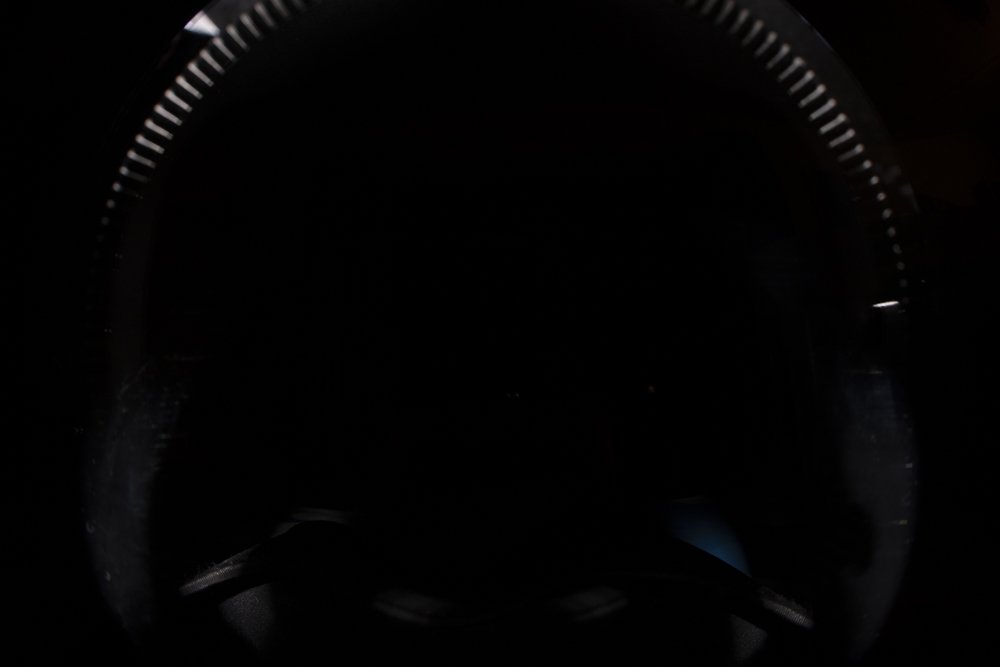
    20210308-_MG_5254.jpg

  2. As you‘ve already found the reason for the reflection, the solution should be clear. You need to find a way to block the light from the flash trigger from going into the port. Maybe some kind of cloth curtain that sits at the port opening? It will probably take a bit of DIY which is not what we expect of a housing at that price point, but it is what it is.

  3. 4 minutes ago, hyp said:

    Maybe some kind of cloth curtain that sits at the port opening? It will probably take a bit of DIY which is not what we expect of a housing at that price point, but it is what it is. 

    I use Aluminium foil or duct tape duct tape for this purpose. it bloks the light to 100%.

  4. There is an u/w equipment manufacturer that makes a disk of stiffened black-out material which is like a focus ring that sits around the lens which does the trick. I just can't think for the moment who it is! (Jet lag after long flights!). I'll try and remember......

  5. Your flash trigger looks like it fires into a prism that's only just above the port opening.  Wrapping some black foam or similar around the end of the flash trigger so it contacts the housing should block the light.  You can check the fit with camera in the housing and no port fitted.  You will likely have to fiddle to get it fitting perfectly.

  6. For Aquatica there is a neoprene blocker for the light.

    Look for item 18472 - Neoprene Light Blocking Mask.

    I do not know how if it fits Nauticam.

    if you can get some neoprene you can DIY

  7. Thanks for the replies and suggestions everyone, I'll try and create something that will block the light.

  8. 13 hours ago, pbalves said:

    For Aquatica there is a neoprene blocker for the light.

    Look for item 18472 - Neoprene Light Blocking Mask.

    I do not know how if it fits Nauticam.

    if you can get some neoprene you can DIY

    Yay! That's the thing I was thinking of - many thanks. I had a feeling it was from Aquatica.

  9. I have now cut neoprene ring out of an old wetsuit like what is shown in the Aquatica product, and that does the trick :)

    Thanks again for input and advice everyone.

Keldan

Account

Navigation

Search

Search

Configure browser push notifications

Chrome (Android)
  1. Tap the lock icon next to the address bar.
  2. Tap Permissions → Notifications.
  3. Adjust your preference.
Chrome (Desktop)
  1. Click the padlock icon in the address bar.
  2. Select Site settings.
  3. Find Notifications and adjust your preference.
