Skip to content

Classifieds / Archived topic

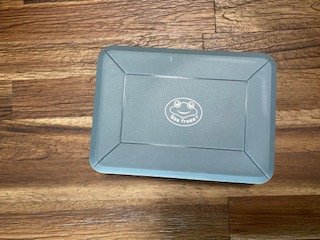
WTS Sea Frogs Salted Line a6xxx housing

Started by tomunderwater ·

  • 4Posts
  • 4Replies

Read-only discussion

WTS Sea Frogs Salted Line a6xxx housing

4 posts
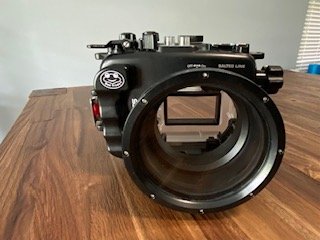
  1. Lightly used Sea Frogs Salted Line a6xxx housing (purchased new less than a year ago).  Never flooded.  Set up for a6400, but can easily be used on the a6000, a6100, a6300, and a6500.  Note, the a6600 will not fit in this housing.  

    Asking $400 or best offer 

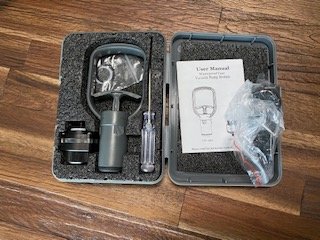
    Includes: 

    -housing https://seafrogs.com.hk/collections/a6xxx-salted-line/products/seafrogs-60m-195ft-waterproof-housing-for-sony-a6xxx-series-salted-line

    -4" flat port (glass) 

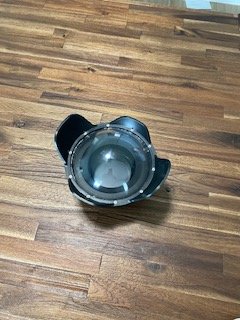
    -6" dome port (acrylic) https://seafrogs.com.hk/collections/a6xxx-salted-line/products/6in-dry-dome-port-for-salted-line-series-waterproof-housing-40m-130ft

    -Vacuum pump system https://seafrogs.com.hk/products/vacuum-pump-system-vps-100

    -Zoom gear for 10-18mm Sony f/4 OSS 

    -Zoom gear for Sony E 16-50mm f3.5-5.6 PZ OSS

    -Extra silicone grease and o-rings 


    See specifications from the manufacturer below. 

    Key Features:

    • Inbuilt leak sensor
    • Depth rate 60m/195ft
    • Port for Fiber optic cable
    • Port for vacuum test system
    • Two 1/4" -20 threaded holes
    • Interchangeable port system
    • High-quality optical viewfinder
    • Double-sided metal hinge lock
    • Multi-coated optical glass standard flat port
    • Reinforced metallic bottom plate

    IMG_1952 (1).jpg

    IMG_1951 (1).jpg

    IMG_1950 (1).jpg

    IMG_1949 (1).jpg

    Edited by tomunderwater
  2. Hi, I am interested, is it ship international? I am locate at Malaysia 

  3. Hi Shinw, sorry I'm just seeing this message.  I am happy to ship this to you if you are willing to cover the shipping costs.  Please send me a direct message if interested. 

    Thanks, 

    Tom 

  4. Sold 

Nauticam

Account

Navigation

Search

Search

Configure browser push notifications

Chrome (Android)
  1. Tap the lock icon next to the address bar.
  2. Tap Permissions → Notifications.
  3. Adjust your preference.
Chrome (Desktop)
  1. Click the padlock icon in the address bar.
  2. Select Site settings.
  3. Find Notifications and adjust your preference.