Skip to content

Lights, Strobes, and Lighting Technique / Archived topic

i-turtle trigger & aquatica port

Started by OwenF ·

  • 4Posts
  • 4Replies

Read-only discussion

i-turtle trigger & aquatica port

4 posts
  1. Does anyone have any direct experience of the i-turtle led trigger with the Aquatica fibre optic ports shown in the image below?


    I’m concerned that the metal tab will prevent the LED from being attached. I can’t check at the moment, but I think the metal tab/ring is what secures the port to the housing. E.g. I cannot take it off.


    Are the i-turtle LEDs small enough I could squeeze them in?


    Lastly, does anyone know who/where I-turtle triggers can be sourced in the UK?

    0a6f0c213ebe5fa9b891ff77aa0b457d.jpg


    Sent from my iPhone using Tapatalk

  2. Hi Owen

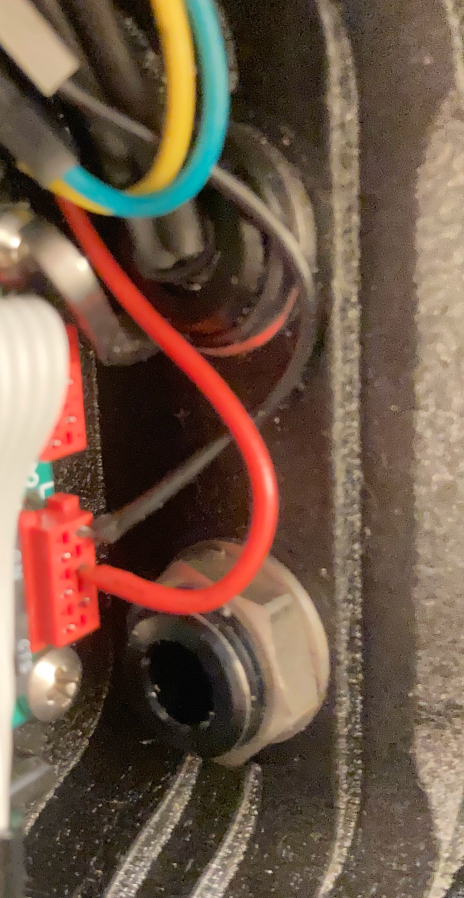
    it is the oring that secures the bulkhead in place. The metal ring cannot be taken out because it works as a spacer. It is needed so the bulkhead does not get loose. If you find a metal (or plastic) washer with the same thickness you can replace the piece.

    The metal piece is to work like a mirror for the internal flash of the camera to reflect the flash to the bulkhead window.

    A regular LED can be fitted into the bulkhead inner space (as seen on the attached picture, the top bulkhead). I have used 1 or 2 oring on the LED to to get it secure inside the bulkhead.

    I do not know the I-turtle trigger. But if it has a LED in an extension, it can be done. If the LED is in a fixed position and you are going to rely on the mirror…. I wouldn’t advise….

    the lower bulkhead is not a bulkhead, it is a vacuum valve from Vivid Housing.

    A53DA1E1-A1FF-4FE0-811A-0CE3ED40CAF1.png


  3. A regular LED can be fitted into the bulkhead inner space (as seen on the attached picture, the top bulkhead). I have used 1 or 2 oring on the LED to to get it secure inside the bulkhead.

    A53DA1E1-A1FF-4FE0-811A-0CE3ED40CAF1.thumb.png.76799f4f0018368df86e0b26d5ef655f.png


    Thanks! This is exactly what I was looking for. It does appear that I’d fit an extended LED in there


    Sent from my iPhone using Tapatalk
  4. If you need, you can take out the oring and the metal part, pass the LED through then, insert the LED inside the bulkhead and them place the metal part and the oring in their proper places.

Keldan

Account

Navigation

Search

Search

Configure browser push notifications

Chrome (Android)
  1. Tap the lock icon next to the address bar.
  2. Tap Permissions → Notifications.
  3. Adjust your preference.
Chrome (Desktop)
  1. Click the padlock icon in the address bar.
  2. Select Site settings.
  3. Find Notifications and adjust your preference.