Skip to content

Lights, Strobes, and Lighting Technique / Archived topic

INON D2000s manual + sony a6300 settings

Started by sarthur1 ·

  • 14Posts
  • 14Replies

Read-only discussion

INON D2000s manual + sony a6300 settings

14 posts
  1. Hey all

    I've recently purchased a used inon D2000s strobe and it looks a bit tricky to me with all the buttons on it's back.

    I can't seem to find any manuals to this strobe anywhere and I was wandering if someone here can help me.


    also, since it's the first I'm shooting with a strobe and with fully manual setting, can someone share his/hers setting for shooting with a strobe?


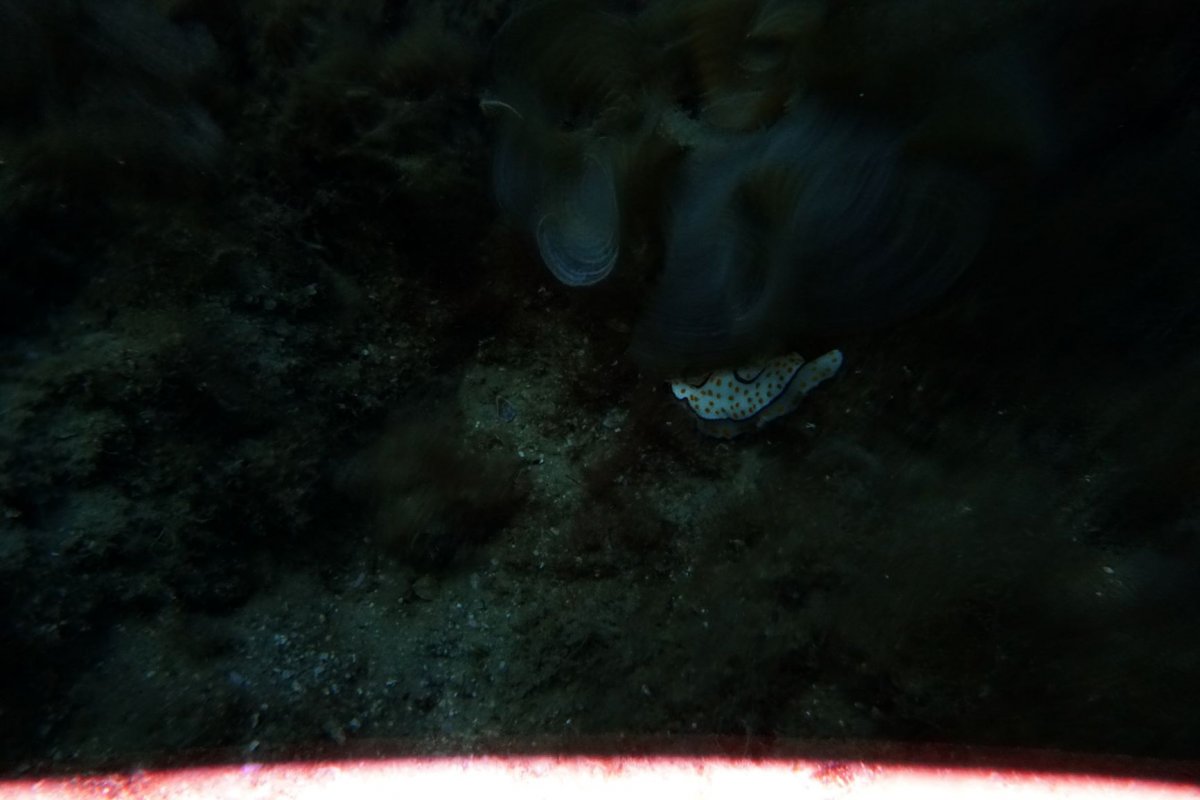
    this is what I got on my last dive- too dark and that flash line at the bottom.

    I tried to play with the settings but I got nothing.


    thanks to all the helpers!

    DSC00772.JPG

  2. Are you triggering with the camera flash or an LED board? Is the strobe magnet in or out?

  3. 4 minutes ago, Barmaglot said:

    Are you triggering with the camera flash or an LED board? Is the strobe magnet in or out?

    I'm using Fantasea FA-led 3 as a flash trigger

    I don't have any magnet in the hole, do I need to buy one?

  4. 1 hour ago, sarthur1 said:

    I'm using Fantasea FA-led 3 as a flash trigger

    I don't have any magnet in the hole, do I need to buy one?

    We need more details than this to help, are trying to do TTL or manual flash?  Which camera and what settings are using on the camera?  That is what is the shutter speed/aperture and what on camera flash settings are you using? Which settings are using on the strobe - the position of both dials please?

    The problem is the camera doesn't know it's got an external flash attached and the flash doesn't know what settings are being used on the camera and the settings need to match for it to work.

    The manual is not available online - they are only supplied with the strobe - INON do it this way on purpose, so for example if you buy a strobe from Japan to save a few $$ you only get a Japanese manual.

  5. If you explore the Inon web site you may find manuals.

    http://www.inon.jp/customer/discontinued/d2000/top.html

    If your flash trigger emulates the Sony always on pre-flash then you will need to install the magnet. If your flash trigger ignores the pre-flash and fires only a single pulse you will need to remove the magnet. In the sTTL mode the magnet switch is irrelevant, in External Auto and Manual it must be used to set the strobe to the camera pre-flash or no pr-eflash.

    The Sony A6300, like my A6400, always fires a pre-flash even when the camera is set to manual mode. 

    J


    INON D-2000 Underwater S-TTL Strobe

    User Manual [Basic manual]

    This manual is translated and rewritten the INON D-2000 manual , Japanese version by Yuzo Kanda. So if you have any question, comments or suggestion regarding this manual then do not ask to INON Japan or INON America Inc, please contact Yuzo Kanda (Naturephoto KANDA Co.ltd / uwdigitalcamera.com)

    info@naturephoto.co.jp http://www.uwdigitalcamera.com

    Please read this manual through and the manual of your camera and housing before you use.

    [ Safety Precautions ]

    Please read the following precautions carefully as they contain highly important information related to personal and product safety. Precautions designated “WARNING!” refers to those situations, which could result in serious injury or death.
    Precautions marked 
    “Danger” or “CAUTION!” refers to those situations or conditions, which could result in personal injury or property damage. Please observe all precautions


    Do not disassemble or remodel D-2000.

    The strobe contains very high voltage circuitry, it could lead to severe electric shock and injury.

    Never touch electric circuit

    Even if it is not installed battery, there is the possibility to get an electric shock.

    When you think it flooded or malfunction, stop using underwater or even on land

    immediately.

    On this case, please remove batteries ASAP and request to repair or service to us.

    Do not drop water or a foreign body in the battery box.
    Do not fire the strobe at near face ( Especially , take care of infants)

    Do not fire this strobe with the reflector placed on a table or the floor as that may cause overheating of the internal circuitry and/or fire.

    Do not use any solvent or other chemical to maintenance or cleaning. Keep this product out of the reach of babies, infants and children.

    !Danger Safety precautions about battery.
    Follow these precautions to avoid damage to batteries and strobe, and depending on the type of batteries,

    possible buildup and explosion of flammable gas.

    1

    ・ Do not use non-specified batteries You can use these batteries.

    1. a)  AA Nickel Metal Hydride battery (1.2V) * recommended

    2. b)  AA Nicad battery (1.2V)

    3. c)  AA alkaline battery (1.5V)

    4. d)  AA Lithium battery (1.5V)

    5. e)  AA oxy ride dry cell battery (1.5V) *

    Battery voltage of the oxy ride dry cell battery, there is 1.735V. So do not turn on built in focus light before their voltage is lower than 1.5V. Usually it will drop down to 1.5V with over 20 times flashing at Full position.

    • ・  Do not mix different battery types, different manufactures or batteries having different

      remaining charges.

    • ・  Do not attempt to charge non-chargeable batteries.

    • ・  Make sure battery +/- positions are placed in Battery Box.

    • ・  Do not intentionally short the batteries or circuits.

    • ・  Do not use battery charging devices that are not compliant with the battery

      manufacturer’s recommendation. !Caution

    • ・  Never repeatedly fire the strobe continuously, for example, to test, discharge or refresh the batteries.

    • ・  If you use this strobe in air plane or near the medical equipment, please follow the instruction of them.

    • ・  Protect the D-2000 from excessive impact shock and vibration. Do not drop, do not leave on a vibrating

      boat deck. Especially, protect the Optical sensor.

    • ・  Do not leave the D-2000 exposed to direct sunlight or other areas of high temperature.

    • ・  Do not leave the strobe closed when traveling to or from high altitudes. Always remove the battery cap

      or O-ring.

    • ・  Please remove batteries after using.

    • ・  Violent impact can severely damage it, and don’t “Back roll” or “Giant stride” with D-2000, please take it

      hand to hand.

      [ Before Use ]

      The D-2000 strobe is a dual use underwater and land external strobe with G.N.20 (ISO100, Air) and following main futures.

    • ・  Underwater TTL auto exposure in S-TTL, from high-end digital cameras to point-and-shoot digital

      cameras.

    • ・  24 steps External Auto control mode and 13 steps manual mode.

    • ・  Film camera’s TTL mode is supported. ( Nikonos type is compatible, but it is required “optical signal

      converter TTL” and optical cable)

    2

    • ・  Integral Shutter linked Auto off Focus light is installed.

    • ・  Clear photo system to completely block all visible light from camera’s built in strobe, so you can take

      more clear images without “backscatter”.

      Before use, please follow these 4 steps guidance
      STEP 1
      Your D-2000 comes from the factory with the following parts.

      1. D-2000 Body

      2. Battery Box Cap

      3. magnet, cap screw and a tool

      4. Extra O-ring

      5. INON grease

      6. Light filter x 2

      7. Instruction manual ( Japanese version x 2 )

      Prepare for the required accessories

      To use the external strobe D-2000, it will be required some optional accessories. Please confirm these items are prepared. If you have any question, please ask us easily.

    1. 4 x AA type batteries. (Nickel Metal Hydride battery is recommended)

    2. Optical cable kit for your housing. It is provided for each housing model.

    3. Housing tray and arm

    3

    [Basic manual]

    Before operating the unit, please read this manual carefully. Keep it for future reference.

    TABLE OF CONTENTS

    Names of D-2000 parts and function ・・・5 Measures to prevent accidental Flooding ・・・6

    Chapter 1 : Before use
    About corresponding camera or strobe system ・・・8 Required connecting parts or accessories ( not included ) ・・・8 Installing Batteries
    Connecting the optical cable

    Chapter 2 : Easy using ( S-TTL mode) S-TTL control
    How to use S-TTL
    Adjustment of the strobe power at S-TTL mode Trouble shooting

    Chapter 3 : After care and maintenance About handling
    Post dive care
    Overhaul and Maintenance service


    4

    Names of D-2000 parts and function

    11. Main mode switch
    You can set S-TTL mode, S-TTL “Low” mode, External Auto Flash exposure Adjustment mode or Manual mode.

    12. Strobe ready lamp (Red)
    When the strobe is ready for flash, it light on Red lamp.
    13. TTL monitor lamp (Green)
    When D-2000 could controls its power correctly with S-TTL, S-TTL ”Low” or External Auto mode, it light on Green lamp. 14. EV compensation dial
    When you use D-2000 at S-TTL or S-TTL “Low” mode, it works as the EV compensation set dial. And when you use D-2000 at External auto mode, this dial works as Aperture value set dial, and when you use D-2000 at manual mode, it works as the power control set dial.
    15. Advanced Cancel circuit switch ( magnet switch hole)
    When you use D-2000 with the camera that do not pre-flash and at External mode or manual, set the magnet here. Then the advanced cancel circuit will be OFF.
    16. Focus light switch
    Off mode: position set at “Light” as in picture,
    Single mode: Push this switch once and release. The light will turn on and then turn off automatically as the internal

    1. Flash tubes

    2. Focus light

    3. Light adjustment sensor

    4. +1/4EV compensation Switch

    5. Slave sensor

    6. Battery box

    7. Battery box Inner cap

    8. Battery box Inner cap screw

    9. Battery box outer cap

    10. 6mm threaded socket for Z adapter or YS bolt


    5

    strobe fires or if shutter not released, after about 8 seconds.
    Continuous mode: By pushing switch and turning it to either right or left “Lock” position while pressing, then the focus light will turn on and shine continuously until the shutter is released. Then the focus light will turn on again automatically 0.5 seconds after the image is captured.
    When you use the focus light at 
    “continuous mode” it will turn on again automatically, and the off time is approximately 0.5 seconds, at the case of using slow shutter speeds it will turn on again while the shutter is still open, exposing the image with light from the focus light. So please use “Off mode” or “Single mode” when you use slow shutter speed.

    Measures to prevent accidental Flooding
    The D-2000 is waterproof due to a rubber O-ring that seals the internal circuitry from the elements. There is only one user serviceable O-ring: the Battery Box O-ring. This O-ring requires frequent inspection and care to ensure its watertight integrity. Since most flooding occurs due an O-ring related problem we strongly recommend you to Inspect the O-ring (and clean, grease or replace as necessary) each time before using the strobe..

    O-ring inspection locations and methods Inspect and maintain these three points:

    1. The O-ring itself

    2. O-ring contact surfaces

    3. O-ring grooves and Battery Box outer cap O-ring contact surface

    4. If O-ring is properly seated in groove

    5. Grease

    First, inspect the O-ring as it is seated in the groove. There is a high chance that the strobe will flood if placed in water if any of the following are evident.

    1. If hair, sand or other debris is attached to the O-ring. Remove O-ring and wipe-off the debris.

    2. If the O-ring is cut or cracked. The O-ring must be removed and replaced with a new O-ring

    17. Focus light filter seal
    When you use S-TTL or S-TTL”Low” mode, paste this on the window at focus light. This filter prevent the focus light have an effect on the accuracy of TTL control. And it makes easy to close fishes or else , they are sensitive to light.
    18. Magnet screw tightener
    19. Magnet
    20. Magnet switch screw
    21. INON grease
    22. Battery box spare O-ring

    6

    1. If the O-ring is twisted. The O-ring must be removed and reinstalled uniformly with no twists.

    2. If there is hair, sand or other debris on the O-ring contact surfaces. Wipe of any debris

    3. If there is a scratch or other imperfection on the O-ring contact surfaces. The strobe must be inspected by an

      authorized technician, and repaired if possible. Contact us.

    O-ring Maintenance Method
    Grease: 
    INON O-rings are compounded with a special type of oil that is not compatible with all grease types. Do not

    use the grease except the supplied INON Grease. If you use any other grease, which may cause the O-rings to swell or deform, causing poor seal and water leakage. If you use non-INON grease , then please replace the O-ring to a new one as soon as possible.

    1. O-ring and sealing surface should be lightly lubricated with INON grease lubricant on a regular basis. This should always be done before storing the strobe and before a first dive after taking the strobe out of storage.

    2. It is important never to use a sharp instrument when removing an o-ring as this may cause damage to the o-ring or the o-ring groove. A hairpin or a credit card works well.

    3. The removed o-ring should be examined for damage. Check to make sure that the o-ring is free from nicks and cuts and that it retains its original round profile. O-rings that appear to be damaged should be discarded immediately and replaced with new o-rings

    4. Clean the o-ring grooves (where the o-rings sit) with a Q-tip. Be sure to remove any lint the Q-tip may leave behind. Inspect the groove and the O-ring contact surfaces for damage.

    5. Wipe the part of the battery cap that the o-ring seals against with a clean lint free cloth.

    6. Re-grease the o-rings with a thin layer of INON grease until it appears to be smooth and shiny. Do not over grease it use just enough grease so that the o-ring will pull smoothly through your fingers. Excessive amounts will only attract

      dirt to the o-ring.

    7. Replace o-rings in its proper position.

    After Installing O-ring
    After Installing the O-ring in the groove, making sure that it is seated uniformly and not twisted. Then add a little extra grease to the O-ring and liberally grease O-ring contact surface on the battery box. A Iittle extra grease is necessary due to friction when screwing down the battery box cap. too much friction.
    When the battery box cap is fully screwed down and seated on the O-ring surface, Iook at the O-ring through the transparent edge of the cap. You should see a continuous, uniform contact line between the cap and O ring. If the contact line is not uniform, or twisted, contaminated with hair, Iint or sand etc. there is a good chance the strobe will flood. Remove cap, re-seat O-ring and remove contaminants as necessary.

    7

    Chapter 1 : Before use

    About corresponding camera or strobe system
    INON D-2000 is a complex, multi-function device with different futures available for 6 kinds camera, strobe or housing systems, and it has 4 ways to control its power.
    In this basic manual, it is instructed how to use with digital cameras ( Pre-flashing type or Non pre-flashing type)
    The other way to use as a slave strobe or with housing, they will be instructed in the 
    “advance manual”

    8

    About the batteries
    The D-2000 can use the following batteries.( Batteries are not included in D-2000) AA type Alkaline batteries x 4
    AA type Nicad batteries x 4
    AA type NiMH batteries x 4
    AA type oxy ride dry cell batteries x 4 *

    Caution 1 : Do not use other kind batteries with merge. We recommend to use with same manufacturer, same kind and same model batteries. And if you use oxy ride dry cell batteries, Please read followed caution. The recommended battery is NiMH battery.

    Caution 2 : The electric current of the oxy ride dry cell battery is same as the alkaline dry cell, but at survey value (as for oxy ride dry cell battery itself inscription 1.5V) there was 1.735V regarding the voltage plane. So if you turn on the focus light of D-2000 when its voltage is still high, it makes easy to burn out light bulb. To prevent it, please turn on the focus light after the battery voltage is low. ( about 20 times or more full flashing make its voltage lower than 1.5V)

    • ・  Do not mix different battery types, different manufactures or batteries having different remaining charges.

    • ・  Do not attempt to charge non-chargeable batteries.

    • ・  Make sure battery +/- positions are placed in Battery Box.

    • ・  Do not intentionally short the batteries or circuits.

    • ・  Do not use battery charging devices that are not compliant with the battery manufacturer’s recommendation. When you do not use D-2000, please remove batteries.

      And it depending on the type of batteries, possible buildup and explosion of flammable (hydrogen) gas.
      IF you ever feel suspicion that the D-2000 is not operating correctly, immediately stop using D-2000 and

      remove batteries promptly. And request to repair or service to us.

    9

    Optical cable
    INON supplies these optical cables.


    Installing Batteries
    When you install the batteries, always turn Main mode switch to OFF

    1. Slowly unscrew the Battery box outer cap counterclockwise.

    2. Unscrew the Battery box inner cap screw counterclockwise and remove the Battery box inner cap. ( at this time please be aware not to lost the inner cap screw)

    3. Install the batteries in proper position, Pay attention the indications of + / - inside of the battery box.

    4. Put the inner battery cap and screw down the battery box inner cap screw.

    5. After checking the O-ring and contact surface, slowly screw down the battery box cap clockwise.

    Do not turn on main mode switch before installing the optical cable.

    Connecting the arm and the optical cable

    Optical cable kit W5 Optical cable kit W12 Optical cable kit W11 Optical cable kit W13 Optical cable kit W14

    M67 adapter for DC20
    AD mount adapter forCP1 AD mount adapter forCP2 AD mount adapter forFX701 AD mount adapter for PHB


    10

    Attach your arm to the D-2000, please use “Z-adapter” or “INON YS attachment bolt kit”. If you will not use proper attachment tool or use some other length bolt, it may break the mount base of D-2000.
    Connecting with 
    “Optical cable D” , and D-2000 requires “ IR filter seal” to control its power with “S-TTL” mode. And when you disconnecting arm or cable, turn off main mode switch for your safety.

    Chapter 2 : Easy using ( S-TTL mode)

    S-TTL control
    D-2000 strobe achieved "Real TTL" control with most digital cameras. From high-end cameras to point-and-shoot cameras, it works TTL auto exposure, programmed mode or other modes, that you should do is only shooting.
    At the present (Oct.2004) INON had confirmed the 
    “S-TTL” compatibility with these cameras

    How to use S-TTL

    1. Paste the Red filter seal of the focus light.

    Do not set flash mode at “Red eye reduction mode”. And there are some case that it is impossible to use enforce flash mode by your camera. ( EX: it is impossible to use enforce flash mode with Canon IXY digital series cameras except Manual mode.) Please refer the instruction of your camera.

    3. Turn on main mode switch and set it to “S-TTL-Low” mode

    11

    4. Set the “EV controller dial” at position “B”
    Using the focus light and confirm the strobe light beams to the object correctly. And this light helps speedy focusing. And shoot the images.
    At almost case, you will have good result that is well controlled strobe light. So it is no need to adjust any more.
    But the accuracy of S-TTL control depends on it of the built in strobe. So if you use D-2000 with a point-and-shoot camera that strobe control accuracy is not so good, on this case it will be need to adjust the EV compensation of D-2000.

    Adjustment of the strobe power at S-TTL mode
    INON D-2000 has the EV controller dial. There are some case that you have better to control the strobe power with this function by the reason of “strobe control accuracy of your camera”, “situation of imaging” or “ your favorite” and else. INON introduced some cases, it will be need the adjustment of the strobe power.

    Case 1:

    Camera:
    Situation
    Result:
    How to adjust
    the source of the trouble

    Case 2:

    Camera: Situation Result:
    How to adjust

    the source of the trouble

    OLYMPUS μ -series
    Macro mode 
    “ON” and using tele zoom, and the working distance 30-40cm or closer.
    Over exposure ( too bright )
    Set your strobe mode 
    “S-TTL Low” and adjust the power with the EV controller dial if it is need.
    At this situation and with this camera, the aperture is closed to f14 and the built in strobe flashes Full power. And this camera controls its exposure level with changing the sensibility of CCD.
    So S-TTL system can not detect the stop signal of the built in strobe power and D-2000 flashes with Full power, too. And the result is over exposure.
    But if you use "S-TTL Low" mode, then D-2000 flashes with the same power with the built in strobe Even if the built in strobe flashes with Full power, but D-2000 flashes the same power of the built in strobe.

    OLYMPUS μ -series
    Wide angle, and in enough ambient light. Ex. backlight photographing.
    Under exposure ( too dark )
    Set your strobe mode 
    “S-TTL ” and adjust the power with the EV controller dial.
    Or changing the ambient light condition, or a little zooming up and use closed aperture. At this situation and with this camera, the built in strobe flashes with a slight power. Even if the camera strobe mode is " enforce mode " but it only do pretend flashing.
    So S-TTL system detect the slight power of the built in strobe power and D-2000 flashes with a slight power, too. And the result is under exposure.
    And the captured image is like a exposure with only ambient light

    12

    How to Adjust exposure level

    1. Use EV controller dial : Position “B” [± 0] ,turn to “A” side then [ + ] compensation, and turn to “C” side then [ – ] compensation.

    [+] compensation: 3 steps [ – ] compensation : 5 steps (the range surrounded by Yellow arc ) 2. Select to use “S-TTL” mode or “S-TTL Low” mode

    “S-TTL Low” is the standard mode, but if you think it will be under exposure then please use “S-TTL” mode.

    1. a)  When you use D-2000 at “S-TTL Low” mode and using EV controller +3, but it is still under exposure

    2. b)  When you use diffuser panel.

    3. c)  When you use closed aperture. At these case, please use “S-TTL” mode.

    3. You can use the EV compensation or strobe power compensation of your camera.

    Adjust strobe power to [–] compensation (over exposure and adjust it to dark) You can adjust the power to –5 step

    Adjust strobe power to [+] compensation (under exposure and adjust it to bright) You can adjust the power to +3 step

    If you could not have proper exposure by this control, then turn mode switch to “S-TTL” mode. And when you use “S-TTL” mode, you can use EV controller dial with the same way.
    Do not fire D-2000 continuously over 15 times, if you need to fire D-2000 continuously, then once stop photographing and cool down the circuit for over 3 minuets.


    13

    Trouble shooting
    If your D-2000 suddenly stop charging, there is a possibility the trouble of inner battery cap with the batteries that you use. Please cope as follows.

    If your battery terminals on the inner cap are crushed, Then pull up the terminals and secure the contact.
    And still it does not work, then there is a possibility it is caused with dirt of the contact face. ( battery side or inner cap)

    It depending on the type of batteries, possible buildup of flammable (hydrogen) gas . And the battery box of D-2000 is highly sealed. And it build up residue on the battery terminals and battery box terminals. This can cause poor connection, so clean the terminals as in images below.

    At this case, please take care not to adhere alcohol or silver polish on plastic parts as the battery box or else.

    Chapter 3 : After care and maintenance

    About handling

    • ・  Never repeatedly fire the strobe continuously, for example, to test, discharge or refresh the batteries.

    • ・  If you use this strobe in air plane or near the medical equipment, please follow the instruction of them.

    • ・  Protect the D-2000 from excessive impact shock and vibration. Do not drop, do not leave on a vibrating

      boat deck. Especially, protect the Optical sensor .

    • ・  Do not leave the D-2000 exposed to direct sunlight or other areas of high temperature.

    • ・  Do not leave the strobe closed when traveling to or from high altitudes. Always remove the battery cap

      or O-ring. This strobe is strong against external pressure but it is not designed to withstand a build up

      of internal pressure. You must loosen the cap of battery box before taking D -2000 on board aircraft.

    • ・  Please remove batteries after using.

    • ・  Do not disassemble or remodel D-2000.

      The strobe contains very high voltage circuitry, it could lead to severe electric shock and injury.

    • ・  Never touch electric circuit

      Even if it is not installed battery, there is the possibility to get an electric shock.

    • ・  When you think it flooded or malfunction, stop using underwater or even on land immediately.

    Wipe each terminal surface with a Q-tips or cotton swab soaked in alcohol to remove any residue or oil similar.
    If this step does not fully clean the terminal, dap a small amount of silver polish on a Q-tips or cotton swab and wipe terminal surface until clean. And clean off any silver polish residue with a clean swab.


    14

    On this case, please remove batteries ASAP and request to repair or service to us.

    • ・  Do not drop water or a foreign body in the battery box.

    • ・  Do not fire this strobe with the reflector placed on a table or the floor as that may cause overheating of

      the internal circuitry and/or fire.

    • ・  Do not use any solvent or other chemical to maintenance or cleaning.

    • ・  Please take care about handling of batteries ( refer page )

      Post dive care

    1. After using D-2000 under water, be sure to wash it thoroughly with fresh water, while leaving all caps on

      waterproofing components closed.

    2. After washing with fresh water, wipe it with a dry, soft cloth and dry in the shade.

    3. After using, remove batteries from the battery component. When removing them, wipe water away

      completely so that water drops will not get into the component or terminal plate.

    4. Apply a thin coat of grease over the O-ring

    5. When not using for a prolonged period of time, store unit with care away from high temperature, high

      humidity, direct sunlight, or severe cold. And the cap of battery component is removed and sealed in

      zippered airtight container or in something like this.

    6. When not using for a prolonged period of time, please recharge and test flashing D-2000 once in a

      month. Then you can maintain the Condenser of D-2000 in good condition.

      Never use petroleum solvents, such as thinner, to clean the D-2000.

    Overhaul and Maintenance service
    We recommend the maintenance at a fixed time. The periodical inspection, once for 1 years and the overhaul, once for 3 years. And if you use D-2000 frequently, then it is better to have in shorter.
    About Maintenance, please request to us. And INON D-2000 has warranty for a year from the day you purchased. But this warranty is valid only in Japan. So For warranty work, the item needs to be shipped back to Japan. In principle, when item is purchased from us, the full Japanese warranty applies. However, if it is shipped to Japan for repair or maintenance, the owner must bear transport ation costs to Japan.

    INON D-2000 English “ Basic manual “ Ver 1.01 12, Dec.2004

    Edited by Captain Fathom
  6. 3 hours ago, sarthur1 said:

    I'm using Fantasea FA-led 3 as a flash trigger

    I don't have any magnet in the hole, do I need to buy one?

    FA-LED3 is listed as a manual trigger, so I assume that it does not pre-flash.

    The Inon manual says this about ACC:

    Quote

    15. Advanced Cancel circuit switch ( magnet switch hole)When you use D-2000 with the camera that do not pre-flash and at External mode or manual, set the magnet here.Then the advanced cancel circuit will be OFF.

    So you need the magnet to put into the hole. Failing that, you can use the camera's pop-up flash to trigger instead of the FA-LED3; this will pre-flash and let the strobe fire on the second detected pulse.

    Also, I don't know whether or not the FA-LED3 allows you to exceed 1/160s shutter speed in camera settings (the pop-up flash doesn't, my UWT trigger does), but if you do set your shutter speed above 1/160s, you will get a partial exposure unless both your trigger and strobe support HSS (yours don't; you need a UWT or TRT trigger plus Retra strobes in HSS mode for that to work).

  7. 7 hours ago, ChrisRoss said:

    We need more details than this to help, are trying to do TTL or manual flash?  Which camera and what settings are using on the camera?  That is what is the shutter speed/aperture and what on camera flash settings are you using? Which settings are using on the strobe - the position of both dials please?

    The problem is the camera doesn't know it's got an external flash attached and the flash doesn't know what settings are being used on the camera and the settings need to match for it to work.

    The manual is not available online - they are only supplied with the strobe - INON do it this way on purpose, so for example if you buy a strobe from Japan to save a few $$ you only get a Japanese manual.

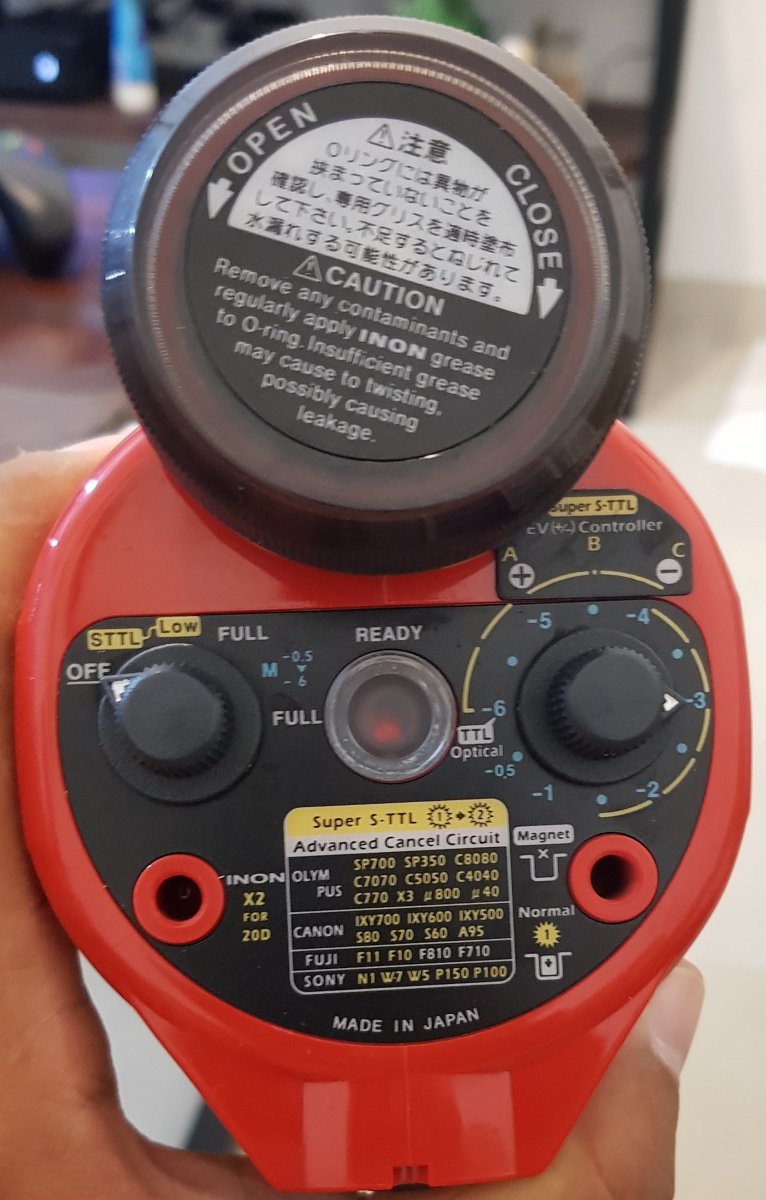
    I don't really know what each button on the strobe mean (adding a photo). I understand the right one is for compensation but I don't know what each mode mean. 

    I'm using Sony a6300, when asking for settings are you asking about ss / ap / iso or other settings?

    I don't think my camera is pre-flashing, my flash trigger is triggered automatically as soon as I take a picture (the camera flash doesn't work for ss higher than 1/160's.

    20210621_223904.jpg

  8. The Sony A6300 always pre-flashes to my knowledge, though the trigger may ignore the preflash.  It states on Fantasea's website that the trigger is for manual flash only but the manual doesn't say anything about preflash and how it is handled by the trigger so we will need to test it.

    Please do the following:

    • connect up the trigger to the camera and a fibre optic cable to the flash as if you were taking it under water
    • Set strobe LH dial to manual (M)
    • set strobe RH dial to -1
    • Set camera in manual to a reasonable setting like 1/160 @ f8
    • take a test shot into a mirror setup so the camera can see the strobe

    Report back if you can see the flash in the image - assuming the strobe fires it should be very bright in the image.  This is to test if the unit is syncing properly. 


  9. 4 hours ago, ChrisRoss said:

    The Sony A6300 always pre-flashes to my knowledge, though the trigger may ignore the preflash.  It states on Fantasea's website that the trigger is for manual flash only but the manual doesn't say anything about preflash and how it is handled by the trigger so we will need to test it.

    Please do the following:

    • connect up the trigger to the camera and a fibre optic cable to the flash as if you were taking it under water
    • Set strobe LH dial to manual (M)
    • set strobe RH dial to -1
    • Set camera in manual to a reasonable setting like 1/160 @ f8
    • take a test shot into a mirror setup so the camera can see the strobe

    Report back if you can see the flash in the image - assuming the strobe fires it should be very bright in the image.  This is to test if the unit is syncing properly. 


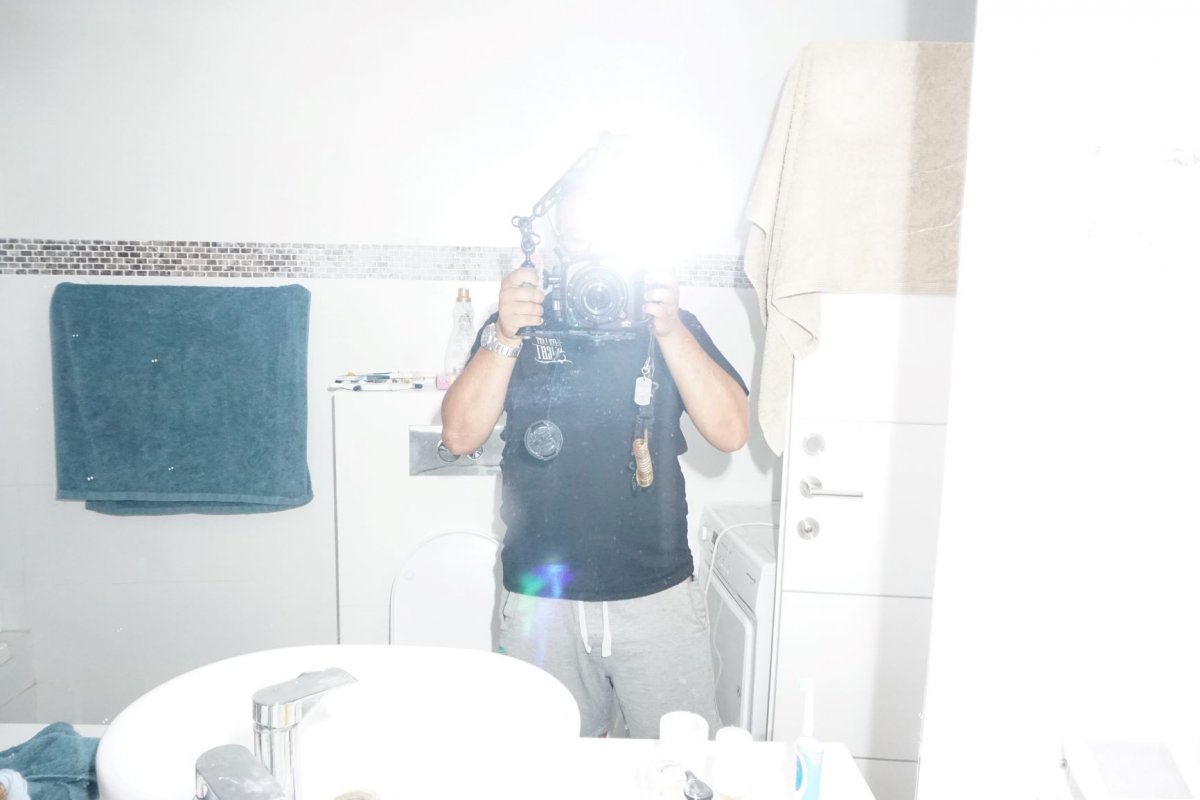
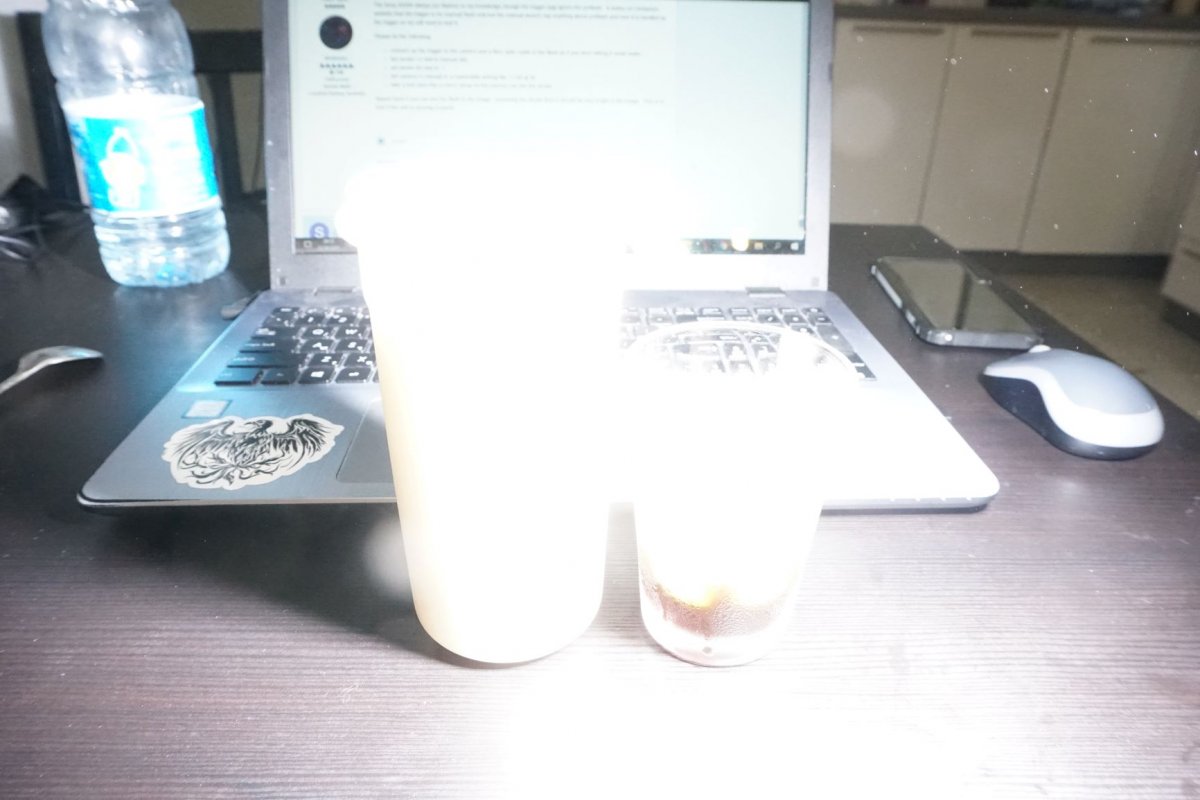
    I took one in front of the mirror in a dark room and one of an object in a lighted room, both were bright.

    2.JPG

    1.JPG

  10. Ok we have established it is syncing OK, so now have to get it setup to shoot.  You will need to shoot with manual flash, that's the only option available with your trigger.  This means you need the LH dial turned to "M" and you set your power with the RH dial.  You have no magnet in , so that indicates to me the unit is delivering a pre-flash as well, but that's fine it will operate fine with a pre-flash and no magnet.

    Next step is to setup to shoot - I assume you are shooting macro based upon the image.  Put your camera in manual exposure and start with 1/160 and f11 as a starting point and base ISO and the strobe set to -1 which is half power.  find a small subject to shoot, a toy figurine or something about the size of the expected subject and set it up about 300mm away from the port,  Set your flash in position on the arm - this link shows your positioning.  https://www.opticaloceansales.com/files/OOS-Strobe-Positioning.pdf

    Take a test shot and review exposure if it's under exposed check that the flash is hitting to subject, you might need to tweak the angle a little.  If it's still under exposed increase the ISO as needed to get the right exposure. 

    Also be careful with shutter speed the manual states that the trigger will fire even if the flash is set to off - so it looks like the camera doesn't know the trigger is there and may well attempt to trigger at higher than 1/160, you can test this out of course.

    Let us know how that setup goes

  11. 3 hours ago, ChrisRoss said:

    Ok we have established it is syncing OK, so now have to get it setup to shoot.  You will need to shoot with manual flash, that's the only option available with your trigger.  This means you need the LH dial turned to "M" and you set your power with the RH dial.  You have no magnet in , so that indicates to me the unit is delivering a pre-flash as well, but that's fine it will operate fine with a pre-flash and no magnet.

    Next step is to setup to shoot - I assume you are shooting macro based upon the image.  Put your camera in manual exposure and start with 1/160 and f11 as a starting point and base ISO and the strobe set to -1 which is half power.  find a small subject to shoot, a toy figurine or something about the size of the expected subject and set it up about 300mm away from the port,  Set your flash in position on the arm - this link shows your positioning.  https://www.opticaloceansales.com/files/OOS-Strobe-Positioning.pdf

    Take a test shot and review exposure if it's under exposed check that the flash is hitting to subject, you might need to tweak the angle a little.  If it's still under exposed increase the ISO as needed to get the right exposure. 

    Also be careful with shutter speed the manual states that the trigger will fire even if the flash is set to off - so it looks like the camera doesn't know the trigger is there and may well attempt to trigger at higher than 1/160, you can test this out of course.

    Let us know how that setup goes

    I will try it, thank you!

    a few questions:

    1. Is 1/160's the fastest shutter speed I can work with? how do I check which shutter speed is the highest one I can work with?

    2. Do I take those photos in a natural lighted room or do I need to find a specific light for it?


    Again, thank you so much!!

  12. 1/160 is the max sync speed for the Sony A series cameras.  I would take the test photos inside in a relatively dim room - you would want an image taken without flash at your settings  to be 2-3 stops under exposed so that the expsoure comes mainly from the strobe.

    so take an ambient pic at 1/160 @ f11 and your chosen ISO and it should  be quite dark.  any room inside away from direct sunlight should be OK.

  13. On 6/22/2021 at 2:39 PM, ChrisRoss said:

    1/160 is the max sync speed for the Sony A series cameras.  I would take the test photos inside in a relatively dim room - you would want an image taken without flash at your settings  to be 2-3 stops under exposed so that the expsoure comes mainly from the strobe.

    so take an ambient pic at 1/160 @ f11 and your chosen ISO and it should  be quite dark.  any room inside away from direct sunlight should be OK.

    Hey again

    so I did what you told me and it was awesome!

    I learned my camera as I should've done when I bought it and now I finally know how to coordinate between the strobe and camera.

    thank you so much for your time and advices my friend :) :)

  14. 1 hour ago, sarthur1 said:

    Hey again

    so I did what you told me and it was awesome!

    I learned my camera as I should've done when I bought it and now I finally know how to coordinate between the strobe and camera.

    thank you so much for your time and advices my friend :) :)

    Happy to see you've worked it out.  In water you may need slightly more strobe output (or ISO) to compensate for the water, but you should be quite close.

Backscatter

Account

Navigation

Search

Search

Configure browser push notifications

Chrome (Android)
  1. Tap the lock icon next to the address bar.
  2. Tap Permissions → Notifications.
  3. Adjust your preference.
Chrome (Desktop)
  1. Click the padlock icon in the address bar.
  2. Select Site settings.
  3. Find Notifications and adjust your preference.