Skip to content

Shooting Technique, Workflow and Editing / Archived topic

Interesting finds about Lightroom (and any RAW editor)

Started by Interceptor121 ·

  • 11Posts
  • 11Replies

Read-only discussion

Interesting finds about Lightroom (and any RAW editor)

11 posts
  1. I discovered after one year of shooting on land that Lightroom and other RAW editors give you what they think looks good of your RAW files not actually the RAW file

    Lightroom in the latest version tends to do quite a few changes:

    1. Increase exposure 1 stop or more

    2. Increase contrast

    3. Neutralise colours to adobe standards

    So shots that look clipped on the highlights are not actually clipped

    Example:

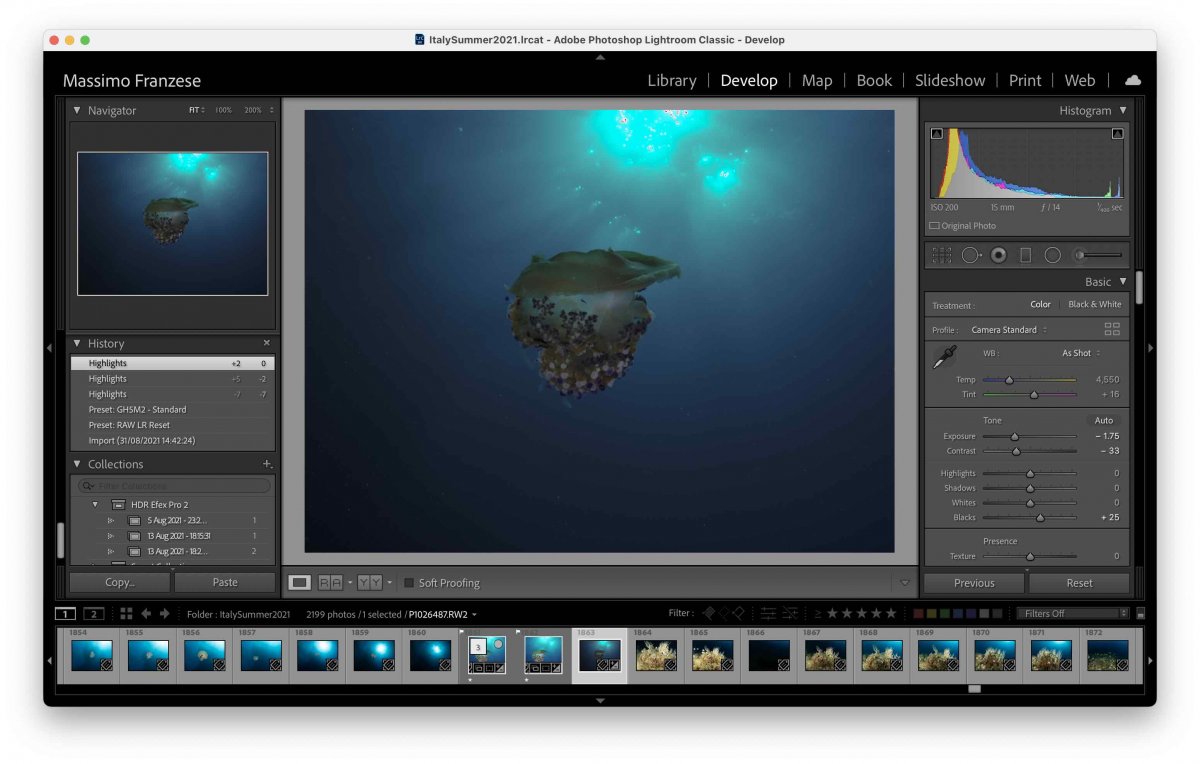
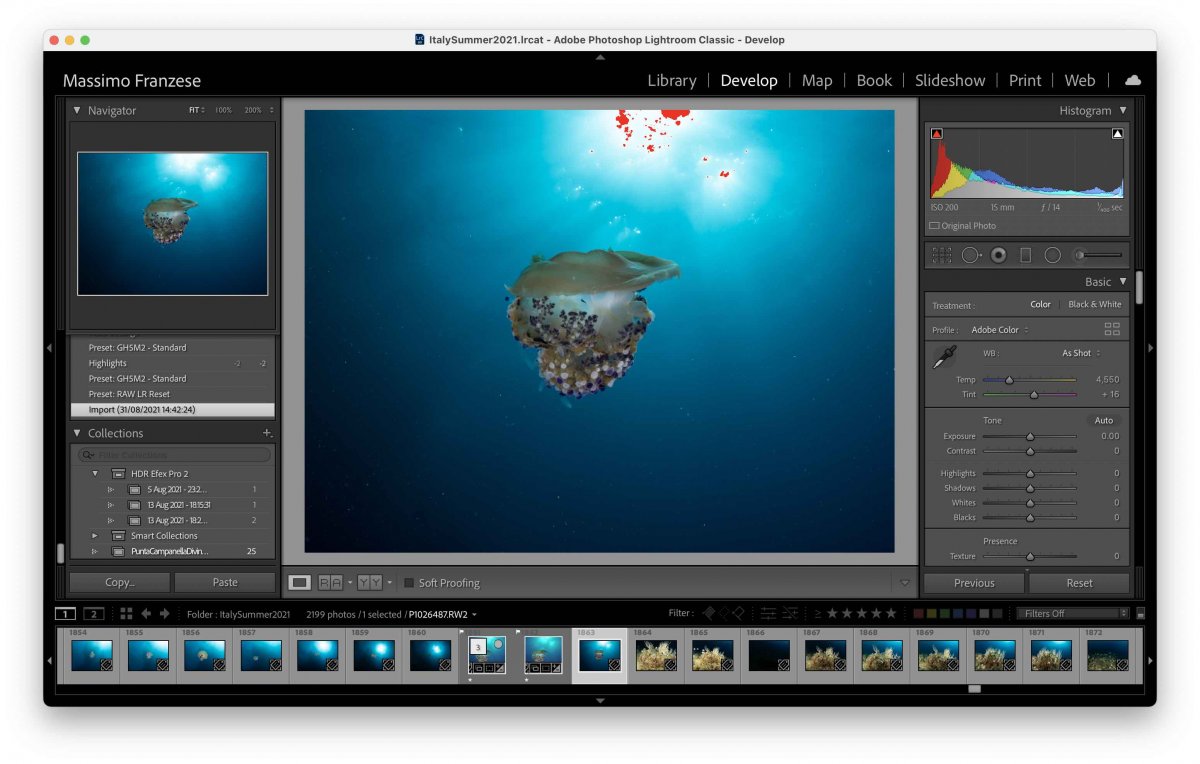
    Shot as imported in lightroom

    The same shot after eliminating lightroom adjustments

    And the final shot

    51418006771_95073afecf_b.jpgCotylorhiza tuberculata by Interceptor121, on Flickr

    The issue is to understand how to expose in camera as the camera will also shot a clipped highlight in the jpeg shown on the LCD so you need to work out an exposure setting and metering to calculate how far you can go into clipping. My camera has a metering mode called highlight weighted which makes it easier on other cameras that do not have this mode is not possible

    It is still possible that the blue channel will clip a little (in this case requiring -2 highlight correction) but you can see how dark the raw file actually was 

    Once you apply this technique and pull shadows up usually there is no noise1826476085_Screenshot2021-09-02at19_18_04.thumb.jpg.5aaa05f6738d19b48541127335bce4ab.jpg1133909650_Screenshot2021-09-02at19_20_15.thumb.jpg.b094bfe9ca49e7b5ca85b84c8a028dc6.jpg
     

    Screenshot 2021-09-02 at 19.18.04.jpg

    Screenshot 2021-09-02 at 19.20.15.jpg

    Edited by Interceptor121
  2. As I understand it no raw editor shows you the actual raw file it needs to use a starting point of some form to actually display the image.  There was a discussion on this a while back about how you can use presets to change the default starting point for images.  I'm not a lightroom user so I'm not sure what the default preview is, I believe you have a range of standard options with the most basic using the embedded JPEG - which is what you see on your camera's LCD panel.   It mentions the embedded jpeg is not colour managed but will be once lightroom builds its own previews.

    The embedded preview options can be influenced by your jpeg image settings in your camera menu.  For example you can specify a natural or muted or custom profile in camera which is going to give you more accurate indication of highlight clipping on the LCD when you are previewing.  It makes no difference to your raw image but does influence the starting point of the embedded preview used in lightroom.

  3. As I understand it no raw editor shows you the actual raw file it needs to use a starting point of some form to actually display the image.  There was a discussion on this a while back about how you can use presets to change the default starting point for images.  I'm not a lightroom user so I'm not sure what the default preview is, I believe you have a range of standard options with the most basic using the embedded JPEG - which is what you see on your camera's LCD panel.   It mentions the embedded jpeg is not colour managed but will be once lightroom builds its own previews.
    The embedded preview options can be influenced by your jpeg image settings in your camera menu.  For example you can specify a natural or muted or custom profile in camera which is going to give you more accurate indication of highlight clipping on the LCD when you are previewing.  It makes no difference to your raw image but does influence the starting point of the embedded preview used in lightroom.

    Nope it doesn’t do anything with the embedded jpeg that is only used for thumbnails on your camera or preimport
    The develop module doesn’t make any use of embedded jpegs
    Lightroom alters the raw of the camera to what adobe thinks is a good starting point this has changed during time
    The adobe starting point is particularly bad for underwater use
    All other raw processors do the same as the camera default is very flat and looks ugly
    A trip to libraw will show discussions on how to find your actual starting point for your camera


    Sent from my iPhone using Tapatalk
  4. 7 hours ago, Interceptor121 said:


    Nope it doesn’t do anything with the embedded jpeg that is only used for thumbnails on your camera or preimport
    The develop module doesn’t make any use of embedded jpegs
    Lightroom alters the raw of the camera to what adobe thinks is a good starting point this has changed during time
    The adobe starting point is particularly bad for underwater use
    All other raw processors do the same as the camera default is very flat and looks ugly
    A trip to libraw will show discussions on how to find your actual starting point for your camera


    Sent from my iPhone using Tapatalk

    OK so specifically in the develop module it generates a 1:1 preview that is cached but not stored  or can use a smart preview, but I would guess that preview is based upon whatever you have set as your initial preview so it looks the same more or less when you open it?  The alternative is to use presets but that assumes you want to do the same thing to all of your images. 

    On the embedded preview on my olympus, you can use a custom picture mode and reduce contrast and brightness which gives you more head room in your images as the camera uses the embedded jpeg to evaluate clipping.  So the camera might show clipping but the image is not clipped when you look on your computer. 

    In any case all it does is set your starting point and you can get the image back to where you want it.  I'm not sure if it's really possible to fundamentally change this?

  5. OK so specifically in the develop module it generates a 1:1 preview that is cached but not stored  or can use a smart preview, but I would guess that preview is based upon whatever you have set as your initial preview so it looks the same more or less when you open it?  The alternative is to use presets but that assumes you want to do the same thing to all of your images. 
    On the embedded preview on my olympus, you can use a custom picture mode and reduce contrast and brightness which gives you more head room in your images as the camera uses the embedded jpeg to evaluate clipping.  So the camera might show clipping but the image is not clipped when you look on your computer. 
    In any case all it does is set your starting point and you can get the image back to where you want it.  I'm not sure if it's really possible to fundamentally change this?

    The camera meter clipping indicator is generally incorrect as based on jpeg that is part 1 of the issue
    If you however resolve the issue (not possible easily on olympus cameras) then you are faced with the lightroom default that are actually worst than the camera jpegs
    Once you work out how to eliminate lightroom defaults you can easily see if you really clipped
    Most shots left to default appear clipped but they are not


    Sent from my iPhone using Tapatalk
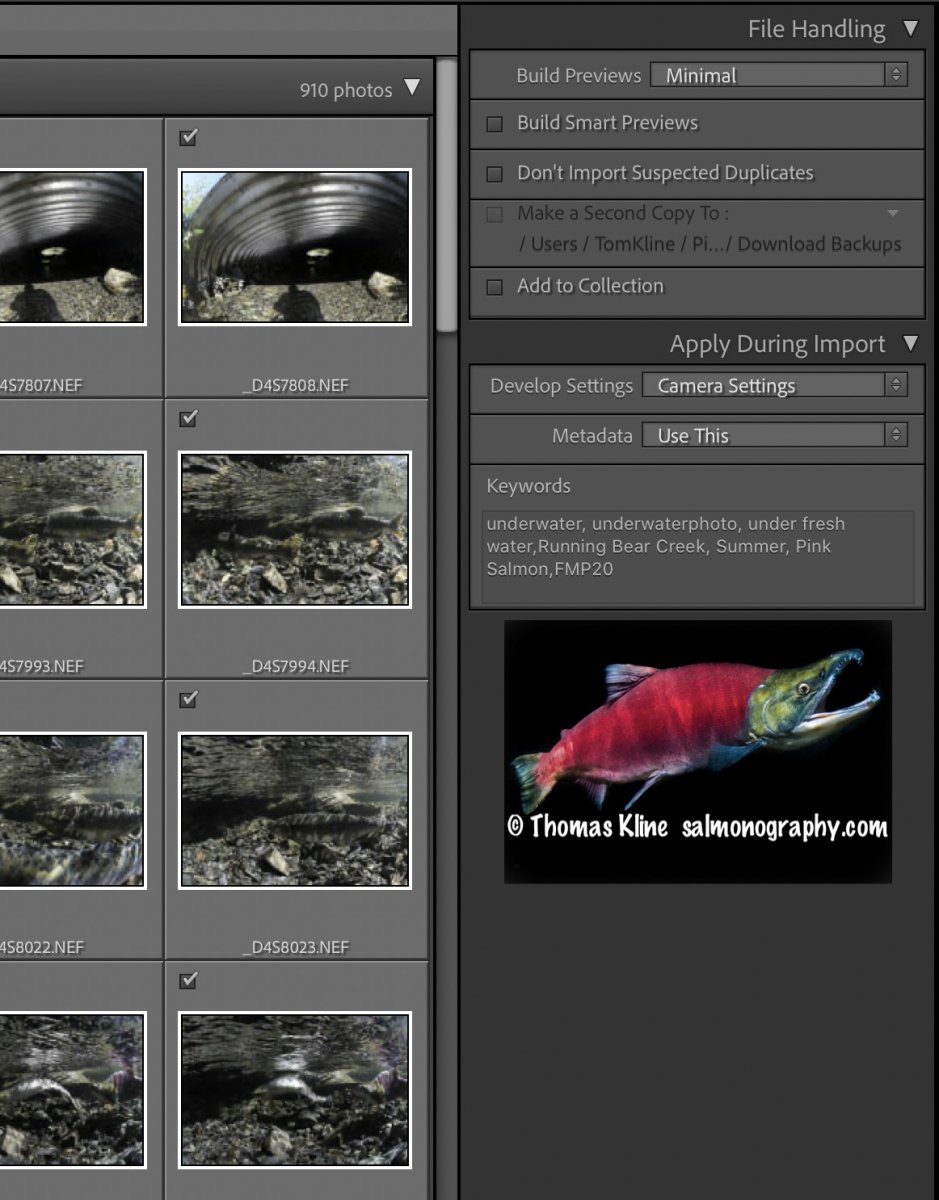
  6. If you want the image to be different after import select a different develop setting in the import menu. See attached pic. I had the camera on neutral and this is what the imports looked like before I worked on the images. There are a bunch of "canned" develop settings and one can even buy some that are UWP-centric from https://below-surface.com/en/

    Note as well the metadata import settings - I named mine "Use This", ROTFL

    Also I selected minimal previews which means it took just a few seconds to import each folder of images.

    BTW one can control how long 1:1 previews are kept - various ways in the menus from automatic to fully manual.

    Screen Shot 2021-09-05 at 8.56.09 PM.jpg

    Edited by Tom_Kline
  7. 1 minute ago, Tom_Kline said:

    If you want the image to be different after import select a different develop setting in the import menu. See attached pic. I had the camera on neutral and this is what the imports looked like before I worked on the images. There are a bunch of "canned" develop settings and one can even buy some that are UWP-centric from https://below-surface.com/en/

    Note as well the metadata import settings - I named mine "Use This", ROTFL

    Also I selected minimal preview which means it only took a few seconds to import each folder of images.

    BTW one can control how long 1:1 previews are kept - various ways in the menus from automatic to fully manual.

    Screen Shot 2021-09-05 at 8.56.09 PM.jpg

    I think my post has been misunderstood

    The point I was trying to make is that all raw processors make the image look like they think they look good so it is not true that your raw file is untouched

    There is a logic to deconstruct those settings and go back to what the camera actually shot

    Once you do that you realise that most times your shots were underexposed not clipped and lots of shots that look clipped with default settings are not

    Those 'presets' are in fact camera specific so that at the end all camera look similar in the program.

    This in turn means you look deeper at your camera metering which is also based on jpegs and does not tell you the full story

    When it comes to underwater presets or presets you can buy all start from that program default which is not actually neutral if that makes sense

    I guess this is a bit too complicated for this forum so I generated confusion instead

  8. @ i121:

    A better choice of wording might help. For example, raw processors do not actually think!  As well, you may not understand the problem. It is not clear that you do from the above.

    The underlying problem is largely due to the 8-bit nature of jpegs.  The raw image needs to be converted into something that can go on one's camera or computer screen that also has tonal range limits. This is not too different from what one had to deal with back in the film days. Ansel Adams et al. wrote about this extensively, re. zone system etc. The tonal range in the scene had to be made to fit within the tonal range of film which was much less than the luminosity range of a bright sunny day with deep shadows. This was controlled by selection of film as well as developer type and method (in the case of black and white). Once one had a film negative one had to go through the same process with making a print on paper.  The analogous controls in digital are the profiles one applies when converting from raw to screen and then to print. The profiles incorporate the mathematical parameters needed to do the conversion, think Y-intercept and slope from way back in school. There is no thinking involved except by the photographer.

    This page (especially towards the bottom; note the table) may help you understand things better than I can write:  https://www.cambridgeincolour.com/tutorials/dynamic-range.htm

  9. No Tom
    You are confusing gamma correction and display with cosmetic adjustments
    And cambridge in colour is not a good website I have discovered it has many gross errors like the article on diffraction so never go back

    Lightroom is applying a +1 ev adjustement to your shots plus a further adjustment camera model dependent and increasing contrast
    Why? Because adobe has determined this is what good looks like
    Undoing all of that makes you understand how the camera really captures data and from there you realise you can also go further when you shoot

    The lightroom defaults are especially unsuitable to underwater photography with flash many times you see people loading their images and saying damn I clipped that shot when in fact it was not clipped
    Then of course you need to fit the image in they dynamic range of the display (10 or less stops) or prints (6-7 stops) and that will require some compromises but at least you have more information to play with

    More or less all software do something similar but adobe products like to make images especially bright which in turn generates the misconception that underwater you need to start at negative values for the ambient just to give an example.
    Sent from my iPhone using Tapatalk

    Edited by Interceptor121
  10. The Cambridge site was the first hit when I web searched the topic and was good enough for my purposes. Gamma or slope of the curve is but one of the parameters I was referring to - the term gamma is also used in analog (film). In the case of digital we can move the endpoints (0 and 255 in 8-bit) to "fix" at least some of the clipping. Folks that simply use LR or any other program to simply convert their raw files are missing the boat so far as a major advantage of digital over film. Clipping is mostly a non-issue for those willing to do even a wee bit of work. You seem to be making a mountain out of a molehill IMHO.

    PP IMHO opinion requires some slider shifting etc. Failure to do so is not the fault of Adobe et al.

  11. The issue is that slider shifting is not the same as understanding clipping or how the camera actually works
    Anyway this is a bit too technical and will leave it at that for now


    Sent from my iPhone using Tapatalk

WaterPixels Store

Account

Navigation

Search

Search

Configure browser push notifications

Chrome (Android)
  1. Tap the lock icon next to the address bar.
  2. Tap Permissions → Notifications.
  3. Adjust your preference.
Chrome (Desktop)
  1. Click the padlock icon in the address bar.
  2. Select Site settings.
  3. Find Notifications and adjust your preference.