



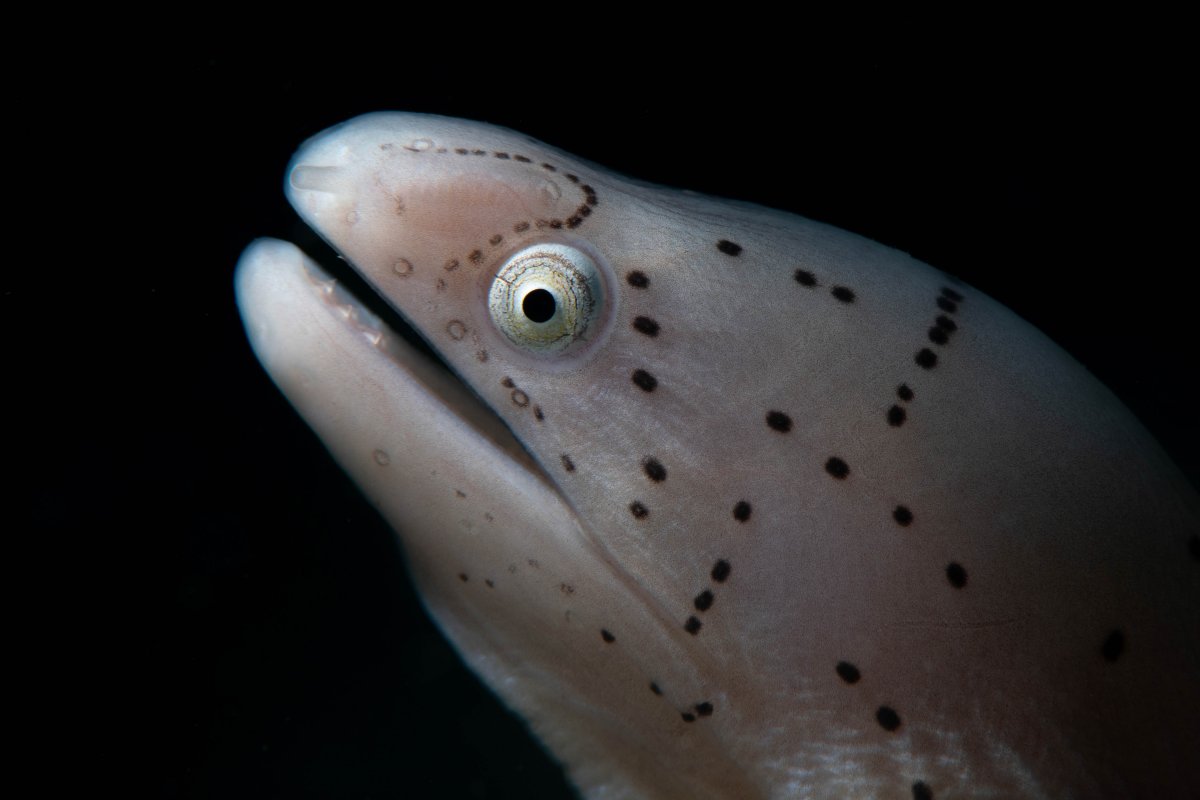
Hello what do people think of This shot with a snoot and a Nikon 100mm macro. would love to hear some feedback.
Read-only discussion
Hello what do people think of This shot with a snoot and a Nikon 100mm macro. would love to hear some feedback.
Pretty good!
Which snoot and strobe did you use? I like the way the strobe is slightly behind and above the moray's head. It brings out the texture of the skin.
Hard to think of a way to improve it. If this is a crop, the only thing I think I might try is to see if you can get the eye into the top third intersection (rule of thirds); or alternatively into the back, top intersection so that the moray is looking into black neutral space. But that's real fine-tuning.
hey Tim, thanks for you kind feedback on the shot, unfortunately its not a crop or id definitely use more neural space. Equipment wise i used a ion z240 with reef net snoot mount base with micro snoot fibre optic arm
Hey Jacob
How do you find aiming with the Z240 and the ReefNet snoot?Is it reasonably accurate?
Tim
very accurate, but very difficult and requires a lot of practice and patience. The shot was actually of a very juvenile moray so it was tiny, unfortunately i don't have that setup any more as i moved to video but now I am looking at going back to a system that can shoot both stills and video and that means i need to purchase some new strobes but on a budget so need to figure out what are the best budget friendly strobes out now.
4 hours ago, Jacobguymedia said:but on a budget so need to figure out what are the best budget friendly strobes out now.
Yeah, not easy. On a budget, second-hand Z240s or Z330s might be worth looking at. They do appear from time-to-time on the Wetpixel Classifieds.
I think practice and patience goes hand-in-hand with snooting! I switched from the Z240/Retra LSD to the Retra/Retra LSD. Snooting is now way better.

Terms of Use Privacy Policy Guidelines We have placed cookies on your device to help make this website better. You can adjust your cookie settings, otherwise we'll assume you're okay to continue.

A worldwide community for underwater imaging.
