



Skip to content

Lights, Strobes, and Lighting Technique / Archived topic

Inon Z240 Type 4 vs Type 1

Started by froop ·

  • 6Posts
  • 6Replies

Read-only discussion

Inon Z240 Type 4 vs Type 1

6 posts
  1. For once I'm posting not a question, but my experience for anyone else who may find themselves in a similar position to me.

    I have two Inon Z-240 strobes - one is an old Type 1, and the other a Type 4. Some subtle differences, but for all intents and purposes they're the same strobe when it comes to using them. One difference is the optical sensor. The Type 1 (and I think Types 2 and 3 too) have a great big bulky sensor, whereas the Type 4 has a slightly smaller one:
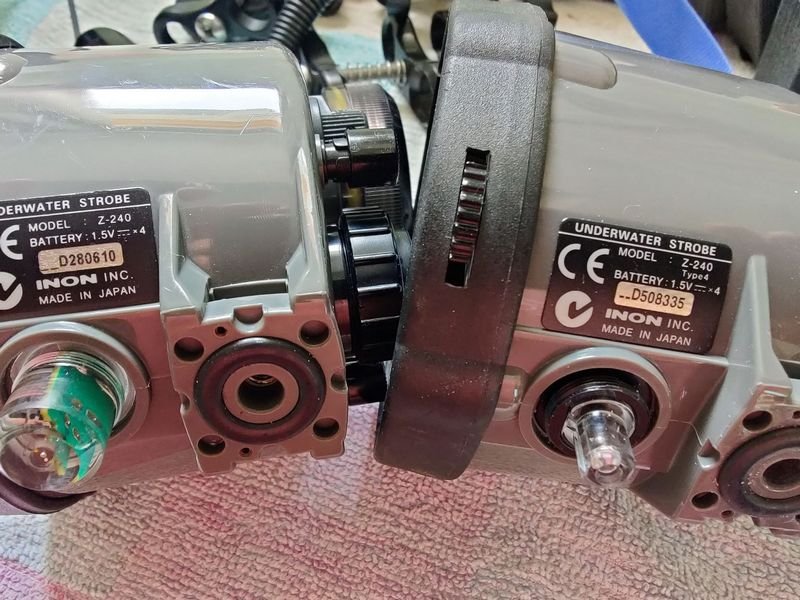
    inon-sensor.jpg.abbee9a0a10c95b07803d24aed55841a.jpg


    Up until now I've been using optical cables that have the Sea&Sea connector on each end - one end pushes into the housing, the other into the cap that fits over the strobe's sensor. On my last outing, something snagged the cable, ripped it in half, and pulled the swivel piece out of the sensor cap. In the pic below you can see cap on the right has a swivelling insert that the cable plug into. The one of the left went bye-bye.
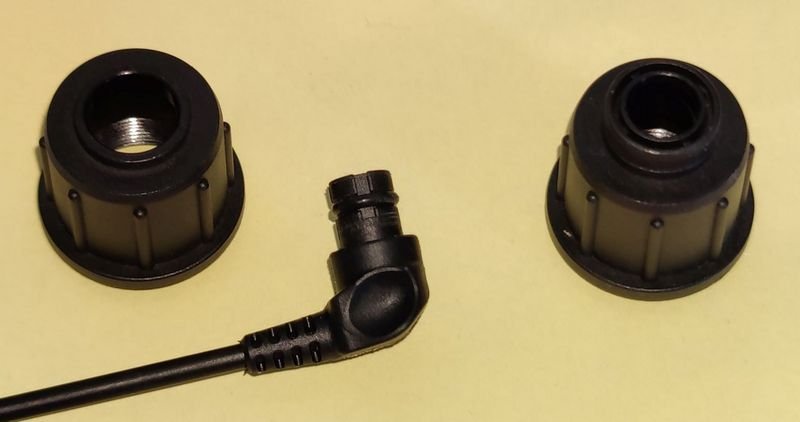
    inon-connector.jpg.86bea55396416de49ab9f2652198480c.jpg


    So I ordered myself two new cables, keeping my single remaining existing cable as a spare. I bought two of these cables, that stated were compatible with Z240 and Z330 strobes. But the screw connector is too small to fit over the great bit hulking sensor on the Type 1.
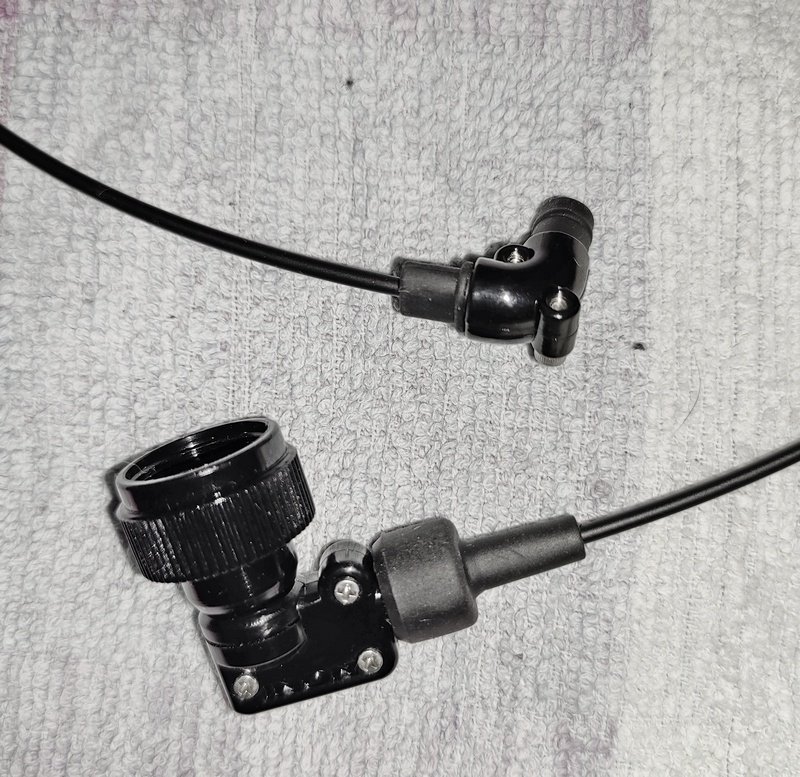
    inon-cable.thumb.jpg.bc07c943d261afeca23c467ca90f8243.jpg


    Luckily I had in my spares box a sensor cap that had a blanking cap in the hole - must've been from when I used to use an electronic sync cable. It just happened that the blanking hole was exactly the same size as the one on the Inon "L" cable. So I simply had to disassemble the "L" connector and replace the cap. It does mean that only one of my cables will attach to the Type 4 strobe. Big deal.
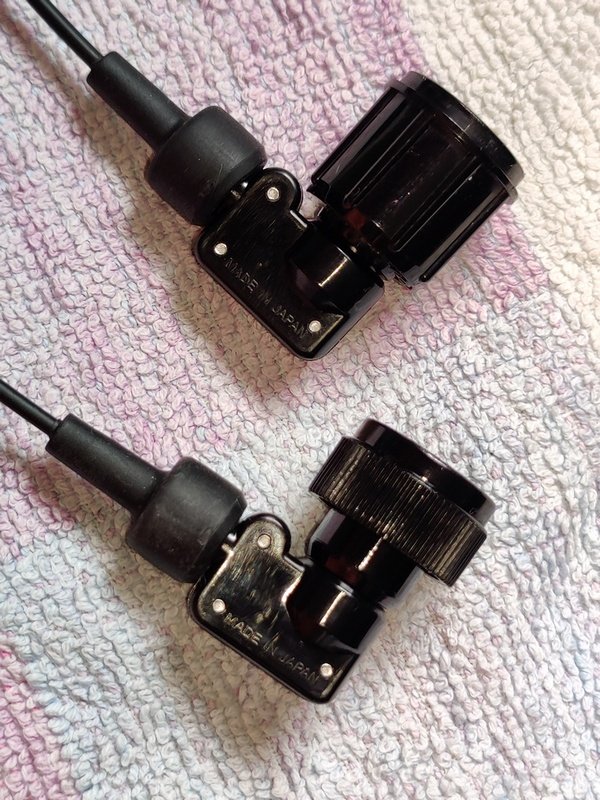
    inon-done.thumb.jpg.5e7ffc01a863dcf5d83a7fd2cbc109ad.jpg

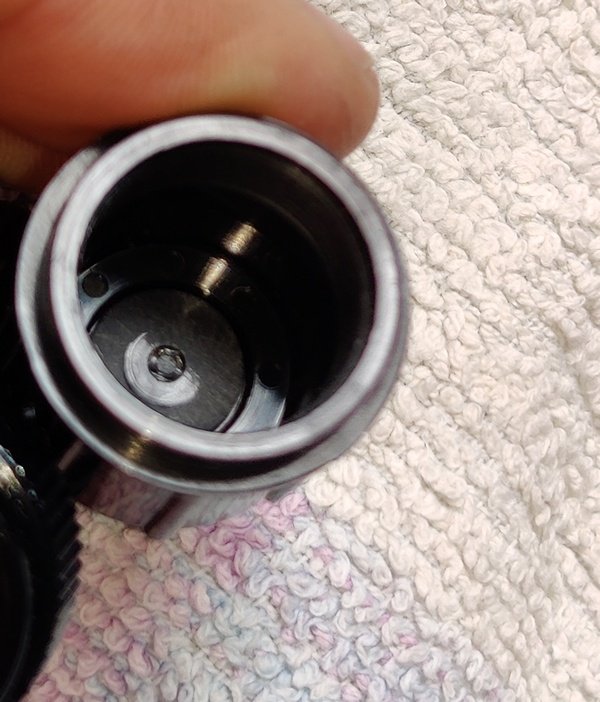
    I noticed that the connector was pushing a bit hard against the optical sensor. Once tightened down, the cable hardly rotated. So I disassembled again, removed the cable, and rubbed the inside of the connector on some sandpaper to take a few thou off:
    inon-inside.jpg.b3967cfe213ec6f4043eb1f3009efaa6.jpg

    End result - fits perfectly. Very happy with the outcome.

    Yes, I know I could've searched a little harder and found a replacement cap (http://www.divervision.com/howshot-fiber-adapter-for-inon-strobe-older-slave-sensor-FA-SS2IN.html) before buying the Inon cable. But once I had the cable, I wanted to be able to use it!


  2. Thanks froop, this is very useful information.

    I used to have both Type 4 and pre-Type 4 Inons and had forgotten about the differing sensor sizes. Well done on the fix.

  3. 9 hours ago, froop said:

    For once I'm posting not a question, but my experience for anyone else who may find themselves in a similar position to me.

    I have two Inon Z-240 strobes - one is an old Type 1, and the other a Type 4. Some subtle differences, but for all intents and purposes they're the same strobe when it comes to using them. One difference is the optical sensor. The Type 1 (and I think Types 2 and 3 too) have a great big bulky sensor, whereas the Type 4 has a slightly smaller one:


    Up until now I've been using optical cables that have the Sea&Sea connector on each end - one end pushes into the housing, the other into the cap that fits over the strobe's sensor. On my last outing, something snagged the cable, ripped it in half, and pulled the swivel piece out of the sensor cap. In the pic below you can see cap on the right has a swivelling insert that the cable plug into. The one of the left went bye-bye.


    So I ordered myself two new cables, keeping my single remaining existing cable as a spare. I bought two of these cables, that stated were compatible with Z240 and Z330 strobes. But the screw connector is too small to fit over the great bit hulking sensor on the Type 1.


    Luckily I had in my spares box a sensor cap that had a blanking cap in the hole - must've been from when I used to use an electronic sync cable. It just happened that the blanking hole was exactly the same size as the one on the Inon "L" cable. So I simply had to disassemble the "L" connector and replace the cap. It does mean that only one of my cables will attach to the Type 4 strobe. Big deal.


    I noticed that the connector was pushing a bit hard against the optical sensor. Once tightened down, the cable hardly rotated. So I disassembled again, removed the cable, and rubbed the inside of the connector on some sandpaper to take a few thou off:


    End result - fits perfectly. Very happy with the outcome.

    Yes, I know I could've searched a little harder and found a replacement cap (http://www.divervision.com/howshot-fiber-adapter-for-inon-strobe-older-slave-sensor-FA-SS2IN.html) before buying the Inon cable. But once I had the cable, I wanted to be able to use it!

    If you buy the INON 90°L connector it comes with both types of screw on cap and you can change over to the smaller cap.  This is the item: https://www.housingcamera.com/id4748-inon-l-connector.html

    The cables also come with both cap types.

    I use the larger cap on both my type 4 strobes.  The threads on my strobes sensors got damaged and the larger cap is easier to screw on.

    INON also have an instruction page on how to modify and maintain the cables.  The cable ends are not moulded on and as a result they are repairable: 

    http://www.inon.jp/technicalguide/cable-l.html


  4. 22 minutes ago, ChrisRoss said:

    If you buy the INON 90°L connector it comes with both types of screw on cap and you can change over to the smaller cap.  This is the item: https://www.housingcamera.com/id4748-inon-l-connector.html

    The cables also come with both cap types. 

    Hmm.. not the ones I got from https://underwater.com.au/shop/fibre-optic-d-cable-inon-l-type-l-rubber-bush-set-2.html

    I'm assuming that since the older versions are so old now, there is not much demand, therefore not much supply of the larger connector.

    Edited by froop
  5. 1 hour ago, froop said:

    Hmm.. not the ones I got from https://underwater.com.au/shop/fibre-optic-d-cable-inon-l-type-l-rubber-bush-set-2.html

    I'm assuming that since the older versions are so old now, there is not much demand, therefore not much supply of the larger connector.

    I bought one in Japan a few years back and it had both, maybe they stoped doing that.  They still include both in the L connector though.  Either way it's good you can take them apart and repair them.

  6. I have a type 3 and type 4 but am upset there is no longer support or parts for them...please let me know if you upgrade!

Kraken Sports

Account

Navigation

Search

Search

Configure browser push notifications

Chrome (Android)
  1. Tap the lock icon next to the address bar.
  2. Tap Permissions → Notifications.
  3. Adjust your preference.
Chrome (Desktop)
  1. Click the padlock icon in the address bar.
  2. Select Site settings.
  3. Find Notifications and adjust your preference.