Skip to content

Beginner Forum / Archived topic

Nauticam N50 3.5 inch Acrylic Dome Port

Started by Sandyzoo2 ·

  • 8Posts
  • 8Replies

Read-only discussion

Nauticam N50 3.5 inch Acrylic Dome Port

8 posts
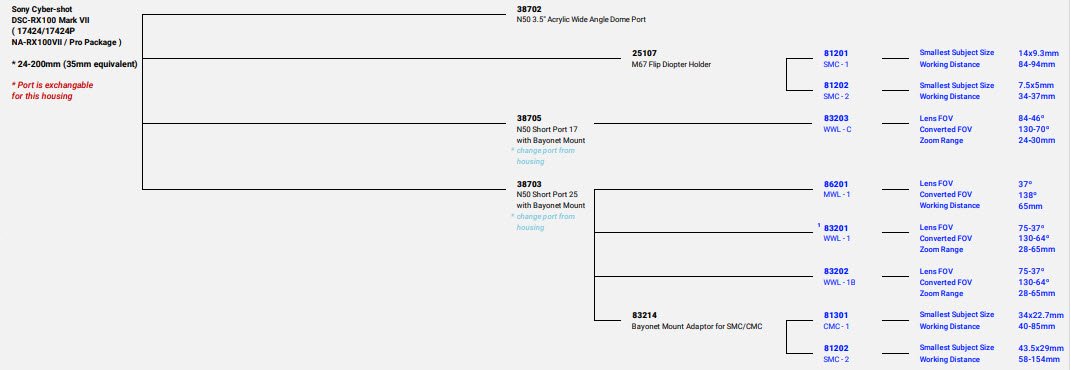
  1. Apoloigies for the newbie questions, I have checked the port chart and this is listed, but I can't quite understand the implications.

    I am wondering if the Nauticam N50 3.5 inch Acrylic Dome Port suitble for the RX100vii in the Nauticam housing?  Will it allow me to shoot using the full zoom range with the standard port? Does it efectively comprise of a port and a dome combines, albeit with purely a correction to the water diffraction, rather than being a wide-angle lense?

    I am considering that it may be a good option to start life with the camera, along aith a strobe or two, while I learn the ropes.

    Paul

    Edited by Sandyzoo2
  2. 2 hours ago, Sandyzoo2 said:

    I am wondering if the Nauticam N50 3.5 inch Acrylic Dome Port suitble for the RX100vii in the Nauticam housing?

    It's on the port chart, so it will fit.

    2 hours ago, Sandyzoo2 said:

    Will it allow me to shoot using the full zoom range with the standard port?

    Pretty sure it won't. The standard port is quite long to allow the lens to fully extend; the N50 port is quite a bit shorter.

    2 hours ago, Sandyzoo2 said:

    Does it efectively comprise of a port and a dome combines, albeit with purely a correction to the water diffraction, rather than being a wide-angle lense?

    It will restore the in-air angle of view for your lens, but nothing more than that. Most likely it will work at 24mm and possibly a little bit more zoom, but nothing close to the full 200mm extension. For the reference, the diagonal field of view for a 24mm lens is 75 degrees - that's what you'll get with the N50 port, whereas a WWL-C will give you 130 degrees.

  3. @Barmaglot - You exist in this place too!

    Thanks or the reply.  For some reason the port chart doesn't have any info in the optical performance column, so it is hard to tell.

    For the "short ports" I can see the zoom range, hence my query / confusion!


    2022-02-17_15-02-29.jpg

  4. Looking at pictures of the standard port and the 3,5" dome I would think you actually get the whole zoom range. For general purpose video this is probably a pretty decent option and certainly cheaper than the WWL-1. Shame there is no flip adapter like there is for the N85 4" port. That could be really cool...

  5. 8 hours ago, Sandyzoo2 said:

    @Barmaglot - You exist in this place too!

    Thanks or the reply.  For some reason the port chart doesn't have any info in the optical performance column, so it is hard to tell.

    For the "short ports" I can see the zoom range, hence my query / confusion!


    2022-02-17_15-02-29.jpg

    I would think it allows the full zoom range otherwise they would list a restricted zoom range, the optical properties is only used for wet lenses where they can report the usable zoom range with the wet lens.  Looking at the 3.5"dome it looks to be a similar size to the standard rectangular dome which allows the full zoom range to be used.  As others have said your field of view will be wider, but 24mm is not that wide.

    Whether it's a good option depends on what you like to shoot.  The RX100VII is a bit problematic as the lens is so long at maximum zoom.  This is a problem for using a wet wide lens as at the min zoom setting the lens is too far from port glass so the camera vignettes and you need to zoom in.  Nauticam don't offer a solution to add a wet lens to the standard port as you need to zoom in so much that  it negates most of the benefit of the wet lens.  They offer a short port which limits zoom to 65mm to use with the WWL which gives you the full angle of view, but rules out anything approaching macro on that dive.

  6. Thanks @ChrisRoss

    It seems like perhaps the benefit of this over the standard port is small.  I think my hard earned would be better spent elsewhere!


  7. 1 hour ago, Sandyzoo2 said:

    Thanks @ChrisRoss

    It seems like perhaps the benefit of this over the standard port is small.  I think my hard earned would be better spent elsewhere!


    perhaps - using 24mm through the flat port works but the corners suffer chromatic aberrations and are a little soft and it it's only a 32mm lens equivalent field of view.  A proper wide lens needs one of the short port options plus the wetlens.  There are plenty of options around for that at various price points but choosing one is a whole another post as wet lenses have their pluses and minuses and a wide range of price points.

  8. 11 hours ago, ChrisRoss said:

    Nauticam don't offer a solution to add a wet lens to the standard port as you need to zoom in so much that  it negates most of the benefit of the wet lens.

    I think you meant wet wide lens here, as the standard port has an option for flip diopter attachment.

    11 hours ago, ChrisRoss said:

    They offer a short port which limits zoom to 65mm to use with the WWL which gives you the full angle of view, but rules out anything approaching macro on that dive.

    I dunno, a 34x23mm frame with CMC-1 is pretty decent macro capability. It's basically what full-frame cameras get at 1:1 without add-on diopters. You won't fill the frame with a Shaun the Sheep or a sexy shrimp, but most nudibranchs, anemone crabs, harlequin shrimp, small gobies, etc? That should be perfectly fine. Working distance range of 40-85mm is pretty good as well.

    17 minutes ago, ChrisRoss said:

    There are plenty of options around for that at various price points but choosing one is a whole another post as wet lenses have their pluses and minuses and a wide range of price points. 

    Yeah, we've been discussing it here. Problem is, Nauticam's built-in bayonet really limits one's choices to basically Nauticam, Nauticam, or maybe Nauticam.


Account

Navigation

Search

Search

Configure browser push notifications

Chrome (Android)
  1. Tap the lock icon next to the address bar.
  2. Tap Permissions → Notifications.
  3. Adjust your preference.
Chrome (Desktop)
  1. Click the padlock icon in the address bar.
  2. Select Site settings.
  3. Find Notifications and adjust your preference.