Skip to content

Shooting Technique, Workflow and Editing / Archived topic

Monitor calibration problems?

Started by Architeuthis ·

  • 11Posts
  • 11Replies

Read-only discussion

Monitor calibration problems?

11 posts
  1. I use a BenQ SW270c for editing my photos with Adobe LR und PS. As computers I use Laptops (a new MacBook Pro M1 and an older Lenovo Thinkpad i7). All monitors get calibrated using the Xrite i1 display plus colorimeter on a regular basis (following the advice of "Artisright" on Youtube; Laptop monitors get calibrated in sRGB space and the BenQ both in sRGB and aRGB (switchable with the "hockeypuck" device of the monitor)).


    => Despite all these efforts the BenQ 270c exerts a clear green cast and colors look oversaturated (more in aRGB mode and less in  sRGB mode).


    I understand that the BenQ has a bigger color space, but what is the advantage of calibration when the displays look clearly different (at least in sRGB mode and with the good retina display of the macbook, that should easily be able to display sRGB)?

    => I assume I make something wrong, what is it...:(?


    Wolfgang

    Edited by Architeuthis
  2. Is it this one?  https://www.xrite.com/categories/calibration-profiling/chart-readers/i1display-pro-plus

    I use the i1 Display Pro and it does a nice job. If you are getting a green cast there are some problems.  Questions:

    • what software are you using to calibrate?
    • X-rite software?
    • BenQ palette master?
    • Do you warm up prior to doing the calibration?

    Let me know what you do and I can see what guidance I can offer


  3. Wolfgang, any chance you have levels of outdoor light hitting the screen? Just a thought. 

  4. 58 minutes ago, ChrisRoss said:

    Is it this one?  https://www.xrite.com/categories/calibration-profiling/chart-readers/i1display-pro-plus

    I use the i1 Display Pro and it does a nice job. If you are getting a green cast there are some problems.  Questions:

    • what software are you using to calibrate?
    • X-rite software?
    • BenQ palette master?
    • Do you warm up prior to doing the calibration?

    Let me know what you do and I can see what guidance I can offer


    Yes it is the "i1Display Pro Plus". For the BenW SW270c I use Palette master elements (two separate calibrations: one for aRGB and another for sRGB; the monitor is hardware calibratable and one can switch between these two different settings). For the laptop monitors I use the software provided with X-rite (just sRGB for them). I warm up. There is light from the window coming in, but in the dark the difference looks even stronger (the laptop monitors, by the way, look similar)...

    Wolfgang


    Wolfgang

    Edited by Architeuthis
  5. 12 minutes ago, Architeuthis said:

    For the BenW SW270c I use Palette master elements (two separate calibrations: one for aRGB and another for sRGB; the monitor is hardware calibratable and one can switch between these two different settings). For the laptop monitors I use the software provided with X-rite (just sRGB for them). I warm up. There is light from the window coming in, but in the dark the difference looks even stronger (the laptop monitors, by the way, look similar)...

    Wolfgang


    Wolfgang

    If using palette master, I would suggest following this guide.  The guy who owns this business really knows his colour management stuff.  One difference is the recommendation to use Panel native to calibrate.  this is the guide:

    https://imagescience.com.au/knowledge/calibrating-benq-p-series-monitors-with-palette-master

    You can check in Photoshop that the calibration is right by making a screen filling image that is neutral - for example a screen filled with 128,128,128 should look neutral with no casts. 

    Is the cast there in all applications , desktop, etc?  What about if you remove calibration and just set the monitor to Adobe RGB ?  Do you make double sure the measuring device sits flat on the screen so ambient light can't get in?

    It's always possible you have a bad measuring device, they are only as good as the filters they use to measure the colours.


    Edited by ChrisRoss
  6. 26 minutes ago, ChrisRoss said:

    If using palette master, I would suggest following this guide.  The guy who owns this business really knows his colour management stuff.  One difference is the recommendation to use Panel native to calibrate.  this is the guide:

    https://imagescience.com.au/knowledge/calibrating-benq-p-series-monitors-with-palette-master

    => I will try another calibration, including panel native ..

    You can check in Photoshop that the calibration is right by making a screen filling image that is neutral - for example a screen filled with 128,128,128 should look neutral with no casts. 

    Is the cast there in all applications , desktop, etc?  What about if you remove calibration and just set the monitor to Adobe RGB ?  Do you make double sure the measuring device sits flat on the screen so ambient light can't get in?

    => The cast is always there. In the factory setting for aRGB it is strongest...

    It's always possible you have a bad measuring device, they are only as good as the filters they use to measure the colours.


    Edited by Architeuthis
  7. I bought SpyderX but I'm not conviced at all with their product. All times I calibrate the results are very different....

  8. 8 hours ago, Architeuthis said:


    By always there - even with no profile active?  sounds like a problem with the panel?  But the calibration in theory should fix any casts.

    If it has a green cast it would mean you will edit your images to have too much magenta in them - which would be visible on a prperly calibrated monitor.

  9. Thank you for the valuable input Chris, Tim and Viking...

    I have now recalibrated both monitors with the difference that I use the entire native color space of the BenQ SW270c monitor for calibrating (then it is calibrated for aRGB and sRGB; previously it was restricted to aRGB or sRGB what was calibrated for the respective space)).

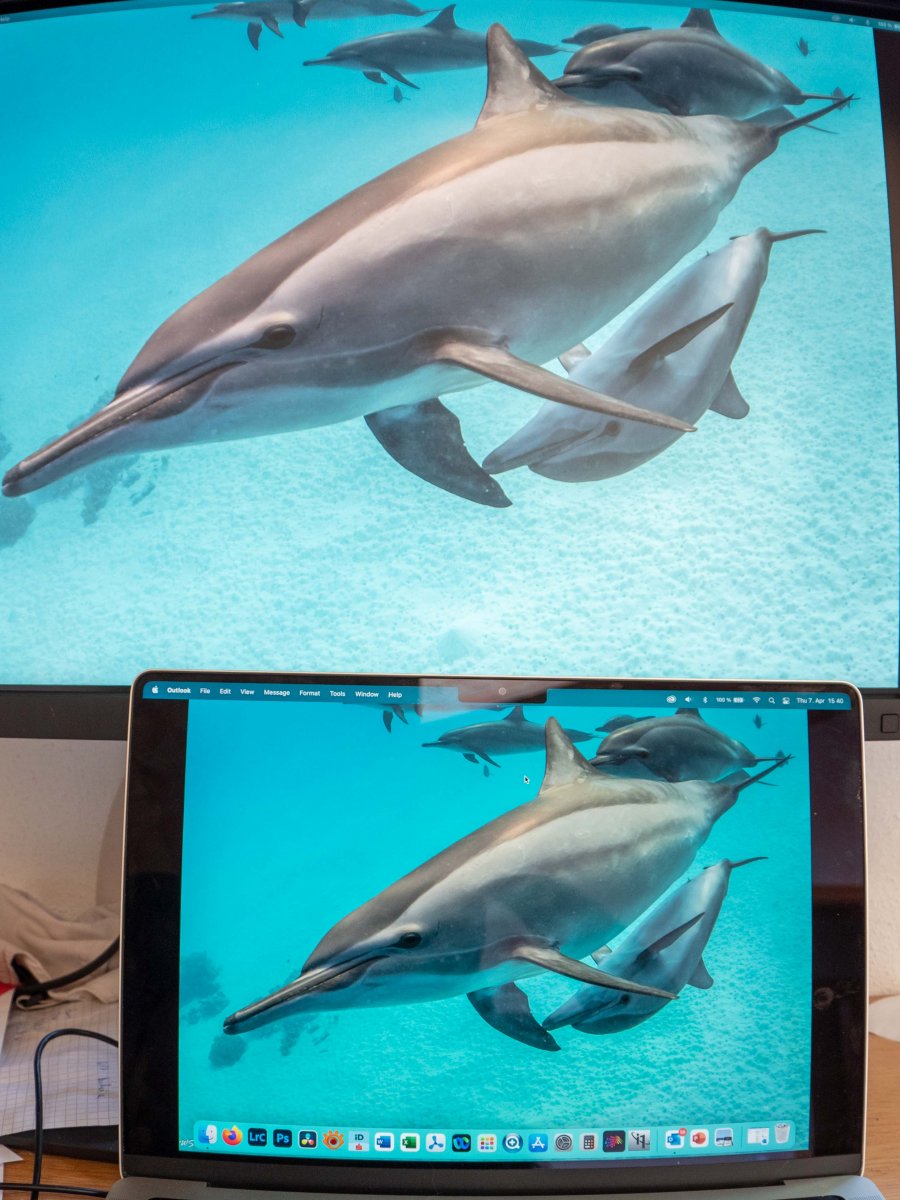
    The results are improved to a substantial extend, but here is still a difference (upper is SW270c, lower is retina display of Macbook Pro M1):

    WetpixelWetpixel.thumb.jpg.e3934fef5bfe47b1e6b348f373735de8.jpg


    There is now almost now difference on the SW20c, when I switch inbetween sRGB and aRGB (previously there was more difference). I guess these differences would need more and finer calibration?


    Wolfgang


    Edited by Architeuthis
  10. 7 minutes ago, Architeuthis said:

    Thank you for the valuable input Chris, Tim and Viking...

    I have now recalibrated both monitors with the difference that I use the entire native color space of the BenQ SW270c monitor for calibrating (then it is calibrated for aRGB and sRGB; previously it was restricted to aRGB or sRGB what was calibrated for the respective space)).

    The results are improved to a substantial extend, but here is still a difference (upper is SW270c, lower is retina display of Macbook Pro M1):


    There is now almost now difference on the SW20c, when I switch inbetween sRGB and aRGB (previously there was more difference). I guess these differences would need more and finer calibration?


    Wolfgang


    Have a read of this article:  https://imagescience.com.au/knowledge/calibrate-multiple-times-with-direct-hardware-calibration-systems

    calibrating multiple times is recommended. 

    If you are talking about matching the two monitors - a difficult task - some more reading on this topic:  https://imagescience.com.au/knowledge/calibrating-dual-or-multiple-monitors

    Hopefully you'll get something you're happy with.  Some of the differences in the monitors seems to be the brightness - are they set to the same target brightness around 110-120 Cd/m2 or so? 

  11. I thank everybody for their valuable inputs... :good:

    The results are now greatly improved. There is still a difference, but it is much smaller: Both BenQ SW270c and MecBook Pro M1 monitors look now similar. When I view a photo, exported exclusively in sRGB color space, on the BenQ SW270c the appearence looks similar when it is viewed under sRGB settings, compared to viewing under aRGB settings (sounds logical to me, from where should additional colors come, when a sRGB photo is viewed with a monitor with larger (aRGB) gamut? When calibrated correctly the appearence should be identical)...

     The solution was mainly to use the native color gamut of the monitor and calibrate this for sRGB (or aRGB) - in contrast to the recommendations of "ArtisRight" in his otherwise very useful youtube videos. Secondly there was an automatic (and a little bit hidden) luminance adaption to ambient light at the MacBook monitor, that I had to switch off in order that both monitors always display at same luminance. Thirdly, calibration has to be performed repeatedly, more often and more carefully...


    Wolfgang

Marelux

Account

Navigation

Search

Search

Configure browser push notifications

Chrome (Android)
  1. Tap the lock icon next to the address bar.
  2. Tap Permissions → Notifications.
  3. Adjust your preference.
Chrome (Desktop)
  1. Click the padlock icon in the address bar.
  2. Select Site settings.
  3. Find Notifications and adjust your preference.