



Skip to content

Photography Gear and Technique / Archived topic

Viewfinder through Ikelite Point & Shoot

Started by Lobalobo ·

  • 4Posts
  • 4Replies

Read-only discussion

Viewfinder through Ikelite Point & Shoot

4 posts
  1. For photos of birds while kayaking, I need a waterproof/resistant point-and-shoot zoom camera that allows use of a viewfinder. Best images where I kayak are with morning sun to my back, which makes the lcd monitor useless. I also snorkel and so my thought is to get a camera housing that could be used either for kayaking (though the housing would be overkill there) or snorkeling (where the housing would be useful, though the zoom would be overkill). Inasmuch as I already own a Panasonic Lumix ZS-70, I may purchase an Ikelite housing for this camera.

    The question is whether, while kayaking, I'd be able to use the viewfinder. (While snorkeling, I'd use the lcd monitor). The Ikelite instruction manual says to set the camera to Monitor but, of course, these instructions have underwater photography in mind.  Anyone know whether the viewfinder would be useable through the housing, at least out of the water? See image below, and thanks in advance.
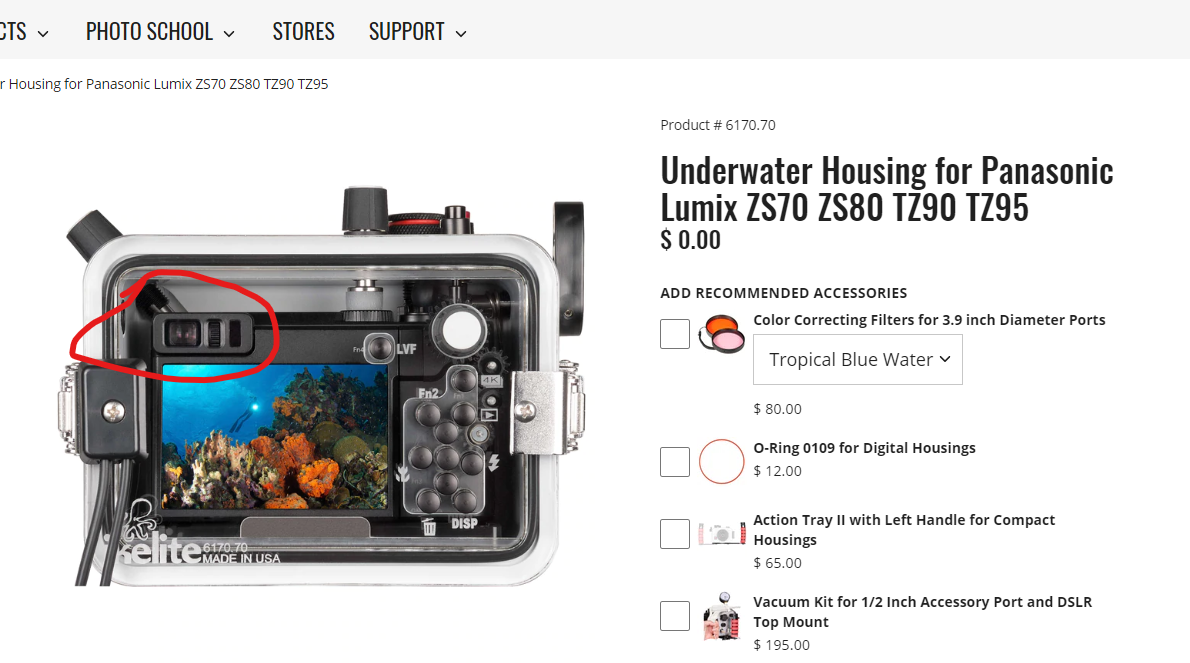
    image.thumb.png.e383f549128c88a77285128383619712.png 

  2. It's unlikely that you'll be able to get the proper eye relief from the EVF with the housing in the way. However, if your problem is the sun glare, you may be able to jury rig an LCD hood to the back of the housing. For example, the AOI UMG-01 mounts onto a pair of rails, so if you 3D print the equivalent rails and glue them to the back of your housing then it should just snap into place.

  3. You could try an LCD magnifying eyepiece like some of the ones on this page:

    https://www.aditech-uw.com/en/shop/cat-238-5-73.html

    You would need to develop a way to attach to the housing as most of them seem to be designed for AOI or Fantasea or other housings.

    I don't think you'd see much through the plexiglass back of the housing if trying to use the eye piece.

Account

Navigation

Search

Search

Configure browser push notifications

Chrome (Android)
  1. Tap the lock icon next to the address bar.
  2. Tap Permissions → Notifications.
  3. Adjust your preference.
Chrome (Desktop)
  1. Click the padlock icon in the address bar.
  2. Select Site settings.
  3. Find Notifications and adjust your preference.

