Skip to content

Beginner Forum / Archived topic

How to put more emphasis on the subject

Started by udic ·

  • 11Posts
  • 11Replies

Read-only discussion

How to put more emphasis on the subject

11 posts
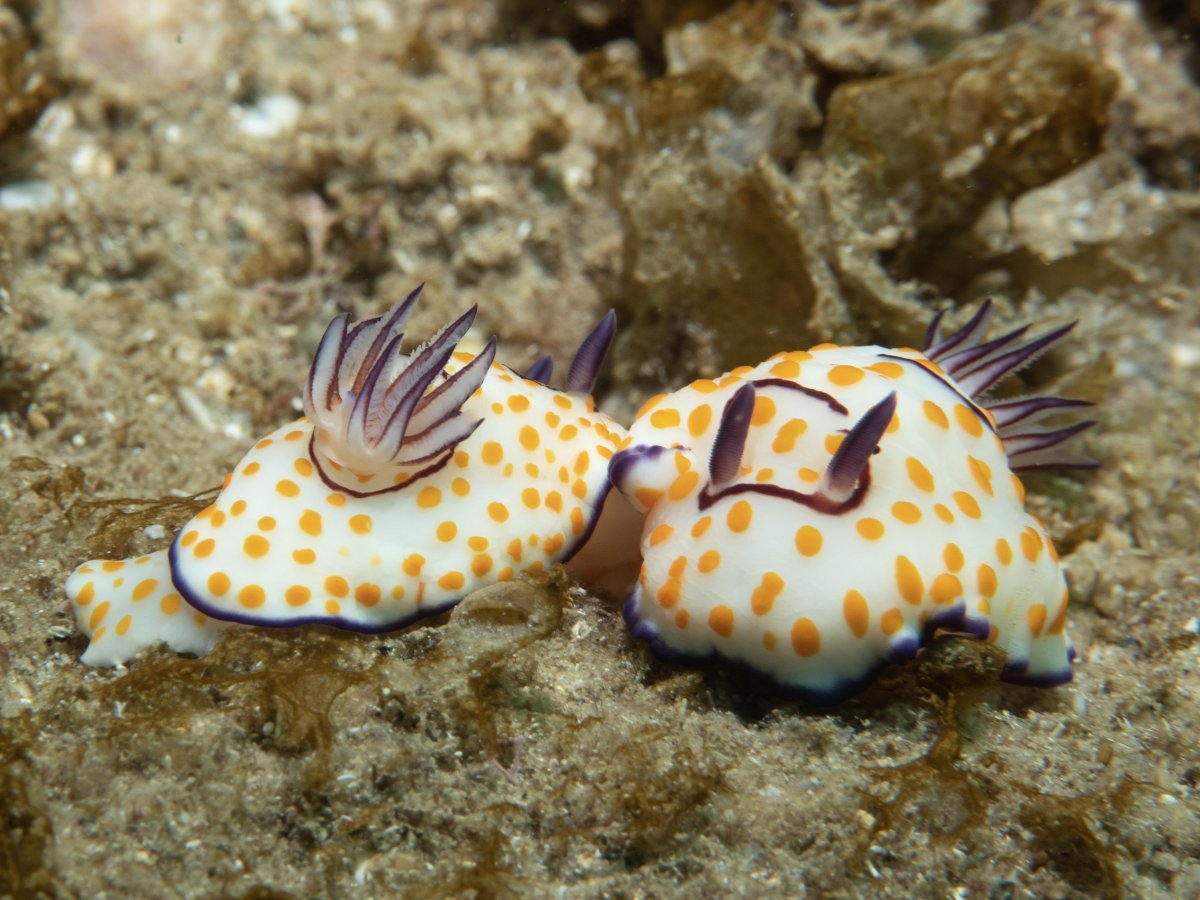
  1. Hi - Took this with my E-PL10 and one AOI strobe from the top (still a novice with these) - Any tips on how to make these stand out more out of the background?

    Also - I'm looking to plot the camera focus point in lightroom - found some links to a plugin for lightroom CC but no mention for lightroom - any tips if there's an option for that?

    Thanks, Udi.

    _UDI0528.jpg

  2. Hi Udi

    Welcome to Wetpixel. We hope you find it enjoyable and useful.

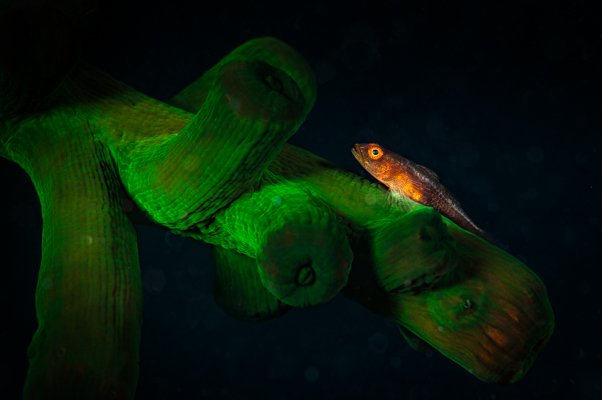
    Photographing against - and especially at a downwards angle - the substrate always makes it hard to get the subject to stand out. If you can, and, yeah, not always possible, shoot upwards. And, again, not always possible, look for subjects that stand out against a neutral space or a sympathetic texture or colour which does not overwhelm the subject.  A couple of examples are attached of shooting up and neutral backgrounds.

    So, if none of the above are feasible, what then? A snoot allows you to light just a small element of the image; using a wider aperture - and therefore less depth of field - will help a little isolate the subject from the background.

    Then in post-production. I see you are using LR: the new masks are brilliant for what you want to do. I'd try selecting the subjects, invert and then desaturate and de-clarity the background. Make a second mask of the subjects themselves and tweak a little with Dehaze, Clarity, Texture and maybe White. The key is not to over do it. The best make-up can't be seen! And give Effects > Vignetting a try - maybe at about -11 or -13. That could make quite a difference.
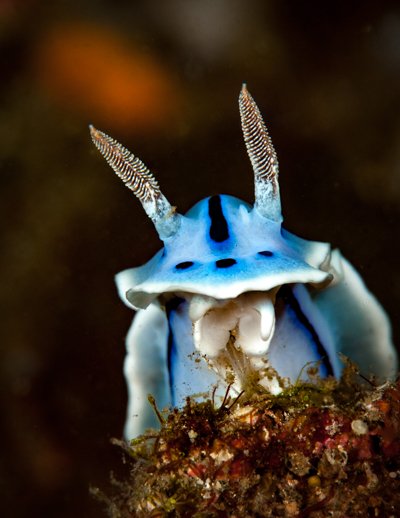
     

    TG22989.jpg

    TG23791.jpg

    Edited by TimG
  3. The key to this question is lighting and composition. The sample photo you shared has no shadows or depth to it. I imagine it was shot with two strobes pointing forward. A simple suggestion might be to work with just one strobe. Move it around, top, side, etc and see if you can get some more interesting images that have light and shadow. Experiment with the power level of the strobe as well. Less can be more some of the time. 

  4.  

    Hi Udic,

    As davehicks and timg said you need to change you lighting and composition a little. I'm not sure if you are shooting with one or two strobes. Rather than light up the nudis and everything around them you can try various ways to place more emphasis on the just the subject. Shallower DOF; getting closer and lower to help separate from the background; a single top-light; cross light from one side or with two strobes that reduce the light straying into the background; using lower power on the strobes and creating some contrast with different power from one side of the other; using a snoot to control what gets light.

    In LRoom you can create a radial filter to mask the edges and create some vignetting, you can select the sand area and try to bring it down a little with the exposure and black sliders. But the way this is exposed it may be a little hard to make too many changes without it being obvious or strange looking.

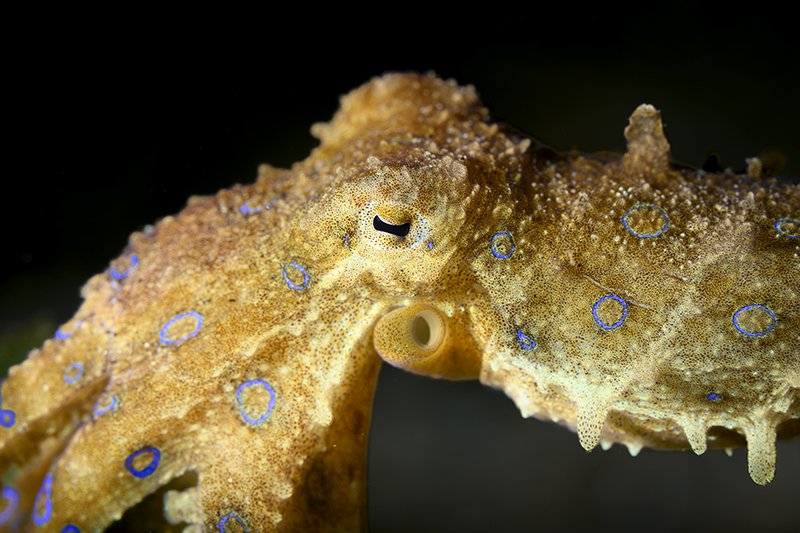
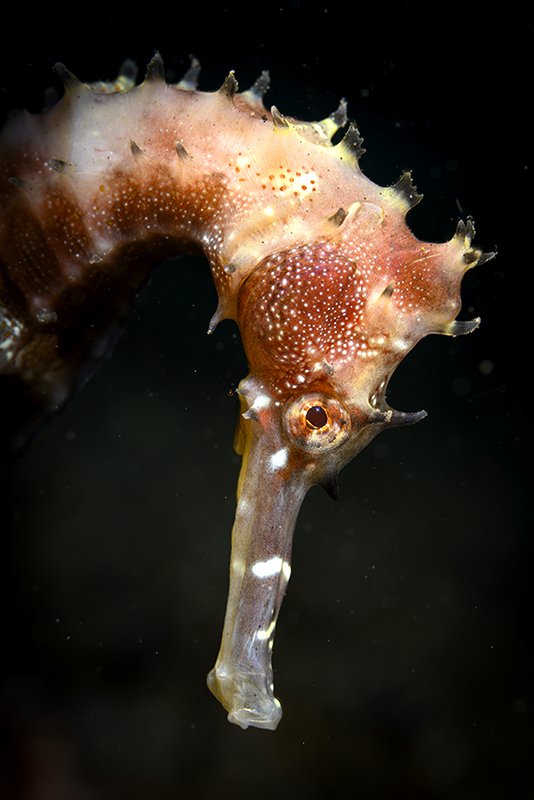
    In the images I shared below the seahorse was shot with a snoot straight down from above and a close-up diopter to get close and the octopus was shot with two strobes cross-lighting it, plus a shallower depth of field to emphasize the side of the critter.


    mini-blue_JBX3763.jpg

    mini-seahorse_JBX3698.jpg

  5.  

    @TimG I like your nudibranch shot

  6. 6 hours ago, TimG said:

    Hi Udi

    Welcome to Wetpixel. We hope you find it enjoyable and useful.

    Photographing against - and especially at a downwards angle - the substrate always makes it hard to get the subject to stand out. If you can, and, yeah, not always possible, shoot upwards. And, again, not always possible, look for subjects that stand out against a neutral pace or a sympathetic texture or colour which does not overwhelm the subject.  A couple of examples are attached of shooting up and neutral backgrounds.

    So, if none of the above are feasible, what then? A snoot allows you to light just a small element of the image; using a wider aperture - and therefore less depth of field - will help a little isolate the subject from the background.

    Then in post-production. I see you are using LR: the new masks are brilliant for what you want to do. I'd try selecting the subjects, invert and then desaturate and de-clarity the background. Make a second mask of the subjects themselves and tweak a little with Dehaze, Clarity, Texture and maybe White. The key is not to over do it. The best make-up can't be seen! And give Effects > Vignetting a try - maybe at about -11 or -13. That could make quite a difference.

     

    TG22989.jpg

    TG23791.jpg


    6 hours ago, davehicks said:

    The key to this question is lighting and composition. The sample photo you shared has no shadows or depth to it. I imagine it was shot with two strobes pointing forward. A simple suggestion might be to work with just one strobe. Move it around, top, side, etc and see if you can get some more interesting images that have light and shadow. Experiment with the power level of the strobe as well. Less can be more some of the time. 


    4 hours ago, rinjani said:


    Hi Udic,

    As davehicks and timg said you need to change you lighting and composition a little. I'm not sure if you are shooting with one or two strobes. Rather than light up the nudis and everything around them you can try various ways to place more emphasis on the just the subject. Shallower DOF; getting closer and lower to help separate from the background; a single top-light; cross light from one side or with two strobes that reduce the light straying into the background; using lower power on the strobes and creating some contrast with different power from one side of the other; using a snoot to control what gets light.

    In LRoom you can create a radial filter to mask the edges and create some vignetting, you can select the sand area and try to bring it down a little with the exposure and black sliders. But the way this is exposed it may be a little hard to make too many changes without it being obvious or strange looking.

    In the images I shared below the seahorse was shot with a snoot straight down from above and a close-up diopter to get close and the octopus was shot with two strobes cross-lighting it, plus a shallower depth of field to emphasize the side of the critter.


    mini-blue_JBX3763.jpg

    mini-seahorse_JBX3698.jpg

    Thank you all for such a warm welcome to wetpixel and for the tips - I was shooting with one strobe, will look for ways to shoot upwards - probably need to do it also it a day that I'm not rocked by the waves too much ;-)

  7. Hi Udi
    Welcome to Wetpixel. We hope you find it enjoyable and useful.
    Photographing against - and especially at a downwards angle - the substrate always makes it hard to get the subject to stand out. If you can, and, yeah, not always possible, shoot upwards. And, again, not always possible, look for subjects that stand out against a neutral space or a sympathetic texture or colour which does not overwhelm the subject.  A couple of examples are attached of shooting up and neutral backgrounds.
    So, if none of the above are feasible, what then? A snoot allows you to light just a small element of the image; using a wider aperture - and therefore less depth of field - will help a little isolate the subject from the background.
    Then in post-production. I see you are using LR: the new masks are brilliant for what you want to do. I'd try selecting the subjects, invert and then desaturate and de-clarity the background. Make a second mask of the subjects themselves and tweak a little with Dehaze, Clarity, Texture and maybe White. The key is not to over do it. The best make-up can't be seen! And give Effects > Vignetting a try - maybe at about -11 or -13. That could make quite a difference.

     
    TG22989.jpg.e444e33e9ea7a64867815d2eec85ab11.jpg
    TG23791.jpg.58ce57e57f7330f7333f92a7d3ede09f.jpg
    Thanks Tim, I was able to include some water in the background here (although certainly not a macro picture :-) )4c40da7d3b4719ebdad66ce483fca039.jpg

    Sent from my SM-G973F using Tapatalk

  8. On 6/19/2022 at 3:04 PM, udic said:

    Hi - Took this with my E-PL10 and one AOI strobe from the top (still a novice with these) - Any tips on how to make these stand out more out of the background?

    Also - I'm looking to plot the camera focus point in lightroom - found some links to a plugin for lightroom CC but no mention for lightroom - any tips if there's an option for that?

    Thanks, Udi.

    _UDI0528.jpg

    Hey Udi,

    I just found a software package called "Fast Raw Review" there is a free and a paid version. I went for the paid version ($30ish USD), there is a feature that tells you what is in focus. FRR also lets me review my raw images SO SO much faster than my raw processor (I use On1 Photo Raw)


    For the images you have, you could try adding a vignette or a radial filter to help darken the background.

  9. Thanks @Dann-Oh, it does highlights areas in the photo which are in focus, but does not show (or at least i did not find) where was the focus point of the camera.

    Sent from my SM-G973F using Tapatalk

Keldan

Account

Navigation

Search

Search

Configure browser push notifications

Chrome (Android)
  1. Tap the lock icon next to the address bar.
  2. Tap Permissions → Notifications.
  3. Adjust your preference.
Chrome (Desktop)
  1. Click the padlock icon in the address bar.
  2. Select Site settings.
  3. Find Notifications and adjust your preference.