Skip to content

Photography Gear and Technique / Archived topic

Nauticam viewfinder questions - ML vs DSLR

Started by phxazcraig ·

  • 5Posts
  • 5Replies

Read-only discussion

Nauticam viewfinder questions - ML vs DSLR

5 posts
  1. I have two Nauticam housing for my DSLR's - NA-D810 and NA-D850.   I have just purchased a Nauticam Z9 housing, plus a 45 degree (0.8x) mirrorless viewfinder.

    I have only used my 180 degree viewfinder for the D810/D850, and I'm wondering what is different about the ML versions.   Can I save $1800 by reusing my old 180 viewfinder on the Z9 housing, even if I can't quite see the corners of the viewfinder or some such?  (Will it fit and not leak?)

  2. my understanding is that the differences are down to the nosepiece,  the SLR version has two pins to locate the nosepiece and prevent rotation in sleeve on the housing.  On the mirrorless version there is a flat machined so there is a D-shaped section that locates  at the outside end of the housing sleeve to prevent rotation.   You could previously buy the nosepiece separately but you would need to check if that were still possible.  Note that the viewfinders don't rotate inside the sleeve they are installed in - they have a rotation mechanism that is built into the viewfinder body.

    As far as which one you need, you can easily check if you have the housing in hand by referring to the viewfinder instructions you can see the difference in the shape of the two different viewfinder sleeves:  32201 32203 32204 32205 Instruction manual for viewfinders.pdf - Google Drive

    If you look at Nauticam's webpage for the Z9 housing you will see they list the 32201 viewfinder as compatible as well as the newer 32211 and 32212 viewfinders.  The 33201 is the DSLR style nosepiece version.

    There are a lot of mirrorless housing that take the DSLR style viewfinders, it is mainly the smaller housings for m43 etc that take the mirrorless style viewfinders and you need to look up the correct version for your housing.

    I expect that you should be able to install your existing viewfinder into your Z9 housing with no trouble.


  3. Today I tried fitting the old DSLR 180 viewfinder into the NA-Z9 housing.  Fit just fine!   I'm going to look more closely at the mount, comparing NA-Z9 and NA-D850 housings.   I wonder what is different on the ML 180 degrees?  I'm going to take it to Roatan this weekend and use it with the wide angle.  Unless I get really used to the 45 degree (actually 40 degrees) viewfinder while shooting macro.

  4. On 8/22/2022 at 8:57 AM, ChrisRoss said:

    m

    As far as which one you need, you can easily check if you have the housing in hand by referring to the viewfinder instructions you can see the difference in the shape of the two different viewfinder sleeves:  32201 32203 32204 32205 Instruction manual for viewfinders.pdf - Google Drive

    If you look at Nauticam's webpage for the Z9 housing you will see they list the 32201 viewfinder as compatible as well as the newer 32211 and 32212 viewfinders.  The 33201 is the DSLR style nosepiece version.

    I expect that you should be able to install your existing viewfinder into your Z9 housing with no trouble.

    I'll compare to my older housings in the daylight, but it sure seems like the Z9 housing has the exact same mount at the DSLR housing - 32201.

    I'm happy!   Now I have both viewfinders and can use which I want.

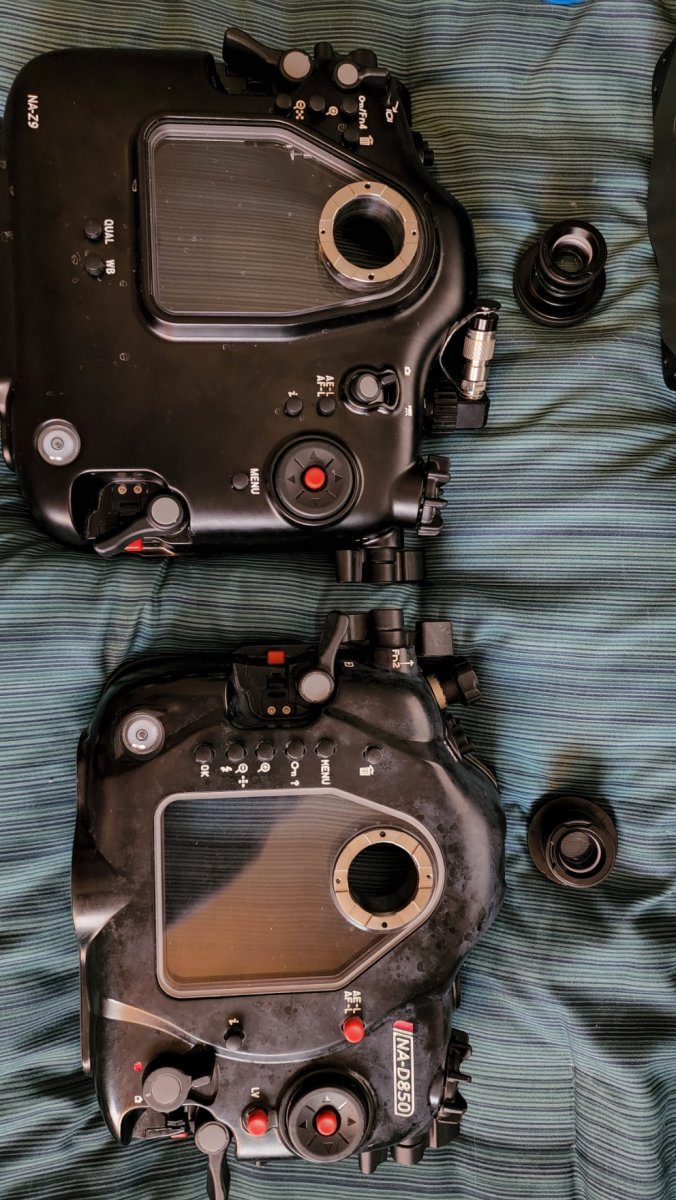
  5. I just took the stock viewfinder out of my D850 and Z9 housings and put the backs side-by-side.  The viewfinder mounts are identical in this case.   There is no fit issue at all putting my 2015-era 180 finder on the Z9 housing. 

    Here is the back side of the two housings:   The Z9 is obviously the one on the top/left.

    20220824_110113.thumb.jpg.9c04797328d52c6686ea1865e813a230.jpg

    Edited by phxazcraig
Marelux

Account

Navigation

Search

Search

Configure browser push notifications

Chrome (Android)
  1. Tap the lock icon next to the address bar.
  2. Tap Permissions → Notifications.
  3. Adjust your preference.
Chrome (Desktop)
  1. Click the padlock icon in the address bar.
  2. Select Site settings.
  3. Find Notifications and adjust your preference.