



Hi,
I have some styx floats but realize that I threw away some of the inserts that hold the float to the strobe arm.
Does someone have an idea of where I can get some again?
Thank you
Read-only discussion
Hi,
I have some styx floats but realize that I threw away some of the inserts that hold the float to the strobe arm.
Does someone have an idea of where I can get some again?
Thank you
You and me both.
5 hours ago, waterpixel said:Does someone have an idea of where I can get some again?
I'm sure the packaging for Stix comes with a small explanation sheet which has the email address of the manufacturer. Just looking through my stuff, I have probably thrown it away. But if someone can find the packaging, an email to them might do the trick.
A Google search didn't come up with a direct contact.
I'm assuming you're looking for the hemispherical bit you slide to fill the gap between the arm and the Stix.
Info here:
You could also consider using "zip ties" to hold the floats in place on the arms if there are slots in the arms.
26 minutes ago, Dann-Oh said:You could also consider using "zip ties" to hold the floats in place on the arms if there are slots in the arms.
It's a very sound idea, had not thought about it! Thank you
I'll message the company and will keep this forum updated on their response
Another option, if replacement pieces are not available, is a roll of 1/2" inch velcro "fast wrap." Cut to desired lengths. I use these with ULCS or Nauticam arms when I use less than a full complement of floats. It keeps the float where I want it instead of sliding up and down the arm. It can also prevent a loose-fitting center piece from disappearing into the sea. This could also work for you and unlike zip ties, these are reusable. I have used them over and over again with no sign of deterioration due to exposure to salt water.
18 hours ago, Draq said:Another option, if replacement pieces are not available, is a roll of 1/2" inch velcro "fast wrap." Cut to desired lengths. I use these with ULCS or Nauticam arms when I use less than a full complement of floats. It keeps the float where I want it instead of sliding up and down the arm. It can also prevent a loose-fitting center piece from disappearing into the sea. This could also work for you and unlike zip ties, these are reusable. I have used them over and over again with no sign of deterioration due to exposure to salt water.
Thanks Draq - do you have any picture you could share? I can't visualize what you mean with the velcro? Do you wrap it around the float or through it?
5 hours ago, waterpixel said:Thanks Draq - do you have any picture you could share? I can't visualize what you mean with the velcro? Do you wrap it around the float or through it?
I will take a picture and post later today
Sorry, I got delayed. I can't get to my usual stuff right now but I stuck a couple half-size floats on an arm with the velcro wrap to illustrate the idea. The velcro wraps all the way around the outside of the float and through the cutout in the arm. Floats don't move and center pieces cannot fall out. In this case velcro is wrapped around twice due to length, but I don't normally do that.
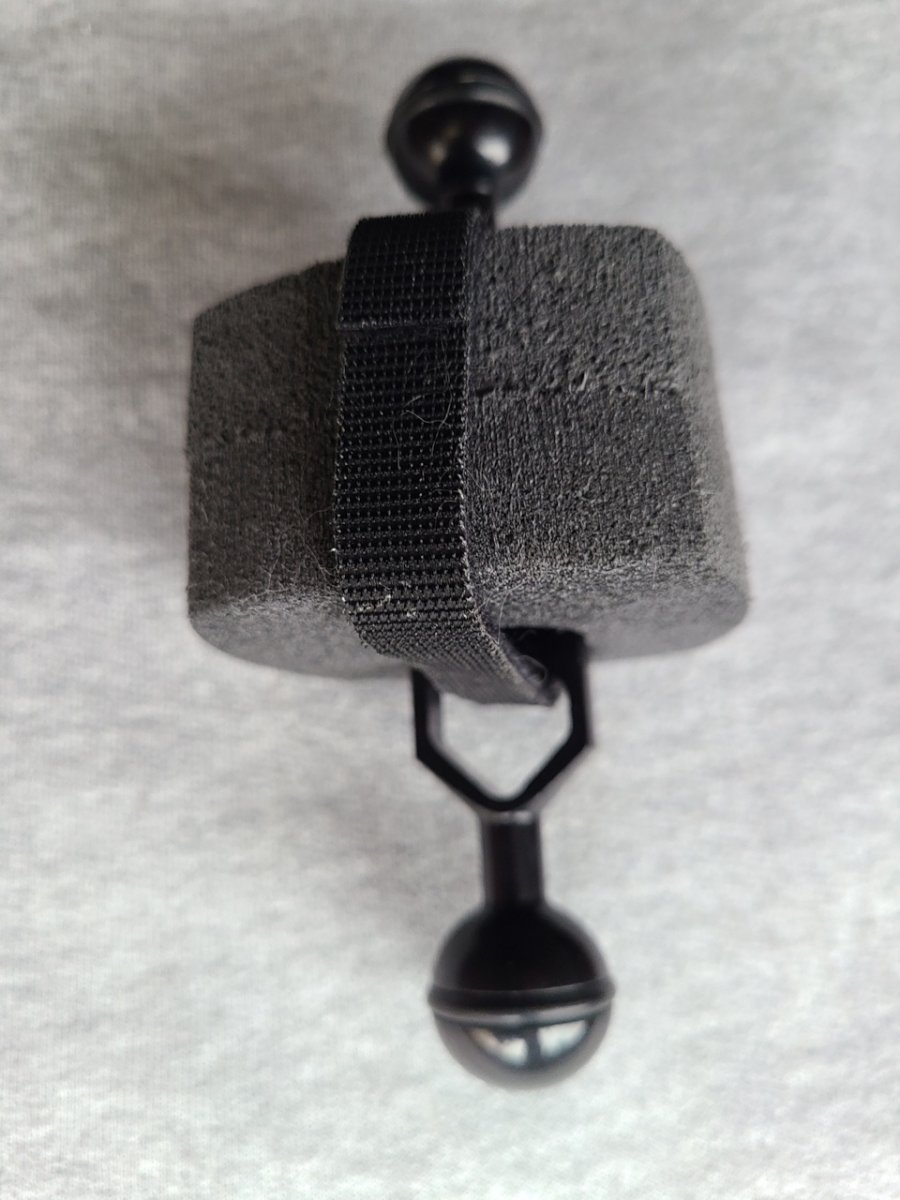
The Velcro strip suggested by Draq is a good idea, but won’t solve the lost of buoyancy of the missing insert.
you can make the insert yourself from fishnet float (https://engelnetze.com/en/float-cd-250g-buoyancy-91x45mm-14mm-center-hole)
or you can make an insert from a piece of wood.
You can see the shape of the insert at this photo https://stores.4gdphoto.com/ful-3-jumbo-float-kit-for-ultralite-arms/
True, it would only allow the float to stay on and in position on an arm, and would only work with the type of arm that has the cutouts, and does not replace any buoyancy, if that is critical. Not sure how much buoyancy is lost from the little cylinder. But it would at least allow use of the float until replacement bits are obtained. I use the velcro primarily to prevent movement of the floats on the arm, which is not really a big issue anyway...just a personal thing. It can also be used (if attached more loosely or combined with something like a small O-ring, to route fiber optic cables along the arm.

Terms of Use Privacy Policy Guidelines We have placed cookies on your device to help make this website better. You can adjust your cookie settings, otherwise we'll assume you're okay to continue.

A worldwide community for underwater imaging.
